Bug
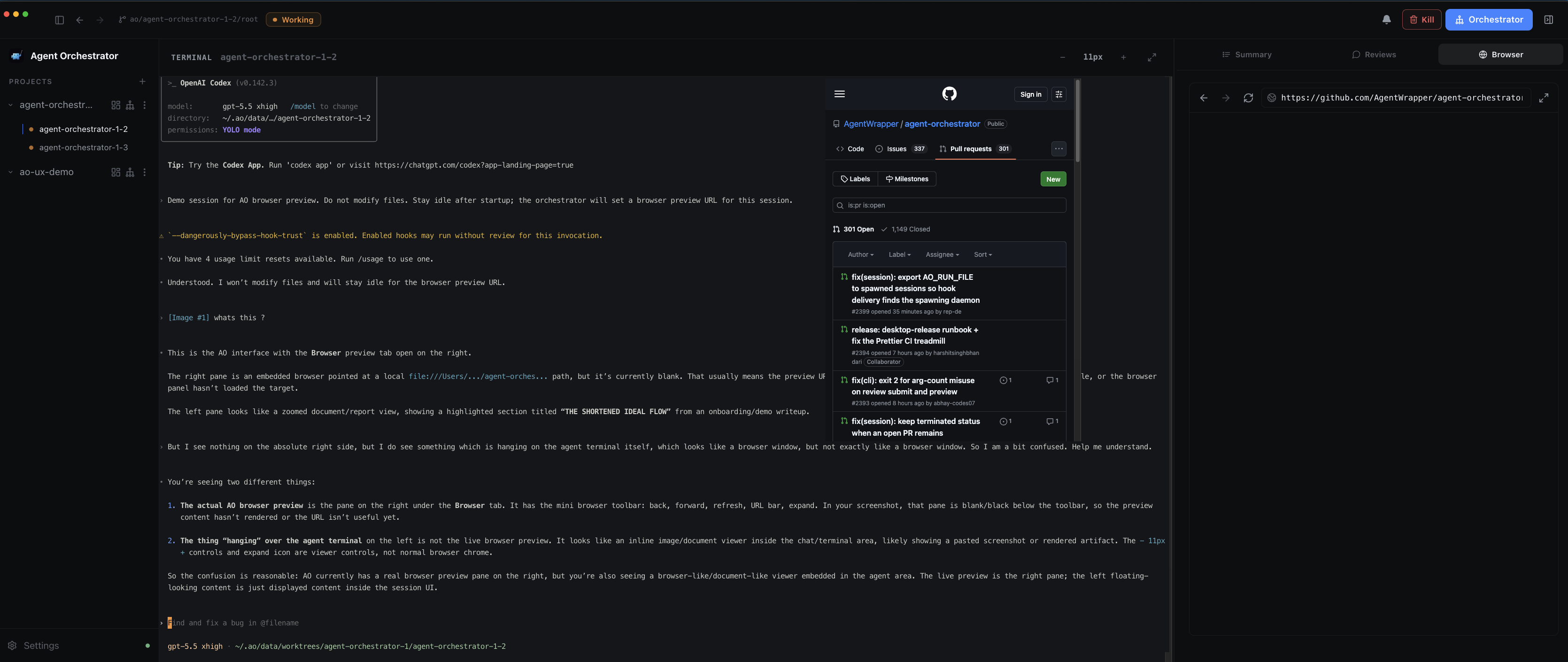
The Browser inspector tab can show the URL and toolbar in the correct right-side Browser panel while the actual native browser content renders offset over the center terminal pane. The misplaced content is interactive/clickable, so the WebContentsView has loaded; it is just not clipped/positioned inside the Browser tab.
Source: live AO browser-preview demo session, reported by Dhruv Sharma on 2026-07-04
Analyzed against: ReverbCode main at 9ae05735d6f06ac989857534bae2766392772c71
Installed app version: 0.10.2-nightly.202607021414
Bundled daemon CLI version: dev
Daemon: /Applications/Agent Orchestrator.app/Contents/Resources/daemon/ao status reports ready on port 3001
Environment: macOS Darwin 25.5.0 arm64, zsh
Confidence: Medium
Priority: high — core Browser preview surface is loaded but rendered in the wrong pane and occludes the terminal.
Reproduction
Observed live in the packaged macOS app:
- Open Agent Orchestrator
0.10.2-nightly.202607021414.
- Open a worker session in project
agent-orchestrator-1.
- Open the right-side inspector Browser tab.
- Navigate the Browser preview to
https://github.com/AgentWrapper/agent-orchestrator (or have the orchestrator set it as the preview URL).
- Observe the Browser tab toolbar and URL bar on the right.
- Observe the loaded GitHub page rendered over the center terminal area instead of inside the Browser tab content area.
Expected Behavior
The WebContentsView should be positioned and clipped to the .browser-panel__slot inside the active Browser tab, below the toolbar, with no overlap into the terminal/center pane.
Actual Behavior
The Browser tab area on the right remains blank/dark below the toolbar, while the loaded page appears over the terminal/center pane. The misplaced page is clickable and navigable, confirming this is a view placement/bounds problem rather than a navigation/load failure.
Diagnostics Collected
Verified this is the ReverbCode packaged daemon, not a shadow ao binary:
which -a ao
/Applications/Agent Orchestrator.app/Contents/Resources/daemon/ao
/Users/dhruvsharma/.nvm/versions/node/v24.14.0/bin/ao
/Users/dhruvsharma/Library/pnpm/ao
/Users/dhruvsharma/go/bin/ao
Bundled daemon status:
AO daemon: ready
  pid: 40974
  port: 3001
  run file: /Users/dhruvsharma/.ao/running.json
  data dir: /Users/dhruvsharma/.ao/data
  healthz: ok
  readyz: ready
ao doctor passed core daemon checks, GitHub auth, and Codex harness checks; only claude --version failed because the process was killed, which does not explain this Browser tab geometry issue.
Root Cause Hypothesis
The likely problem is in the renderer-to-main bounds handoff for Electron's native WebContentsView:
frontend/src/renderer/hooks/useBrowserView.ts measures .browser-panel__slot with node.getBoundingClientRect() and sends { x: rect.x, y: rect.y, width, height } through browser:setBounds.frontend/src/main/browser-view-host.ts receives those values and applies them directly to entry.view.setBounds(...) after only clamping to mainWindow.getContentBounds().- The Browser tab itself is rendered via
frontend/src/renderer/components/SessionView.tsx and frontend/src/renderer/components/SessionInspector.tsx, inside a resizable inspector rail that can animate/collapse/expand.
- In the observed state, the Browser toolbar and URL state belong to the right panel, but the native WebContentsView is positioned several hundred pixels left, over the terminal. That suggests the native view is using stale bounds or bounds in the wrong coordinate space after the inspector layout/tab activation changes.
Relevant code references on main:
Duplicate Check
Nearby issue #391 is about root-relative links/assets escaping the session preview route. This report is different: the page loads and is interactive, but the native view is painted in the wrong pane.
Searches run before filing:
gh issue list --repo aoagents/ReverbCode --state all --search "browser preview offset terminal WebContentsView"
gh issue list --repo aoagents/ReverbCode --state all --search "WebContentsView terminal"
gh issue list --repo aoagents/ReverbCode --state all --search "BrowserPanel bounds"
gh issue list --repo aoagents/ReverbCode --state all --search "browser view geometry"
gh issue list --repo aoagents/ReverbCode --state all --search "preview overlay terminal"
gh pr list --repo aoagents/ReverbCode --state all --search "WebContentsView BrowserPanel bounds"
Only #391 and merged live-browser PR #375 surfaced as related.
Suggested Fix Shape
A focused fix should make the native view bounds authoritative to the Browser slot's current position in the BrowserWindow content-view coordinate space and remeasure after layout changes that move the slot.
Potential approach:
- Convert renderer slot bounds to the exact coordinate system expected by
WebContentsView.setBounds, accounting for BrowserWindow content origin and any renderer/content-view offsets.
- Force a fresh measurement when the Browser tab becomes active, when the inspector panel opens/finishes resizing, and after pop-out/in transitions.
- Hide the native view until a non-zero, current slot rect has been measured for the active Browser tab.
- Add tests around
useBrowserView/browser-view-host to catch stale or wrong bounds when the Browser slot moves between center pane and inspector rail.
Impact
- Browser preview appears blank in the intended Browser tab.
- Loaded preview content occludes terminal/session UI.
- Users can interact with the wrong-place page, which makes the UI feel broken and risks clicks going to the wrong surface.
Bug
The Browser inspector tab can show the URL and toolbar in the correct right-side Browser panel while the actual native browser content renders offset over the center terminal pane. The misplaced content is interactive/clickable, so the WebContentsView has loaded; it is just not clipped/positioned inside the Browser tab.
Source: live AO browser-preview demo session, reported by Dhruv Sharma on 2026-07-04
Analyzed against: ReverbCode
mainat9ae05735d6f06ac989857534bae2766392772c71Installed app version:
0.10.2-nightly.202607021414Bundled daemon CLI version:
devDaemon:
/Applications/Agent Orchestrator.app/Contents/Resources/daemon/ao statusreports ready on port3001Environment: macOS Darwin 25.5.0 arm64, zsh
Confidence: Medium
Priority: high — core Browser preview surface is loaded but rendered in the wrong pane and occludes the terminal.
Reproduction
Observed live in the packaged macOS app:
0.10.2-nightly.202607021414.agent-orchestrator-1.https://github.com/AgentWrapper/agent-orchestrator(or have the orchestrator set it as the preview URL).Expected Behavior
The WebContentsView should be positioned and clipped to the
.browser-panel__slotinside the active Browser tab, below the toolbar, with no overlap into the terminal/center pane.Actual Behavior
The Browser tab area on the right remains blank/dark below the toolbar, while the loaded page appears over the terminal/center pane. The misplaced page is clickable and navigable, confirming this is a view placement/bounds problem rather than a navigation/load failure.
Diagnostics Collected
Verified this is the ReverbCode packaged daemon, not a shadow
aobinary:Bundled daemon status:
ao doctorpassed core daemon checks, GitHub auth, and Codex harness checks; onlyclaude --versionfailed because the process was killed, which does not explain this Browser tab geometry issue.Root Cause Hypothesis
The likely problem is in the renderer-to-main bounds handoff for Electron's native
WebContentsView:frontend/src/renderer/hooks/useBrowserView.tsmeasures.browser-panel__slotwithnode.getBoundingClientRect()and sends{ x: rect.x, y: rect.y, width, height }throughbrowser:setBounds.frontend/src/main/browser-view-host.tsreceives those values and applies them directly toentry.view.setBounds(...)after only clamping tomainWindow.getContentBounds().frontend/src/renderer/components/SessionView.tsxandfrontend/src/renderer/components/SessionInspector.tsx, inside a resizable inspector rail that can animate/collapse/expand.Relevant code references on
main:Duplicate Check
Nearby issue #391 is about root-relative links/assets escaping the session preview route. This report is different: the page loads and is interactive, but the native view is painted in the wrong pane.
Searches run before filing:
Only #391 and merged live-browser PR #375 surfaced as related.
Suggested Fix Shape
A focused fix should make the native view bounds authoritative to the Browser slot's current position in the BrowserWindow content-view coordinate space and remeasure after layout changes that move the slot.
Potential approach:
WebContentsView.setBounds, accounting for BrowserWindow content origin and any renderer/content-view offsets.useBrowserView/browser-view-hostto catch stale or wrong bounds when the Browser slot moves between center pane and inspector rail.Impact