Repository navigation
Releases: Keralots/BambuHelper
Release list
v3.9.0

BambuHelper v3.9.0 - Release Notes
Firmware Builds
| Build Target | Board / Hardware | Display | OTA Update File | Full Flash File |
|---|---|---|---|---|
esp32s3 |
ESP32-S3 Super Mini | ST7789 240x240 | BambuHelper-esp32s3-v3.9.0-ota.bin |
BambuHelper-esp32s3-v3.9.0-Full.bin |
esp32s3_round |
ESP32-S3 Super Mini | GC9A01 1.28" round 240x240 | BambuHelper-esp32s3_round-v3.9.0-ota.bin |
BambuHelper-esp32s3_round-v3.9.0-Full.bin |
esp32s3_zero |
Waveshare ESP32-S3-Zero | external ST7789 240x240 | BambuHelper-esp32s3_zero-v3.9.0-ota.bin |
BambuHelper-esp32s3_zero-v3.9.0-Full.bin |
esp32s3_zero_320 |
Waveshare ESP32-S3-Zero | external ST7789 240x320 | BambuHelper-esp32s3_zero_320-v3.9.0-ota.bin |
BambuHelper-esp32s3_zero_320-v3.9.0-Full.bin |
esp32c3 |
ESP32-C3 Super Mini | ST7789 240x240 | BambuHelper-esp32c3-v3.9.0-ota.bin |
BambuHelper-esp32c3-v3.9.0-Full.bin |
esp32c3_round |
ESP32-C3 Super Mini | GC9A01 1.28" round 240x240 | BambuHelper-esp32c3_round-v3.9.0-ota.bin |
BambuHelper-esp32c3_round-v3.9.0-Full.bin |
ws_lcd_200 |
Waveshare ESP32-S3-Touch-LCD-2 | ST7789 240x320 | BambuHelper-ws_lcd_200-v3.9.0-ota.bin |
BambuHelper-ws_lcd_200-v3.9.0-Full.bin |
ws_lcd_154 |
Waveshare ESP32-S3-Touch-LCD-1.54 | ST7789 240x240 | BambuHelper-ws_lcd_154-v3.9.0-ota.bin |
BambuHelper-ws_lcd_154-v3.9.0-Full.bin |
ws_lcd_280 |
Waveshare ESP32-S3-Touch-LCD-2.8 | ST7789 240x320 | BambuHelper-ws_lcd_280-v3.9.0-ota.bin |
BambuHelper-ws_lcd_280-v3.9.0-Full.bin |
es3n28p |
QD ES3N28P 2.8" | ILI9341V 240x320 | BambuHelper-es3n28p-v3.9.0-ota.bin |
BambuHelper-es3n28p-v3.9.0-Full.bin |
sc05_x |
Panlee SC05_X (ZX2D80CE02S) 2.8" | ST7789 240x320 (8-bit parallel) | BambuHelper-sc05_x-v3.9.0-ota.bin |
BambuHelper-sc05_x-v3.9.0-Full.bin |
ws_lcd_350 |
Waveshare ESP32-S3-Touch-LCD-3.5 | ST7796 320x480 | BambuHelper-ws_lcd_350-v3.9.0-ota.bin |
BambuHelper-ws_lcd_350-v3.9.0-Full.bin |
ws_lcd_28c |
Waveshare ESP32-S3-Touch-LCD-2.8C | ST7701 2.8" round 480x480 | BambuHelper-ws_lcd_28c-v3.9.0-ota.bin |
BambuHelper-ws_lcd_28c-v3.9.0-Full.bin |
wt32_sc01_plus |
Panlee WT32-SC01 Plus 3.5" | ST7796 320x480 | BambuHelper-wt32_sc01_plus-v3.9.0-ota.bin |
BambuHelper-wt32_sc01_plus-v3.9.0-Full.bin |
jc3248w535 |
Guition JC3248W535 (ESP32-S3-N16R8, 16MB flash / 8MB PSRAM) | AXS15231B QSPI 320x480 | BambuHelper-jc3248w535-v3.9.0-ota.bin |
BambuHelper-jc3248w535-v3.9.0-Full.bin |
cyd |
ESP32-2432S028 (CYD / Cheap Yellow Display) | ILI9341 240x320 | BambuHelper-cyd-v3.9.0-ota.bin |
BambuHelper-cyd-v3.9.0-Full.bin |
tzt_2432 |
TZT ESP32-2432S028 (CYD variant) | ILI9341 240x320 | BambuHelper-tzt_2432-v3.9.0-ota.bin |
BambuHelper-tzt_2432-v3.9.0-Full.bin |
cyd_2432s024 |
ESP32-2432S024 (CYD 2.4") | ILI9341 240x320 | BambuHelper-cyd_2432s024-v3.9.0-ota.bin |
BambuHelper-cyd_2432s024-v3.9.0-Full.bin |
OTA is for updating an already working device from the BambuHelper web UI.
Full is for first-time flashing, recovery, or ESP Web Flasher use.
First-time flashing? Easiest path is the hosted web flasher at keralots.github.io/BambuHelper - pick your board in the dropdown, click Install, and the browser handles bootloader + partitions + firmware in one go (no downloads, no flash offsets). The
-Full.binfiles below are only needed if you prefer the generic ESP Web Flasher.
Setting up Cloud mode? Open the device's web page, pick Bambu Cloud, and sign in with your Bambu account - with a password, or with a code Bambu emails you. Then press My printers and pick yours from the list. The Companion Tool and the paste-a-token route both still work; see the cloud setup page.
Updating from v3.8.3 or a v3.9.0 beta? OTA the matching
-ota.binfor your board, or use Check for updates. Settings carry over and your screen looks the same as before - Cards stays off until you pick it. The web interface menu is reorganised, so some settings have moved (see below).
New Features
Cards print screen (beta)
A calmer alternative to the gauges, readable from across the room: a big progress percentage, time left, finish time, a progress bar and one row of temperatures. The Ready and Print complete screens follow the same style. Gauges stays the default.
| Gauges (default) | Cards (beta) |
|---|---|
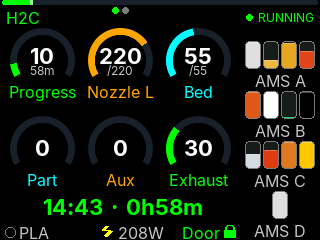 |
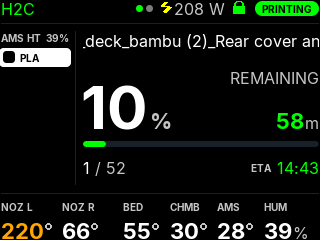 |
- Left column: AMS slots with the feeding slot highlighted, the plate preview of the running job (from Bambu Cloud), or nothing.
- Bottom row: the temperatures your printer has (both nozzles on H2, chamber, AMS temperature and humidity), or the filaments of this print with how much is left on each spool.
- AMS page: how much filament is left in every tray, Bambu Studio style. Show it on the Ready screen, or tap to switch to it for 30 s.
- Header: printer name, plug power, door state and status; long job names scroll; finish time gets "+1" when the print ends tomorrow.
- Uses your existing Colors and the Warning threshold.
Turn it on under Print screen -> Print screen style -> Cards (beta). It runs on every 240x320 and 320x480 board and on the 240x240 boards with PSRAM. The CYD family (no PSRAM) gets Cards too, without the plate preview. Not on the ESP32-C3 boards, round displays or the 480x480 boards. Split view keeps the gauges.
It is still a beta - feedback and photos in Issues are welcome. More in the README.
Plate preview tile for the gauges
The plate thumbnail from Cards is also available as a gauge: pick Plate preview (cloud) for any slot under Printer -> Gauge Layout. On the Ready / Print complete pair it shows the last job. Needs the Bambu account sign-in on the device, a job sent through the cloud, and a board with PSRAM.
Button & touch gestures
Screen -> Button & touch gestures sets what a tap, a double tap and a hold do:
| Gesture | Choices |
|---|---|
| Tap | Smart cycle (default), next printer only, switch status / AMS page, wake the screen only |
| Double tap | Nothing (default), plug power on/off, switch status / AMS page, next printer |
| Hold | Status LED brightness (default), switch status / AMS page, nothing |
If you had Button power control on, it becomes Double tap = Plug power on/off automatically.
Web interface reorganised
- Display is split into Screen, Print screen, After print, Clock and Colors. Advanced is gone: rotation moved to Printer, the danger zone to WiFi & System.
- Long help texts fold behind a ?.
- Save / Apply buttons show when something is not saved yet.
- Settings that only apply to the gauges are hidden while Cards is picked.
New board in the release files
- CYD 2.4" (ESP32-2432S024) now has its own
cyd_2432s024OTA and Full files (#186). Thanks @GizmoTheGreen for testing it on real hardware.
Improvements (all boards)
- No more short screen freezes with H2 printers over LAN. An H2C with several AMS units sends ~38 KB of status about every 2 s, and the device used to stop everything while it arrived. Status is now read in the background: the longest pause dropped from ~3 s to ~60 ms.
- Faster reconnect after a printer is switched on. A powered-off LAN printer is now checked every 20 s instead of backing off to 2 minutes.
- Router shows the device's hostname - the hostname you set is now sent over DHCP, not only mDNS (#192). Thanks @SafariKC.
- The web interface can no longer freeze the device when a browser stops reading (closed tab, weak WiFi).
Bug Fixes
- Brisbane and Darwin were an hour off from October to April (#194). They shared a timezone entry with cities that use daylight saving. They now have their own entries - if you are in Brisbane or Darwin, pick your city again under Clock after updating. Thanks @tmbailey70.
- "Printer Off" while the printer was printing. If the smart plug mapped to a printer read off (wrong plug in that slot, or a printer idling below the plug's watt threshold), the screen said "Printer Off" even though data was coming in. Live data from the printer now wins.
- Settings backup no longer contains your WiFi password. Importing a backup keeps the device's own WiFi. The backup now also includes the Landscape 8 slots / Portrait 9 slots grid modes.
- Web flasher installed the wrong board when you picked one while the page was still loading (or the browser restored an old choice): it flashed the default
esp32s3image. Fixed - already live on the flasher page. - "Unsaved changes" on a button is cleared only after the save really went through.
For tinkerers
GET /screen.bmpreturns a screenshot of whatever is on the screen (boards with PSRAM)./debugreports why the device last restarted (reset_reason).esp32s3,esp32s3_zeroandesp32s3_zero_320are now built without C++ exceptions (like the C3 builds) to free flash on their 4 MB chips. If one of them reboots unexpectedly, please open an issue.
Known Limitations
- Plate preview (Cards and the gauge tile) needs Bambu Cloud; jobs started from the SD card or over LAN only have no preview.
- Cards on the TZT CYD clone, the CYD 2.4" and several community boards has not been ...
Contributors


Assets 38
- 1.91 MB
2026-10-11T13:02:49Z - 1.84 MB
2026-10-11T13:02:49Z - 1.91 MB
2026-10-11T13:02:49Z - 1.84 MB
2026-10-11T13:02:49Z - 2.06 MB
2026-10-11T13:02:49Z - 2 MB
2026-10-11T13:02:52Z - 1.71 MB
2026-10-11T13:02:52Z - 1.65 MB
2026-10-11T13:02:52Z - 1.7 MB
2026-10-11T13:02:52Z - 1.63 MB
2026-10-11T13:02:52Z -
2026-10-11T13:02:30Z -
2026-10-11T13:02:30Z - Loading
v3.9.0-beta.2 - Cards (beta 2)
BambuHelper v3.9.0-beta.2 - Cards (beta 2)
This is a BETA. It is not offered by "Check for updates" and it is not in the web flasher - you install it by hand, and only if you want to try it. Please report anything odd in Issues (a photo of the screen helps a lot). What Cards is and how to turn it on: see v3.9.0-beta.1.
What is new since beta.1
Cards on CYD boards (no PSRAM)
The 2.8" CYD (cyd), its TZT clone (tzt_2432) and the 2.4" CYD (cyd_2432s024) now get Cards too. These boards have no PSRAM, so the screen is drawn in thin strips instead of one full frame.

Two things are missing there: the plate preview (needs PSRAM) and the scrolling job name (a long name is shortened with ".." instead).
AMS page


How much filament is left in every tray, Bambu Studio style: a remain bar over a tile in the filament colour, low spools in orange, -- where the printer does not know. Every AMS unit, AMS HT and the external spool.
- Display -> Card: Ready screen ->
Status,AMS filament left, orAlternate status / AMS(switches every 8 s). - A tap on Ready or Print Complete switches to the other view for 30 seconds.
Button and touch gestures
Display -> Button & touch gestures sets what a tap, a double tap and a hold do:
| Gesture | Choices |
|---|---|
| Tap | Smart cycle (default); Next printer only; Switch status / AMS page; Wake the screen only |
| Double tap | Nothing (default); Plug power on/off; Switch status / AMS page; Next printer |
| Hold | Status LED brightness (default); Switch status / AMS page; Nothing |
With a double tap set, a single tap waits ~0.5 s for a second one. If you had "Button power control" switched on, it moves over as Double tap = Plug power on/off.
Smaller things
-
The clock on the Ready screen blinks its colon, like the Clock screen.

-
Temperatures turn red above the Warning threshold, like the gauges do.
-
Web interface: long help texts fold behind a "?", settings that only apply to the classic gauges are hidden while Cards is picked, and Save / Apply buttons show when something is not saved yet.
-
esp32s3_zeroandesp32s3_zero_320now have the plate preview too. Like theesp32s3build, they are compiled without C++ exceptions to make room on their 4 MB flash. -
/debugshows why the device last restarted (reset_reason).
Fixes (all boards, classic gauges included)
- Short screen freezes with H2 printers over LAN. An H2C with 3 AMS sends its full status (~38 KB) about every 2 seconds. The device waited for each message to arrive in full, which froze the screen, the LED and the edge glow for up to ~3 s at a time. Messages are now collected piece by piece in between - measured on a CYD, the longest pause dropped from ~3 s to ~60 ms.
- The web interface could freeze the whole device. A browser that stopped reading (closed tab, weak WiFi) kept the device busy for minutes. It now gives up on a stalled browser, but still survives one slow moment on weak WiFi.
- Printer powered back on: up to 2 minutes of "Connecting". After a LAN printer was off for a while, the device only checked for it every 2 minutes. It now checks every 20 s while the printer is off, so it connects about 20 s after the printer is up.
- The plate preview is no longer downloaded again every time two printers rotate on screen.
- Cards frees its memory when you switch back to the classic gauges.
Boards
| Build target | Board | Display | Cards tested on hardware | Plate preview |
|---|---|---|---|---|
ws_lcd_200 |
Waveshare ESP32-S3-Touch-LCD-2 | 240x320 | yes (landscape + portrait) | yes |
esp32s3 |
ESP32-S3 Super Mini | 240x240 | yes | yes |
jc3248w535 |
Guition JC3248W535 | 320x480 | yes (landscape + portrait) | yes |
cyd |
ESP32-2432S028 (CYD 2.8") | 240x320 | yes | no (no PSRAM) |
esp32s3_zero |
Waveshare ESP32-S3-Zero | 240x240 | yes | yes (not seen on hardware yet) |
ws_lcd_280 |
Waveshare ESP32-S3-Touch-LCD-2.8 | 240x320 | not yet | yes |
es3n28p |
QD ES3N28P 2.8" | 240x320 | not yet | yes |
sc05_x |
Panlee SC05_X 2.8" | 240x320 | not yet | yes |
ws_lcd_154 |
Waveshare ESP32-S3-Touch-LCD-1.54 | 240x240 | not yet | yes |
ws_lcd_350 |
Waveshare ESP32-S3-Touch-LCD-3.5 | 320x480 | not yet | yes |
wt32_sc01_plus |
Panlee WT32-SC01 Plus 3.5" | 320x480 | not yet | yes |
esp32s3_zero_320 |
Waveshare ESP32-S3-Zero | 240x320 | not yet | yes |
tzt_2432 |
TZT CYD clone 2.8" | 240x320 | not yet | no (no PSRAM) |
cyd_2432s024 |
ESP32-2432S024 (CYD 2.4") | 240x320 | not yet | no (no PSRAM) |
"Not yet" means it builds and should work like the tested board with the same screen, but nobody has seen it on that board - a photo in an issue is very welcome.
Not in this beta: ESP32-C3 boards (too little memory), round displays, and the 480x480 boards.
How to install (manual OTA)
- You need a board that already runs BambuHelper (v3.8.3 from the web flasher, or beta.1).
- Optional but recommended: web interface -> WiFi & System -> Settings backup -> Export backup.
- Download the
-ota.binfor your board from the files below. - Web interface -> WiFi & System -> Firmware update -> Manual update -> pick the file -> Upload firmware.
Settings carry over. Cards stays off until you switch it on.
Going back: upload the v3.8.3 -ota.bin for your board the same way. Settings are kept both ways (tested on ws_lcd_200: beta.2 -> v3.8.3 -> beta.2, plus export/import). Gesture choices other than the defaults are not known to v3.8.3; "Double tap = Plug power" survives the trip as "Button power control".
When the final v3.9.0 is out, "Check for updates" will offer it to beta users as usual.
Known limitations
- Plate preview needs Bambu Cloud (sign-in on the device). Reading it locally from the printer is planned for printers with an SD card (P1/X1/A1); H2 printers do not expose the file locally.
- A spool on the external holder (no AMS) shows as "?" in "Filaments of this print".
- On a touch screen a hold is less reliable than a tap (resistive CYD panels especially).
v3.9.0-beta.1 - Cards (beta)
BambuHelper v3.9.0-beta.1 - Cards (beta)
This is a BETA. It is not offered by "Check for updates" and it is not in the web flasher - you install it by hand, and only if you want to try the new screen. Things may not work yet. I am still working on it, so please report anything odd in Issues (a photo of the screen helps a lot).
What is new: the "Cards" print screen
A new, calmer print screen next to the classic gauges: a big progress percentage, the time left, the finish time, a progress bar, and one row of temperatures - readable from across the room. The idle and finished screens follow the same style.


- Plate preview - the thumbnail of what is printing right now, taken from Bambu Cloud (needs the Bambu account sign-in on the device; works for LAN and Cloud printers bound to that account). Until it arrives, the AMS slots show instead.
- Filaments of this print - optional bottom row listing only the filaments the job uses (e.g. PLA plus a PETG support interface), with how much is left on each spool.
- AMS column with the feeding slot highlighted, or nothing - your choice.
- Temperatures for what your printer has - both nozzles on H2 printers, chamber only where there is a sensor, AMS temperature and humidity.
- Job name scrolls when it is too long; finish time shows "+1" when the print ends tomorrow; plug power (W) and door state in the header; progress bar shimmer.
- Text is antialiased properly on light backgrounds too - try the new Warm paper colour preset.
How to turn it on
Web interface -> Display:
- Print screen style ->
Cards (beta) - Card: left column ->
AMS slots,NoneorPlate preview - Card: bottom row ->
TemperaturesorFilaments of this print
Colours come from the Colors section (Background, Text, Progress Bar, Finish time, Status OK, ...). Split view (two printers at once) keeps the classic gauges.
Boards
Only boards with PSRAM get Cards. CYD-style boards without PSRAM are not supported (the screen does not render correctly there yet), so there is no file for them in this beta.
| Build target | Board | Display | Cards tested on hardware | Plate preview |
|---|---|---|---|---|
ws_lcd_200 |
Waveshare ESP32-S3-Touch-LCD-2 | 240x320 | yes (landscape + portrait) | yes |
esp32s3 |
ESP32-S3 Super Mini | 240x240 | yes | yes |
jc3248w535 |
Guition JC3248W535 | 320x480 | yes (landscape + portrait) | yes |
ws_lcd_280 |
Waveshare ESP32-S3-Touch-LCD-2.8 | 240x320 | not yet | yes |
es3n28p |
QD ES3N28P 2.8" | 240x320 | not yet | yes |
sc05_x |
Panlee SC05_X 2.8" | 240x320 | not yet | yes |
ws_lcd_154 |
Waveshare ESP32-S3-Touch-LCD-1.54 | 240x240 | not yet | yes |
ws_lcd_350 |
Waveshare ESP32-S3-Touch-LCD-3.5 | 320x480 | not yet | yes |
wt32_sc01_plus |
Panlee WT32-SC01 Plus 3.5" | 320x480 | not yet | yes |
esp32s3_zero |
Waveshare ESP32-S3-Zero | 240x240 | not yet | no (flash space) |
esp32s3_zero_320 |
Waveshare ESP32-S3-Zero | 240x320 | not yet | no (flash space) |
"Not yet" means it builds and should work like the tested board with the same screen size, but nobody has seen it on that board - if you have one, a photo in an issue is very welcome.
How to install (manual OTA)
- You need a board that already runs BambuHelper (install v3.8.3 from the web flasher first if not).
- Optional but recommended: web interface -> WiFi & System -> Settings backup -> Export backup.
- Download the
-ota.binfor your board from the files below. - Web interface -> WiFi & System -> Firmware update -> Manual update -> pick the file -> Upload firmware.
Your settings carry over. Cards stays off until you switch it on, so after the update the device looks and behaves like v3.8.3.
Going back: upload the v3.8.3 -ota.bin for your board the same way. Settings are kept both ways (tested on ws_lcd_200: beta -> v3.8.3 -> beta, and export/import).
When the final v3.9.0 is out, "Check for updates" will offer it to beta users as usual.
Also in this build
- Changes on
mainsince v3.8.3: the configured hostname is sent over DHCP (#192) and the CYD 2.4" ESP32-2432S024 board (#186). - The
esp32s3(Super Mini) build is compiled without C++ exceptions, like the ESP32-C3 build, to make room on its 4 MB flash. If your Super Mini reboots unexpectedly on this beta, please tell me.
Known limitations
- Plate preview needs Bambu Cloud. Reading it locally from the printer is planned for printers with an SD card (P1/X1/A1); H2 printers do not expose the file locally.
- A spool on the external holder (no AMS) shows as "?" in "Filaments of this print".
- Not available on boards without PSRAM (CYD family, ESP32-C3) or on round displays.
v3.8.3
BambuHelper v3.8.3 - Release Notes
Firmware Builds
| Build Target | Board / Hardware | Display | OTA Update File | Full Flash File |
|---|---|---|---|---|
esp32s3 |
ESP32-S3 Super Mini | ST7789 240x240 | BambuHelper-esp32s3-v3.8.3-ota.bin |
BambuHelper-esp32s3-v3.8.3-Full.bin |
esp32s3_round |
ESP32-S3 Super Mini | GC9A01 1.28" round 240x240 | BambuHelper-esp32s3_round-v3.8.3-ota.bin |
BambuHelper-esp32s3_round-v3.8.3-Full.bin |
esp32s3_zero |
Waveshare ESP32-S3-Zero | external ST7789 240x240 | BambuHelper-esp32s3_zero-v3.8.3-ota.bin |
BambuHelper-esp32s3_zero-v3.8.3-Full.bin |
esp32s3_zero_320 |
Waveshare ESP32-S3-Zero | external ST7789 240x320 | BambuHelper-esp32s3_zero_320-v3.8.3-ota.bin |
BambuHelper-esp32s3_zero_320-v3.8.3-Full.bin |
esp32c3 |
ESP32-C3 Super Mini | ST7789 240x240 | BambuHelper-esp32c3-v3.8.3-ota.bin |
BambuHelper-esp32c3-v3.8.3-Full.bin |
esp32c3_round |
ESP32-C3 Super Mini | GC9A01 1.28" round 240x240 | BambuHelper-esp32c3_round-v3.8.3-ota.bin |
BambuHelper-esp32c3_round-v3.8.3-Full.bin |
ws_lcd_200 |
Waveshare ESP32-S3-Touch-LCD-2 | ST7789 240x320 | BambuHelper-ws_lcd_200-v3.8.3-ota.bin |
BambuHelper-ws_lcd_200-v3.8.3-Full.bin |
ws_lcd_154 |
Waveshare ESP32-S3-Touch-LCD-1.54 | ST7789 240x240 | BambuHelper-ws_lcd_154-v3.8.3-ota.bin |
BambuHelper-ws_lcd_154-v3.8.3-Full.bin |
ws_lcd_280 |
Waveshare ESP32-S3-Touch-LCD-2.8 | ST7789 240x320 | BambuHelper-ws_lcd_280-v3.8.3-ota.bin |
BambuHelper-ws_lcd_280-v3.8.3-Full.bin |
es3n28p |
QD ES3N28P 2.8" | ILI9341V 240x320 | BambuHelper-es3n28p-v3.8.3-ota.bin |
BambuHelper-es3n28p-v3.8.3-Full.bin |
sc05_x |
Panlee SC05_X (ZX2D80CE02S) 2.8" | ST7789 240x320 (8-bit parallel) | BambuHelper-sc05_x-v3.8.3-ota.bin |
BambuHelper-sc05_x-v3.8.3-Full.bin |
ws_lcd_350 |
Waveshare ESP32-S3-Touch-LCD-3.5 | ST7796 320x480 | BambuHelper-ws_lcd_350-v3.8.3-ota.bin |
BambuHelper-ws_lcd_350-v3.8.3-Full.bin |
ws_lcd_28c |
Waveshare ESP32-S3-Touch-LCD-2.8C | ST7701 2.8" round 480x480 | BambuHelper-ws_lcd_28c-v3.8.3-ota.bin |
BambuHelper-ws_lcd_28c-v3.8.3-Full.bin |
wt32_sc01_plus |
Panlee WT32-SC01 Plus 3.5" | ST7796 320x480 | BambuHelper-wt32_sc01_plus-v3.8.3-ota.bin |
BambuHelper-wt32_sc01_plus-v3.8.3-Full.bin |
jc3248w535 |
Guition JC3248W535 (ESP32-S3-N16R8, 16MB flash / 8MB PSRAM) | AXS15231B QSPI 320x480 | BambuHelper-jc3248w535-v3.8.3-ota.bin |
BambuHelper-jc3248w535-v3.8.3-Full.bin |
cyd |
ESP32-2432S028 (CYD / Cheap Yellow Display) | ILI9341 240x320 | BambuHelper-cyd-v3.8.3-ota.bin |
BambuHelper-cyd-v3.8.3-Full.bin |
tzt_2432 |
TZT ESP32-2432S028 (CYD variant) | ILI9341 240x320 | BambuHelper-tzt_2432-v3.8.3-ota.bin |
BambuHelper-tzt_2432-v3.8.3-Full.bin |
OTA is for updating an already working device from the BambuHelper web UI.
Full is for first-time flashing, recovery, or ESP Web Flasher use.
First-time flashing? Easiest path is the hosted web flasher at keralots.github.io/BambuHelper - pick your board in the dropdown, click Install, and the browser handles bootloader + partitions + firmware in one go (no downloads, no flash offsets). The
-Full.binfiles below are only needed if you prefer the generic ESP Web Flasher or are flashing one of the community / beta boards that the hosted flasher doesn't list yet.
Setting up Cloud mode? You no longer need to dig a token out of your browser. Open the device's web page, pick Bambu Cloud, and sign in with your Bambu account - with a password, or with a code Bambu emails you if you would rather not type one. Then press My printers and pick yours from the list. The Companion Tool and the old paste-a-token route both still work; all three are laid out on the cloud setup page.
Updating from v3.8.2? OTA the matching
-ota.binfor your board. Settings are preserved - your printers, your Cloud sign-in and your display options all carry over, and there is nothing to redo.
New Board
Waveshare ESP32-S3-Touch-LCD-2.8C (480x480 round)
A second round board, and the first large one: a 2.8" 480x480 round IPS panel with GT911 touch, 16MB flash and 8MB PSRAM. Pick it in the web flasher or use the ws_lcd_28c files.
- The full round dashboard at 2x - all three print skins (Rim / Speedo / Rings), the round clock, drying, finish and error screens, and the edge glow ring, with a sharper font set made for this size rather than scaled-up pixels.
- Touch for screen switching, dismissing and the hold-to-confirm plug gestures.
- Battery indicator on the board's battery input.
- The buzzer sits on an IO expander, so it can only switch on and off - melodies play as rhythm without pitch.
- Up to 2 printers (up to 4 with the experimental opt-in).
Confirmed on real hardware by @Captain-Benjamin in #171 - thank you for the testing and the photo. It is a community board: I do not own one myself.
Bug Fixes
Printer errors
- "MQTT command verification failed" no longer sets off the alarm (#185). The printer raises this when some other program on your network sends it a command it refuses. It took over the screen, buzzer and glow a few times an hour for something you cannot act on. It is still listed on the error screen and in the web interface - it just stops alerting. If a command sent by BambuHelper itself (the chamber light) is refused, that still alerts.
Display
- Tap to switch between the finish screen and AMS drying (#183). With a dryer running after a print, the drying screen took over for good and there was no way back to the cooldown. A tap now flips between the two; the automatic choice is unchanged if you never tap.
- A 5th or 6th AMS unit now shows when drying. An H2 with three AMS 2 Pro plus two AMS HT reports five units, and the fifth was dropped: no drying screen, and the display slept through the dry cycle.
- Long job names are no longer cut at 47 characters (#187). The name was silently truncated when it arrived from the printer, before the screen ever saw it. The display now gets the whole name and shortens it only to fit the width it has.
- Round clock: the printer name and IP line under the clock ran off the edge of the circle for any ordinary name. It is now trimmed to fit.
- Finish screen, 240x320 landscape: the energy and cost lines no longer overlap. Thanks @nunnypern (#189).
Other
- Puerto Rico added to the timezone list. Thanks @nunnypern.
/statusnow reports which board build a device is running, which makes remote troubleshooting easier.
Contributors


Assets 36
v3.8.2
BambuHelper v3.8.2 - Release Notes
Firmware Builds
| Build Target | Board / Hardware | Display | OTA Update File | Full Flash File |
|---|---|---|---|---|
esp32s3 |
ESP32-S3 Super Mini | ST7789 240x240 | BambuHelper-esp32s3-v3.8.2-ota.bin |
BambuHelper-esp32s3-v3.8.2-Full.bin |
esp32s3_round |
ESP32-S3 Super Mini | GC9A01 1.28" round 240x240 | BambuHelper-esp32s3_round-v3.8.2-ota.bin |
BambuHelper-esp32s3_round-v3.8.2-Full.bin |
esp32s3_zero |
Waveshare ESP32-S3-Zero | external ST7789 240x240 | BambuHelper-esp32s3_zero-v3.8.2-ota.bin |
BambuHelper-esp32s3_zero-v3.8.2-Full.bin |
esp32s3_zero_320 |
Waveshare ESP32-S3-Zero | external ST7789 240x320 | BambuHelper-esp32s3_zero_320-v3.8.2-ota.bin |
BambuHelper-esp32s3_zero_320-v3.8.2-Full.bin |
esp32c3 |
ESP32-C3 Super Mini | ST7789 240x240 | BambuHelper-esp32c3-v3.8.2-ota.bin |
BambuHelper-esp32c3-v3.8.2-Full.bin |
esp32c3_round |
ESP32-C3 Super Mini | GC9A01 1.28" round 240x240 | BambuHelper-esp32c3_round-v3.8.2-ota.bin |
BambuHelper-esp32c3_round-v3.8.2-Full.bin |
ws_lcd_200 |
Waveshare ESP32-S3-Touch-LCD-2 | ST7789 240x320 | BambuHelper-ws_lcd_200-v3.8.2-ota.bin |
BambuHelper-ws_lcd_200-v3.8.2-Full.bin |
ws_lcd_154 |
Waveshare ESP32-S3-Touch-LCD-1.54 | ST7789 240x240 | BambuHelper-ws_lcd_154-v3.8.2-ota.bin |
BambuHelper-ws_lcd_154-v3.8.2-Full.bin |
ws_lcd_280 |
Waveshare ESP32-S3-Touch-LCD-2.8 | ST7789 240x320 | BambuHelper-ws_lcd_280-v3.8.2-ota.bin |
BambuHelper-ws_lcd_280-v3.8.2-Full.bin |
es3n28p |
QD ES3N28P 2.8" | ILI9341V 240x320 | BambuHelper-es3n28p-v3.8.2-ota.bin |
BambuHelper-es3n28p-v3.8.2-Full.bin |
sc05_x |
Panlee SC05_X (ZX2D80CE02S) 2.8" | ST7789 240x320 (8-bit parallel) | BambuHelper-sc05_x-v3.8.2-ota.bin |
BambuHelper-sc05_x-v3.8.2-Full.bin |
ws_lcd_350 |
Waveshare ESP32-S3-Touch-LCD-3.5 | ST7796 320x480 | BambuHelper-ws_lcd_350-v3.8.2-ota.bin |
BambuHelper-ws_lcd_350-v3.8.2-Full.bin |
wt32_sc01_plus |
Panlee WT32-SC01 Plus 3.5" | ST7796 320x480 | BambuHelper-wt32_sc01_plus-v3.8.2-ota.bin |
BambuHelper-wt32_sc01_plus-v3.8.2-Full.bin |
jc3248w535 |
Guition JC3248W535 (ESP32-S3-N16R8, 16MB flash / 8MB PSRAM) | AXS15231B QSPI 320x480 | BambuHelper-jc3248w535-v3.8.2-ota.bin |
BambuHelper-jc3248w535-v3.8.2-Full.bin |
cyd |
ESP32-2432S028 (CYD / Cheap Yellow Display) | ILI9341 240x320 | BambuHelper-cyd-v3.8.2-ota.bin |
BambuHelper-cyd-v3.8.2-Full.bin |
tzt_2432 |
TZT ESP32-2432S028 (CYD variant) | ILI9341 240x320 | BambuHelper-tzt_2432-v3.8.2-ota.bin |
BambuHelper-tzt_2432-v3.8.2-Full.bin |
OTA is for updating an already working device from the BambuHelper web UI.
Full is for first-time flashing, recovery, or ESP Web Flasher use.
First-time flashing? Easiest path is the hosted web flasher at keralots.github.io/BambuHelper - pick your board in the dropdown, click Install, and the browser handles bootloader + partitions + firmware in one go (no downloads, no flash offsets). The
-Full.binfiles below are only needed if you prefer the generic ESP Web Flasher or are flashing one of the community / beta boards that the hosted flasher doesn't list yet.
Setting up Cloud mode? You no longer need to dig a token out of your browser. Open the device's web page, pick Bambu Cloud, and sign in with your Bambu account - with a password, or with a code Bambu emails you if you would rather not type one. Then press My printers and pick yours from the list. The Companion Tool and the old paste-a-token route both still work; all three are laid out on the cloud setup page.
Updating from v3.8.1? OTA the matching
-ota.binfor your board. Settings are preserved - your printers, your Cloud sign-in and your display options all carry over, and there is nothing to redo.
New Features
"Printer Off" screen
If a printer is on a smart plug, the display now knows when the printer itself is switched off.
- No more stale data. A printer turned off at the plug used to leave a live-looking "Ready" screen for a couple of minutes, or an endless "Connecting" spinner if the device booted while the printer was off. It now shows a clear Printer Off screen within one plug poll.
- Hold to power on. On that screen a single press-and-hold fills the confirm ring and switches the plug back on - no double-click first. Release early to cancel.
- Powering back on shows "Printer starting..." and pulls fresh data in seconds instead of waiting for the printer's next update.
- The clock screen gains a small off tag, and a plug that is itself offline never takes over the screen.
Night mode can now switch the screen fully off
Setting night brightness to 0 now means dark - previously it was clamped to a faint glow.
- A button press wakes the panel for 30 seconds at the screensaver brightness, then it goes dark again on its own.
- Works on boards with no backlight control (the 7-pin round GC9A01 modules), because the screen is blanked, not just dimmed.
- New "Turn LED off during night mode" option keeps the status LED dark for the whole night window, for anyone who wants an unlit room.
What the printer is actually doing
While a print reports RUNNING, the ETA line now shows the current stage - changing filament, bed leveling, heating, and so on - instead of a bland "RUNNING" with a meaningless estimate. It returns to the normal finish time as soon as the stage clears.
Smart plugs
- Shelly Power Strip Gen4 support - a new plug type where you pick which of the four outputs to track and control.
- "Also count these outlets" - if your printer setup spans more than one output of a Gen4 strip (printer on one, AMS supply on another), tick the extras and live watts, Total and per-print kWh cover the whole setup. Switching and auto power-off deliberately stay on the outlet you selected.
- Four plugs on PSRAM boards - one per printer slot, instead of two. Boards with less RAM keep their single assignable plug.
OTA rollback
If an update misbehaves, the web interface can now boot the previous firmware still sitting in the device's other update slot - no cable, no re-flash.
Bug Fixes
Cloud token could be silently refused
On a device whose settings partition had filled up over many updates, pasting a Cloud token appeared to work but the page kept saying "No token set". The token is now stored in a format that survives a fragmented partition, is verified by reading it back, and a failed write is reported instead of discarded. Unused printer slots also release their storage, freeing space on devices that were tight.
Screensaver
- "Disable screensaver" now actually holds. Several paths ignored it, and a device could get stuck on the clock forever after a WiFi drop or a printer being switched off - with no way back on boards without a button or touchscreen. Units already stuck recover on their next boot.
- The setting is now its own "Disable screensaver (display always on)" checkbox under a "Screensaver & sleep" card, instead of being buried in the print-finished dropdown. Clearing it restores your previous finish timeout.
Printer errors
- AMS auto-refill no longer looks like a fault. After an automatic slot switch the printer keeps republishing an informational notice for the rest of the job, which left ERR, the edge glow, the status LED and the error screen stuck over a perfectly healthy print. Those two notices no longer raise an alert; they still appear in the error list.
Display
- AMS drying no longer hides the finish screen - a dryer running as a print ended stole the screen after a single frame and kept it.
- The hold-to-confirm ring scales with the panel. On 320x480 and 480x480 it was a tiny dot fully covered by a fingertip; it is now sized for the layout and sits higher on tall screens.
Touch (Guition JC3248W535)
- Double-tap works. Finger release is now read from the touch controller directly, so a fast double-tap is no longer mistaken for one long press - the power-confirm gesture is reachable again.
- Waking from the screensaver no longer gets eaten by the LED dimming logic.
Web interface
- A Shelly Gen2/Gen3 plug no longer breaks after trying the Gen4 strip. A leftover outlet number made the plug show as offline with dead power buttons.
- The plug outlet row no longer squeezes two dropdowns side by side on a phone.
- The "connected but no data" banner now names a token from the wrong Bambu account as a possible cause on Cloud printers.
Notes
- H2 series (H2C / H2D / H2S) work in LAN Direct with no printer-side toggle. No LAN-only mode, no Developer Mode - the printer stays on cloud and Bambu Handy keeps working. Documented in the README.
v3.8.1
BambuHelper v3.8.1 - Release Notes
Firmware Builds
| Build Target | Board / Hardware | Display | OTA Update File | Full Flash File |
|---|---|---|---|---|
esp32s3 |
ESP32-S3 Super Mini | ST7789 240x240 | BambuHelper-esp32s3-v3.8.1-ota.bin |
BambuHelper-esp32s3-v3.8.1-Full.bin |
esp32s3_round |
ESP32-S3 Super Mini | GC9A01 1.28" round 240x240 | BambuHelper-esp32s3_round-v3.8.1-ota.bin |
BambuHelper-esp32s3_round-v3.8.1-Full.bin |
esp32s3_zero |
Waveshare ESP32-S3-Zero | external ST7789 240x240 | BambuHelper-esp32s3_zero-v3.8.1-ota.bin |
BambuHelper-esp32s3_zero-v3.8.1-Full.bin |
esp32s3_zero_320 |
Waveshare ESP32-S3-Zero | external ST7789 240x320 | BambuHelper-esp32s3_zero_320-v3.8.1-ota.bin |
BambuHelper-esp32s3_zero_320-v3.8.1-Full.bin |
esp32c3 |
ESP32-C3 Super Mini | ST7789 240x240 | BambuHelper-esp32c3-v3.8.1-ota.bin |
BambuHelper-esp32c3-v3.8.1-Full.bin |
esp32c3_round |
ESP32-C3 Super Mini | GC9A01 1.28" round 240x240 | BambuHelper-esp32c3_round-v3.8.1-ota.bin |
BambuHelper-esp32c3_round-v3.8.1-Full.bin |
ws_lcd_200 |
Waveshare ESP32-S3-Touch-LCD-2 | ST7789 240x320 | BambuHelper-ws_lcd_200-v3.8.1-ota.bin |
BambuHelper-ws_lcd_200-v3.8.1-Full.bin |
ws_lcd_154 |
Waveshare ESP32-S3-Touch-LCD-1.54 | ST7789 240x240 | BambuHelper-ws_lcd_154-v3.8.1-ota.bin |
BambuHelper-ws_lcd_154-v3.8.1-Full.bin |
ws_lcd_280 |
Waveshare ESP32-S3-Touch-LCD-2.8 | ST7789 240x320 | BambuHelper-ws_lcd_280-v3.8.1-ota.bin |
BambuHelper-ws_lcd_280-v3.8.1-Full.bin |
es3n28p |
QD ES3N28P 2.8" | ILI9341V 240x320 | BambuHelper-es3n28p-v3.8.1-ota.bin |
BambuHelper-es3n28p-v3.8.1-Full.bin |
sc05_x |
Panlee SC05_X (ZX2D80CE02S) 2.8" | ST7789 240x320 (8-bit parallel) | BambuHelper-sc05_x-v3.8.1-ota.bin |
BambuHelper-sc05_x-v3.8.1-Full.bin |
ws_lcd_350 |
Waveshare ESP32-S3-Touch-LCD-3.5 | ST7796 320x480 | BambuHelper-ws_lcd_350-v3.8.1-ota.bin |
BambuHelper-ws_lcd_350-v3.8.1-Full.bin |
wt32_sc01_plus |
Panlee WT32-SC01 Plus 3.5" | ST7796 320x480 | BambuHelper-wt32_sc01_plus-v3.8.1-ota.bin |
BambuHelper-wt32_sc01_plus-v3.8.1-Full.bin |
jc3248w535 |
Guition JC3248W535 (ESP32-S3-N16R8, 16MB flash / 8MB PSRAM) | AXS15231B QSPI 320x480 | BambuHelper-jc3248w535-v3.8.1-ota.bin |
BambuHelper-jc3248w535-v3.8.1-Full.bin |
cyd |
ESP32-2432S028 (CYD / Cheap Yellow Display) | ILI9341 240x320 | BambuHelper-cyd-v3.8.1-ota.bin |
BambuHelper-cyd-v3.8.1-Full.bin |
tzt_2432 |
TZT ESP32-2432S028 (CYD variant) | ILI9341 240x320 | BambuHelper-tzt_2432-v3.8.1-ota.bin |
BambuHelper-tzt_2432-v3.8.1-Full.bin |
OTA is for updating an already working device from the BambuHelper web UI.
Full is for first-time flashing, recovery, or ESP Web Flasher use.
First-time flashing? Easiest path is the hosted web flasher at keralots.github.io/BambuHelper - pick your board in the dropdown, click Install, and the browser handles bootloader + partitions + firmware in one go (no downloads, no flash offsets). The
-Full.binfiles below are only needed if you prefer the generic ESP Web Flasher or are flashing one of the community / beta boards that the hosted flasher doesn't list yet.
Setting up Cloud mode? You no longer need to dig a token out of your browser. Open the device's web page, pick Bambu Cloud, and sign in with your Bambu account - with a password, or with a code Bambu emails you if you would rather not type one. Then press My printers and pick yours from the list. The Companion Tool and the old paste-a-token route both still work; all three are laid out on the cloud setup page.
Updating from v3.8.0? OTA the matching
-ota.binfor your board. Settings are preserved - your printers, your Cloud sign-in and your display options all carry over, and there is nothing to redo.
New Features
Colour themes
The dashboard's accent and text colours are now yours to set, from the Display section of the web interface.
- Eight colour knobs - printer name, status word, finish-time line, the "Print Complete!" headline, the two door states, and the main and secondary text - each with its own colour, previewed on the device the moment you save.
- A new "Paper" preset: a light background with dark text, for anyone who would rather not have a black screen glowing in the room. One click sets every colour; tweak any of them afterwards.
- Semantic colours stay put. Pause yellow, error red and the humidity, battery and speed ladders keep their meaning - a theme recolours the chrome, never the warnings.
- The finish-time line now follows your finish-time colour on every time format. If you use the "time of day" format, that line was white before and turns your accent colour (green by default) now - no setting of yours changed.
RGB and WS2812 status LEDs
The status LED can now be a full-colour indicator showing the printer's state at a glance.
- Three wiring modes in the Display section: the original single LED (still the default), a three-pin RGB LED, or a WS2812 / NeoPixel.
- A colour per state - idle, printing, paused, finished and error - so a finished print and a fault never look alike.
- Boards with an onboard RGB LED (CYD and TZT panels, the S3-Zero, the QD ES3N28P) can drive it directly - pick the onboard option and it maps to the right pins for you.
Bug Fixes
Printer errors
Follow-ups to the printer-error feature:
- The error glow and LED now switch off the moment the fault clears - clearing a jam no longer leaves the screen pulsing.
- A fatal code is never hidden. Codes without a published description are suppressed to cut noise; a fatal one now always shows regardless.
- A door-open advisory no longer floods the screen, and the "+N more" footnote stays put when several codes stack up.
- Codes are now written the way Bambu writes them (
HMS_wwww-xxxx-yyyy-zzzz), so a code on the screen matches the one on the wiki and in the app.
v3.8.0
BambuHelper v3.8.0 - Release Notes
Firmware Builds
| Build Target | Board / Hardware | Display | OTA Update File | Full Flash File |
|---|---|---|---|---|
esp32s3 |
ESP32-S3 Super Mini | ST7789 240x240 | BambuHelper-esp32s3-v3.8.0-ota.bin |
BambuHelper-esp32s3-v3.8.0-Full.bin |
esp32s3_round |
ESP32-S3 Super Mini | GC9A01 1.28" round 240x240 | BambuHelper-esp32s3_round-v3.8.0-ota.bin |
BambuHelper-esp32s3_round-v3.8.0-Full.bin |
esp32s3_zero |
Waveshare ESP32-S3-Zero | external ST7789 240x240 | BambuHelper-esp32s3_zero-v3.8.0-ota.bin |
BambuHelper-esp32s3_zero-v3.8.0-Full.bin |
esp32s3_zero_320 |
Waveshare ESP32-S3-Zero | external ST7789 240x320 | BambuHelper-esp32s3_zero_320-v3.8.0-ota.bin |
BambuHelper-esp32s3_zero_320-v3.8.0-Full.bin |
esp32c3 |
ESP32-C3 Super Mini | ST7789 240x240 | BambuHelper-esp32c3-v3.8.0-ota.bin |
BambuHelper-esp32c3-v3.8.0-Full.bin |
esp32c3_round |
ESP32-C3 Super Mini | GC9A01 1.28" round 240x240 | BambuHelper-esp32c3_round-v3.8.0-ota.bin |
BambuHelper-esp32c3_round-v3.8.0-Full.bin |
ws_lcd_200 |
Waveshare ESP32-S3-Touch-LCD-2 | ST7789 240x320 | BambuHelper-ws_lcd_200-v3.8.0-ota.bin |
BambuHelper-ws_lcd_200-v3.8.0-Full.bin |
ws_lcd_154 |
Waveshare ESP32-S3-Touch-LCD-1.54 | ST7789 240x240 | BambuHelper-ws_lcd_154-v3.8.0-ota.bin |
BambuHelper-ws_lcd_154-v3.8.0-Full.bin |
ws_lcd_280 |
Waveshare ESP32-S3-Touch-LCD-2.8 | ST7789 240x320 | BambuHelper-ws_lcd_280-v3.8.0-ota.bin |
BambuHelper-ws_lcd_280-v3.8.0-Full.bin |
es3n28p |
QD ES3N28P 2.8" | ILI9341V 240x320 | BambuHelper-es3n28p-v3.8.0-ota.bin |
BambuHelper-es3n28p-v3.8.0-Full.bin |
sc05_x |
Panlee SC05_X (ZX2D80CE02S) 2.8" | ST7789 240x320 (8-bit parallel) | BambuHelper-sc05_x-v3.8.0-ota.bin |
BambuHelper-sc05_x-v3.8.0-Full.bin |
ws_lcd_350 |
Waveshare ESP32-S3-Touch-LCD-3.5 | ST7796 320x480 | BambuHelper-ws_lcd_350-v3.8.0-ota.bin |
BambuHelper-ws_lcd_350-v3.8.0-Full.bin |
wt32_sc01_plus |
Panlee WT32-SC01 Plus 3.5" | ST7796 320x480 | BambuHelper-wt32_sc01_plus-v3.8.0-ota.bin |
BambuHelper-wt32_sc01_plus-v3.8.0-Full.bin |
jc3248w535 |
Guition JC3248W535 (ESP32-S3-N16R8, 16MB flash / 8MB PSRAM) | AXS15231B QSPI 320x480 | BambuHelper-jc3248w535-v3.8.0-ota.bin |
BambuHelper-jc3248w535-v3.8.0-Full.bin |
cyd |
ESP32-2432S028 (CYD / Cheap Yellow Display) | ILI9341 240x320 | BambuHelper-cyd-v3.8.0-ota.bin |
BambuHelper-cyd-v3.8.0-Full.bin |
tzt_2432 |
TZT ESP32-2432S028 (CYD variant) | ILI9341 240x320 | BambuHelper-tzt_2432-v3.8.0-ota.bin |
BambuHelper-tzt_2432-v3.8.0-Full.bin |
OTA is for updating an already working device from the BambuHelper web UI.
Full is for first-time flashing, recovery, or ESP Web Flasher use.
First-time flashing? Easiest path is the hosted web flasher at keralots.github.io/BambuHelper - pick your board in the dropdown, click Install, and the browser handles bootloader + partitions + firmware in one go (no downloads, no flash offsets). The
-Full.binfiles below are only needed if you prefer the generic ESP Web Flasher or are flashing one of the community / beta boards that the hosted flasher doesn't list yet.
Setting up Cloud mode? You no longer need to dig a token out of your browser. Open the device's web page, pick Bambu Cloud, and sign in with your Bambu account - with a password, or with a code Bambu emails you if you would rather not type one. Then press My printers and pick yours from the list. The Companion Tool and the old paste-a-token route both still work; all three are laid out on the cloud setup page.
Updating from v3.7.8 or v3.7.9? OTA the matching
-ota.binfor your board. Settings are preserved, and a token you pasted or signed in with earlier keeps working - there is nothing to redo.
Changes
New feature: printer errors
Until now an alarming printer looked exactly like a healthy one - the dashboard carried on showing temperatures while the machine sat there with a jam. BambuHelper now reads the printer's HMS codes and print errors and shows what they actually mean.
- A red
ERRbadge replaces the status word, in the colour of the fault's severity, on every screen that carries a status. - Press the button or touch the screen to open a full error page: the module at fault, the severity, the code, and Bambu's own description of what went wrong.
- Optional alerts on a new error - edge glow, buzzer, status LED, and waking a sleeping screen, each switchable on its own.
- A live Printer Errors section in the web interface, listing everything every printer is reporting right now, with a link to the wiki page for the codes that have one.
- Codes already active when the device connects are listed but never alert. They are the printer's normal state, not news, so a permanent standing code cannot nag you on every reconnect.
- A print you cancelled yourself now reads
CANCELED, notFAILED. The printer reports a cancel the same way it reports a crash; calling that an error sends people looking for a fault that does not exist.
Where the descriptions come from depends on how much flash your board has.
| Board | On the display | In the web interface |
|---|---|---|
| Waveshare 1.54" / 2" / 2.8" / 3.5", Guition JC3248W535, WT32-SC01 Plus, QD ES3N28P, Panlee SC05_X | full wording for every code | from the device, no internet needed |
| ESP32-S3 Super Mini and S3-Zero (square and round), CYD, TZT L1435-2.4 | print errors in full; HMS codes as module, severity and code | full wording, looked up by your browser |
| ESP32-C3 Super Mini (square and round) | module, severity and code | full wording, looked up by your browser |
On the boards in the last two rows the device itself never goes online for this - the config page you are looking at does the lookup, so it makes no difference whether your printer network can reach the internet. There is an off switch if you would rather the page contacted nothing at all; every row then keeps its code, severity and module.
The ESP32-C3 is the tightest board in the range and this release fills its program space. It gets the codes on screen and the wording in the web interface, which is the same deal every 4 MB board already had for HMS codes.
v3.7.9
BambuHelper v3.7.9 - Release Notes
Firmware Builds
| Build Target | Board / Hardware | Display | OTA Update File | Full Flash File |
|---|---|---|---|---|
esp32s3 |
ESP32-S3 Super Mini | ST7789 240x240 | BambuHelper-esp32s3-v3.7.9-ota.bin |
BambuHelper-esp32s3-v3.7.9-Full.bin |
esp32s3_round |
ESP32-S3 Super Mini | GC9A01 1.28" round 240x240 | BambuHelper-esp32s3_round-v3.7.9-ota.bin |
BambuHelper-esp32s3_round-v3.7.9-Full.bin |
esp32s3_zero |
Waveshare ESP32-S3-Zero | external ST7789 240x240 | BambuHelper-esp32s3_zero-v3.7.9-ota.bin |
BambuHelper-esp32s3_zero-v3.7.9-Full.bin |
esp32s3_zero_320 |
Waveshare ESP32-S3-Zero | external ST7789 240x320 | BambuHelper-esp32s3_zero_320-v3.7.9-ota.bin |
BambuHelper-esp32s3_zero_320-v3.7.9-Full.bin |
esp32c3 |
ESP32-C3 Super Mini | ST7789 240x240 | BambuHelper-esp32c3-v3.7.9-ota.bin |
BambuHelper-esp32c3-v3.7.9-Full.bin |
esp32c3_round |
ESP32-C3 Super Mini | GC9A01 1.28" round 240x240 | BambuHelper-esp32c3_round-v3.7.9-ota.bin |
BambuHelper-esp32c3_round-v3.7.9-Full.bin |
ws_lcd_200 |
Waveshare ESP32-S3-Touch-LCD-2 | ST7789 240x320 | BambuHelper-ws_lcd_200-v3.7.9-ota.bin |
BambuHelper-ws_lcd_200-v3.7.9-Full.bin |
ws_lcd_154 |
Waveshare ESP32-S3-Touch-LCD-1.54 | ST7789 240x240 | BambuHelper-ws_lcd_154-v3.7.9-ota.bin |
BambuHelper-ws_lcd_154-v3.7.9-Full.bin |
ws_lcd_280 |
Waveshare ESP32-S3-Touch-LCD-2.8 | ST7789 240x320 | BambuHelper-ws_lcd_280-v3.7.9-ota.bin |
BambuHelper-ws_lcd_280-v3.7.9-Full.bin |
es3n28p |
QD ES3N28P 2.8" | ILI9341V 240x320 | BambuHelper-es3n28p-v3.7.9-ota.bin |
BambuHelper-es3n28p-v3.7.9-Full.bin |
sc05_x |
Panlee SC05_X (ZX2D80CE02S) 2.8" | ST7789 240x320 (8-bit parallel) | BambuHelper-sc05_x-v3.7.9-ota.bin |
BambuHelper-sc05_x-v3.7.9-Full.bin |
ws_lcd_350 |
Waveshare ESP32-S3-Touch-LCD-3.5 | ST7796 320x480 | BambuHelper-ws_lcd_350-v3.7.9-ota.bin |
BambuHelper-ws_lcd_350-v3.7.9-Full.bin |
wt32_sc01_plus |
Panlee WT32-SC01 Plus 3.5" | ST7796 320x480 | BambuHelper-wt32_sc01_plus-v3.7.9-ota.bin |
BambuHelper-wt32_sc01_plus-v3.7.9-Full.bin |
jc3248w535 |
Guition JC3248W535 (ESP32-S3-N16R8, 16MB flash / 8MB PSRAM) | AXS15231B QSPI 320x480 | BambuHelper-jc3248w535-v3.7.9-ota.bin |
BambuHelper-jc3248w535-v3.7.9-Full.bin |
cyd |
ESP32-2432S028 (CYD / Cheap Yellow Display) | ILI9341 240x320 | BambuHelper-cyd-v3.7.9-ota.bin |
BambuHelper-cyd-v3.7.9-Full.bin |
tzt_2432 |
TZT ESP32-2432S028 (CYD variant) | ILI9341 240x320 | BambuHelper-tzt_2432-v3.7.9-ota.bin |
BambuHelper-tzt_2432-v3.7.9-Full.bin |
OTA is for updating an already working device from the BambuHelper web UI.
Full is for first-time flashing, recovery, or ESP Web Flasher use.
First-time flashing? Easiest path is the hosted web flasher at keralots.github.io/BambuHelper - pick your board in the dropdown, click Install, and the browser handles bootloader + partitions + firmware in one go (no downloads, no flash offsets). The
-Full.binfiles below are only needed if you prefer the generic ESP Web Flasher or are flashing one of the community / beta boards that the hosted flasher doesn't list yet.
Setting up Cloud mode? You no longer need to dig a token out of your browser. Open the device's web page, pick Bambu Cloud, and sign in with your Bambu account - with a password, or with a code Bambu emails you if you would rather not type one. Then press My printers and pick yours from the list. The Companion Tool and the old paste-a-token route both still work; all three are laid out on the cloud setup page.
Updating from v3.7.8? OTA the matching
-ota.binfor your board. Settings are preserved, and a token you pasted earlier keeps working - there is nothing to redo.
Changes
New features
- Sign in to your Bambu account from the device - Cloud mode no longer starts with browser DevTools. The device signs in itself and stores the resulting token. Three ways in: an emailed code (no password typed anywhere), a password, or a password plus your authenticator app if the account has 2FA. Optionally have the device remember the password so it can renew the expired token by itself every ~3 months - that only works on accounts without 2FA, and the device deletes a password it discovers it cannot use unattended.
- Pick your printer from your account - once signed in (or with a pasted token), My printers lists every printer bound to the account with its model and online state, and fills in the serial number for you. No more transcribing a 15-character code off a label.
- Sign out clears the token, the account email and any stored password in one go.
Improvements
- Smaller firmware on every board. The config portal's CSS and JavaScript are now stored gzipped and served as separate cached files instead of living inside the page markup, which reclaimed roughly 77 KB of program space. That is more than the whole sign-in feature costs, so builds are still smaller than v3.7.8 despite it - and the portal loads its assets once instead of on every page view.
- Server region is now a single Europe / Americas entry plus China. The first two always resolved to the same Bambu servers, so the third option only invited wrong guesses. Devices configured before this keep working untouched.
- The printer pickers moved above the serial field in Cloud mode, so you see "My printers" and "Scan local network" before you start typing a serial by hand.
- Board differences in the firmware now derive from named capabilities rather than board names, and the touch drivers were split into one file per controller. No behaviour change - this is groundwork that keeps new boards from leaking
#ifdefs across the codebase.
Fixes
- Companion Tool could not sign in to accounts with an authenticator app. Bambu announces that challenge without naming it, and the tool was looking for the name - so it stopped at "Unexpected login response" instead of asking for the 6-digit code. Both the tool's window and its command-line mode are fixed.
- The account email field in the portal rendered at the browser's default width with a pale border instead of matching every other input on the page.
- The README and the cloud setup page still said BambuHelper never asks for an email or a password, which stopped being true with this release. Both now spell out what each way in leaves on the device - the token always, the email after a sign-in, the password only when you ask for it - and note that the config portal has no password of its own and runs over plain HTTP, so an emailed code is the safer choice on a network you do not fully trust.
v3.7.8
BambuHelper v3.7.8 - Release Notes
Firmware Builds
| Build Target | Board / Hardware | Display | OTA Update File | Full Flash File |
|---|---|---|---|---|
esp32s3 |
ESP32-S3 Super Mini | ST7789 240x240 | BambuHelper-esp32s3-v3.7.8-ota.bin |
BambuHelper-esp32s3-v3.7.8-Full.bin |
esp32s3_round |
ESP32-S3 Super Mini | GC9A01 1.28" round 240x240 | BambuHelper-esp32s3_round-v3.7.8-ota.bin |
BambuHelper-esp32s3_round-v3.7.8-Full.bin |
esp32s3_zero |
Waveshare ESP32-S3-Zero | external ST7789 240x240 | BambuHelper-esp32s3_zero-v3.7.8-ota.bin |
BambuHelper-esp32s3_zero-v3.7.8-Full.bin |
esp32s3_zero_320 |
Waveshare ESP32-S3-Zero | external ST7789 240x320 | BambuHelper-esp32s3_zero_320-v3.7.8-ota.bin |
BambuHelper-esp32s3_zero_320-v3.7.8-Full.bin |
esp32c3 |
ESP32-C3 Super Mini | ST7789 240x240 | BambuHelper-esp32c3-v3.7.8-ota.bin |
BambuHelper-esp32c3-v3.7.8-Full.bin |
esp32c3_round |
ESP32-C3 Super Mini | GC9A01 1.28" round 240x240 | BambuHelper-esp32c3_round-v3.7.8-ota.bin |
BambuHelper-esp32c3_round-v3.7.8-Full.bin |
ws_lcd_200 |
Waveshare ESP32-S3-Touch-LCD-2 | ST7789 240x320 | BambuHelper-ws_lcd_200-v3.7.8-ota.bin |
BambuHelper-ws_lcd_200-v3.7.8-Full.bin |
ws_lcd_154 |
Waveshare ESP32-S3-Touch-LCD-1.54 | ST7789 240x240 | BambuHelper-ws_lcd_154-v3.7.8-ota.bin |
BambuHelper-ws_lcd_154-v3.7.8-Full.bin |
ws_lcd_280 |
Waveshare ESP32-S3-Touch-LCD-2.8 | ST7789 240x320 | BambuHelper-ws_lcd_280-v3.7.8-ota.bin |
BambuHelper-ws_lcd_280-v3.7.8-Full.bin |
es3n28p |
QD ES3N28P 2.8" | ILI9341V 240x320 | BambuHelper-es3n28p-v3.7.8-ota.bin |
BambuHelper-es3n28p-v3.7.8-Full.bin |
sc05_x |
Panlee SC05_X (ZX2D80CE02S) 2.8" | ST7789 240x320 (8-bit parallel) | BambuHelper-sc05_x-v3.7.8-ota.bin |
BambuHelper-sc05_x-v3.7.8-Full.bin |
ws_lcd_350 |
Waveshare ESP32-S3-Touch-LCD-3.5 | ST7796 320x480 | BambuHelper-ws_lcd_350-v3.7.8-ota.bin |
BambuHelper-ws_lcd_350-v3.7.8-Full.bin |
wt32_sc01_plus |
Panlee WT32-SC01 Plus 3.5" | ST7796 320x480 | BambuHelper-wt32_sc01_plus-v3.7.8-ota.bin |
BambuHelper-wt32_sc01_plus-v3.7.8-Full.bin |
jc3248w535 |
Guition JC3248W535 (ESP32-S3-N16R8, 16MB flash / 8MB PSRAM) | AXS15231B QSPI 320x480 | BambuHelper-jc3248w535-v3.7.8-ota.bin |
BambuHelper-jc3248w535-v3.7.8-Full.bin |
cyd |
ESP32-2432S028 (CYD / Cheap Yellow Display) | ILI9341 240x320 | BambuHelper-cyd-v3.7.8-ota.bin |
BambuHelper-cyd-v3.7.8-Full.bin |
tzt_2432 |
TZT ESP32-2432S028 (CYD variant) | ILI9341 240x320 | BambuHelper-tzt_2432-v3.7.8-ota.bin |
BambuHelper-tzt_2432-v3.7.8-Full.bin |
OTA is for updating an already working device from the BambuHelper web UI.
Full is for first-time flashing, recovery, or ESP Web Flasher use.
First-time flashing? Easiest path is the hosted web flasher at keralots.github.io/BambuHelper - pick your board in the dropdown, click Install, and the browser handles bootloader + partitions + firmware in one go (no downloads, no flash offsets). The
-Full.binfiles below are only needed if you prefer the generic ESP Web Flasher or are flashing one of the community / beta boards that the hosted flasher doesn't list yet.
Setting up Cloud mode? The Companion Tool signs into your Bambu account, finds your BambuHelper on the network, and pushes the token and serial directly. You can also do it by hand; see the cloud token page.
Updating from v3.7.7? OTA the matching
-ota.binfor your board. Settings are preserved.
Changes
New features
- Edge glow border effect - animated light border on print complete or failure, visible across the room. Three styles (Sweep, Pulse, Storm), configurable colour (including rainbow; failures force red), configurable duration (burst, until dismissed, burst + reminders). Works on all display shapes - round boards get a smooth annular rim. Off by default; preview with the Test button in the web UI.
- TP-Link Kasa smart plug support - live watts, kWh and relay control from KP115/HS110-compatible plugs over local TCP. Per-print energy tracking and auto-off work the same as Tasmota and Shelly. (#161, contributed by @nunnypern)
- Configurable Ready / Print Complete gauges - pick which two gauges show on the idle and finished screens instead of the hardcoded nozzle + bed pair. Set in the Gauge Layout card. (#158)
- Print completion time on the finished screen - shows "Print Complete! @ 10:07 AM" so you know how long ago a print finished. Toggleable on narrow screens. (#158)
- Arizona (Phoenix) timezone added. (#157)
- MQTT slot limit diagnostic - Companion Tool now explains that Bambu printers allow ~3 local MQTT clients when a LAN connection fails, instead of leaving people chasing serial numbers and firewalls.
Fixes
- Round finished screen always dropped the completion time due to a too-small headline width budget.
- Ready/Complete gauge labels not refreshing when airduct bitmask arrived on first pushall.
- Removed dead code: unused animation helpers, orphaned
cloudEmailNVS setting.
Contributors
Assets 34
v3.7.7
BambuHelper v3.7.7 - Release Notes
Firmware Builds
| Build Target | Board / Hardware | Display | OTA Update File | Full Flash File |
|---|---|---|---|---|
esp32s3 |
ESP32-S3 Super Mini | ST7789 240x240 | BambuHelper-esp32s3-v3.7.7-ota.bin |
BambuHelper-esp32s3-v3.7.7-Full.bin |
esp32s3_round |
ESP32-S3 Super Mini | GC9A01 1.28" round 240x240 | BambuHelper-esp32s3_round-v3.7.7-ota.bin |
BambuHelper-esp32s3_round-v3.7.7-Full.bin |
esp32s3_zero |
Waveshare ESP32-S3-Zero | external ST7789 240x240 | BambuHelper-esp32s3_zero-v3.7.7-ota.bin |
BambuHelper-esp32s3_zero-v3.7.7-Full.bin |
esp32s3_zero_320 |
Waveshare ESP32-S3-Zero | external ST7789 240x320 | BambuHelper-esp32s3_zero_320-v3.7.7-ota.bin |
BambuHelper-esp32s3_zero_320-v3.7.7-Full.bin |
esp32c3 |
ESP32-C3 Super Mini | ST7789 240x240 | BambuHelper-esp32c3-v3.7.7-ota.bin |
BambuHelper-esp32c3-v3.7.7-Full.bin |
esp32c3_round |
ESP32-C3 Super Mini | GC9A01 1.28" round 240x240 | BambuHelper-esp32c3_round-v3.7.7-ota.bin |
BambuHelper-esp32c3_round-v3.7.7-Full.bin |
ws_lcd_200 |
Waveshare ESP32-S3-Touch-LCD-2 | ST7789 240x320 | BambuHelper-ws_lcd_200-v3.7.7-ota.bin |
BambuHelper-ws_lcd_200-v3.7.7-Full.bin |
ws_lcd_154 |
Waveshare ESP32-S3-Touch-LCD-1.54 | ST7789 240x240 | BambuHelper-ws_lcd_154-v3.7.7-ota.bin |
BambuHelper-ws_lcd_154-v3.7.7-Full.bin |
ws_lcd_280 |
Waveshare ESP32-S3-Touch-LCD-2.8 | ST7789 240x320 | BambuHelper-ws_lcd_280-v3.7.7-ota.bin |
BambuHelper-ws_lcd_280-v3.7.7-Full.bin |
es3n28p |
QD ES3N28P 2.8" | ILI9341V 240x320 | BambuHelper-es3n28p-v3.7.7-ota.bin |
BambuHelper-es3n28p-v3.7.7-Full.bin |
sc05_x |
Panlee SC05_X (ZX2D80CE02S) 2.8" | ST7789 240x320 (8-bit parallel) | BambuHelper-sc05_x-v3.7.7-ota.bin |
BambuHelper-sc05_x-v3.7.7-Full.bin |
ws_lcd_350 |
Waveshare ESP32-S3-Touch-LCD-3.5 | ST7796 320x480 | BambuHelper-ws_lcd_350-v3.7.7-ota.bin |
BambuHelper-ws_lcd_350-v3.7.7-Full.bin |
wt32_sc01_plus |
Panlee WT32-SC01 Plus 3.5" | ST7796 320x480 | BambuHelper-wt32_sc01_plus-v3.7.7-ota.bin |
BambuHelper-wt32_sc01_plus-v3.7.7-Full.bin |
jc3248w535 |
Guition JC3248W535 (ESP32-S3-N16R8, 16MB flash / 8MB PSRAM) | AXS15231B QSPI 320x480 | BambuHelper-jc3248w535-v3.7.7-ota.bin |
BambuHelper-jc3248w535-v3.7.7-Full.bin |
cyd |
ESP32-2432S028 (CYD / Cheap Yellow Display) | ILI9341 240x320 | BambuHelper-cyd-v3.7.7-ota.bin |
BambuHelper-cyd-v3.7.7-Full.bin |
tzt_2432 |
TZT ESP32-2432S028 (CYD variant) | ILI9341 240x320 | BambuHelper-tzt_2432-v3.7.7-ota.bin |
BambuHelper-tzt_2432-v3.7.7-Full.bin |
OTA is for updating an already working device from the BambuHelper web UI.
Full is for first-time flashing, recovery, or ESP Web Flasher use.
First-time flashing? Easiest path is the hosted web flasher at keralots.github.io/BambuHelper - pick your board in the dropdown, click Install, and the browser handles bootloader + partitions + firmware in one go (no downloads, no flash offsets). The
-Full.binfiles below are only needed if you prefer the generic ESP Web Flasher or are flashing one of the community / beta boards that the hosted flasher doesn't list yet.
Setting up Cloud mode? Optional, but it saves the fiddliest part: the Companion Tool signs into your Bambu account, finds your BambuHelper on the network, and sends the access token and serial number to it directly - no digging a token out of browser cookies and no mistyped serials. This release turns it into a proper app window. You can still do it all by hand; see the cloud token page for both routes.
Updating from v3.7.6? OTA the matching
-ota.binfor your board. Settings are preserved.
Changes
New features
- Check AMS drying during a print - a button tap now brings the drying screen up for a few seconds and then returns on its own, so you no longer have to wait for the printer to go idle to see drying temperature and remaining time. A second tap closes it early, and the tap is only offered when the printer on screen actually has an AMS drying, so it keeps its old behaviour otherwise. On boards with a camera tile it becomes the next stop in the tap cycle (printing -> camera -> drying -> printing); with more than one printer connected, tapping out of the peek advances to the next printer. With several units drying, the peek starts at the first one and stays up long enough to show them all. (#150)
- Time display: finish time, remaining time, or both - the old "Show remaining time instead of ETA" checkbox becomes a three-way picker, with a new option that shows both values on a single line (e.g.
18:42 | 2h 05m). Each option in the web UI spells out the format you will actually see on the panel. Existing devices keep their current choice on update. The round Speedo/dial skins also gain the finish-time line the square layouts have always had. (#152) - Custom-wired displays - a hand-wired SPI panel that matches none of the supported boards no longer needs C++ changes. A new generic build target takes the driver, pins and geometry from build flags, so a new wiring is a new
boards/*.inifile. Supported drivers: GC9A01, ST7789, ILI9341, ST7796. Starter envs are included for a round GC9A01 on an ESP32-C3 Super Mini and on a classic ESP32 DevKitC, plus a fully commented template. Mismatched flags (wrong layout for the driver, a pin that collides with the display bus, an out-of-range offset) fail at build time with a message naming the flag to change. These builds are user-compiled and are not in the hosted web flasher - seeboards/DIY-DISPLAY-HOWTO.mdand the "Custom-Wired Displays" section of the README. (#153, #151)
Fixes
- Buzzer silent on ESP32-S3 240x320 boards - the default buzzer pin was picked from the display layout rather than the actual board pinout, so every ESP32-S3 board using the 240x320 layout inherited the CYD's GPIO 26 - a flash/PSRAM bus pin on the S3. The buzzer never sounded and enabling it drove a bus line. Defaults are now per board:
ws_lcd_200uses GPIO 4,esp32s3_zero_320GPIO 5, andws_lcd_280ships disabled (it has no free safe pin - GPIO 5 is the backlight, GPIO 4 the touch interrupt). A stored value of exactly 26 on these boards is migrated to the board default on update; a pin you chose yourself is left alone. Buzzer and status-LED wiring for these boards is now documented in the README. (#156) - Reserved pins rejected for button, buzzer and LED - on
ws_lcd_200andws_lcd_280the button setting accepted pins belonging to the flash/PSRAM bus, USB or the display, which were then driven as GPIOs. All three inputs now refuse reserved pins on these boards. - Display stayed lit after a second printer finished - with "turn display off after finish" enabled, a finish on another printer woke the backlight but nothing turned it back off, leaving a lit panel over a black screen.
- ETA line overrunning its band - the split dual-printer view never applied the width fit-down, so a long cross-day value in the new combined mode ran into the neighbouring band and the longest valid string was truncated. The round Speedo skin left ghost pixels behind the ETA before NTP had synced, which is exactly the state the device boots into. Both are fixed.
- Status LED during a drying peek - the LED dropped out of its printing animation for as long as the peek was up.
Companion Tool
The helper that sets up a device and captures diagnostics is no longer a terminal program.
- It's an app window now. Double-click it and you get a normal interface - sidebar, forms, buttons, light and dark theme - styled to match the web flasher and the device's own config page. No numbered menus, no typing answers at a prompt. The old terminal wizard is still in the same exe behind
--cliif you prefer it. - It finds your BambuHelper for you. A Scan my network button sweeps your network and lists every BambuHelper it finds, with a note on whether each one is set up yet. Reading an IP address off a small display and typing it in was the step people got wrong most often.
- The diagnostic runs in front of you. Output streams into the window as the test happens instead of appearing all at once, and finishes with a pass/fail summary plus a plain-English explanation of what the result means.
- Dumps save where you put them. The diagnostic files used to land in whatever folder Windows happened to consider current, which meant people often could not find
pushall_dump.jsonto send. There's now a Save button with a normal file dialog. - Cloud login fixed. Bambu added CSRF protection to the sign-in endpoints on bambulab.com, which broke the tool at the 2FA step with
Verification failed: HTTP 403. It now sends the required token, keeps one session across the cloud calls, and reports the server's own error message instead of a bare status code.
Windows: download BambuHelper-CompanionTool.exe - same name and place as before. Windows 11 has everything it needs; on Windows 10 the app opens in your browser instead unless you have Microsoft's WebView2 runtime installed. Mac and Linux: run python tools/companion/bambu_companion.py from a clone for the same interface.
Documentation
- Cloud token setup page - the flasher site now has a dedicated cloud token page covering both ways to get a token onto the device: the Companion Tool, which logs in and pushes the token and serial over the LAN, and the manual browser-cookie copy for Chrome, Firefox and Safari. It also lists what quietly breaks cloud mode - a server region that doesn't match the ...