Note
Read the launch post for our optimized SpreadsheetBench skill.
Production focused Self-harnessed LM runtime (RLM) that allows the LM to call its sub-lm with DSPy signatures. Define your inputs, outputs, and tools — the model handles its own control flow. Get fully interpretable trajectories and performance that scales directly with model improvements. Without context rot.
Based on the Recursive Language Models
paper by Alex L. Zhang,
Tim Kraska, and
Omar Khattab from MIT CSAIL.






crafted with ♥ in MTL · NYC · FLP
by Trampoline AI
uv add predict-rlmOptional extras are available for adjacent tooling:
# GEPA optimization support
uv add "predict-rlm[gepa]"

# Codex-backed DSPy LM and the `codex-lm` CLI
uv add "predict-rlm[codex-lm]"
With the Codex LM extra installed, import CodexLM or use the script. The
vendored backend supports current Codex model slugs including gpt-5.5.
from dspy_codex_lm import CodexLMcodex-lm auth list
codex-lm usage
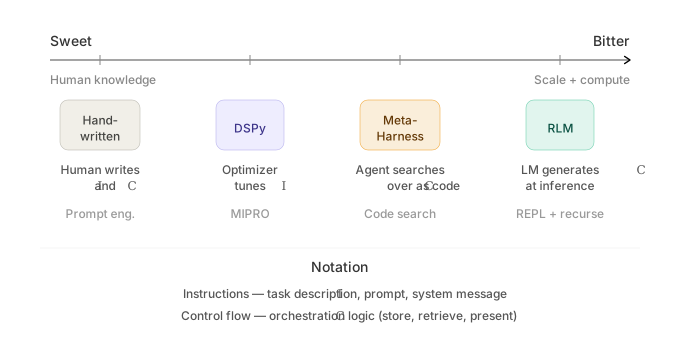
- Avoid context rot — The root LM only interacts with its context programmatically through the REPL, staying well within its comfortable operating range — enabling complex, long-horizon tasks that would otherwise cause models to silently degrade.
- Bitter lesson-proof: RLMs improve as LMs improve — Unlike harnesses, which can cap or constrain the base model's capabilities, the performance, speed, and cost of RLM calls correlate directly with improvements to base model capabilities. If the base model handles 10M tokens tomorrow, the RLM handles 100M.
- Symbolic reasoning & recursion — like algebra, RLMs express the structure of computation rather than performing each operation individually; a single line can represent 1M sub-calls — in direct contrast to agents like Claude Code that must mechanically emit each sub-agent call one at a time.
- Interpretability — RLM trajectories are fully readable: you can trace every peek, chunk, sub-call, and verification step the model takes. This not only reveals how the model decomposed a problem, but provides concrete optimization signals which tools like GEPA can ingest to evolve the RLM's strategies.
- Ideal for improving performance per token — RLMs allow small models to punch way above their weight (RLM(GPT-5-mini) outperforms base GPT-5) providing great opportunities for reducing costs or stretching limited compute budgets without sacrificing quality.
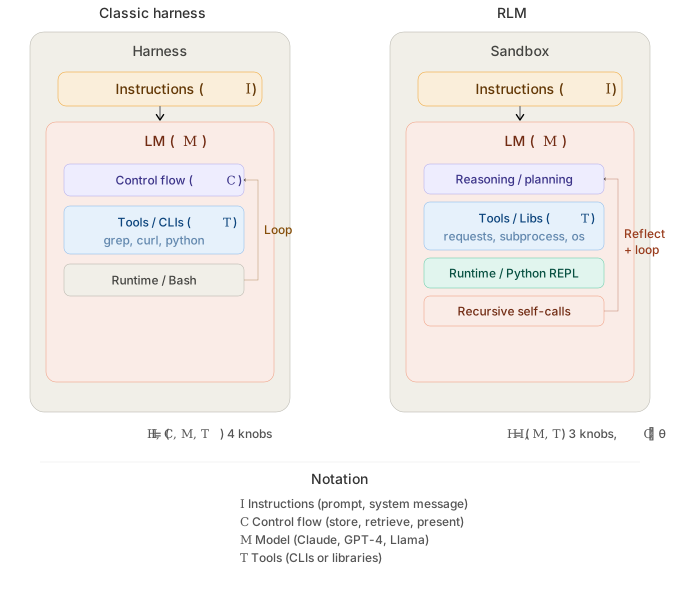
- Multimodal — process images, documents, audio, and video through sub-LM calls using native provider multimodal APIs.
- Async tool calling — native RLM async support in the WASM sandbox, enabling concurrent sub-LM invocations and tool calls
- Prompt-optimized skills & tools — predict-rlm skills comes tested and optimized to ensure maximum LM interoperability and performance, bundling instructions, PyPI packages, and tools for domain-specific tasks
- Simple file I/O — pass local or cloud files as typed inputs and outputs
via
File, keeping interop with your existing data pipelines straightforward. (S3 files support soon) - Structured sub-LM calls — native Pydantic and DSPy signature support for type-safe sub-LM invocations with structured outputs
| Description | Input / Output | Preview |
|---|---|---|
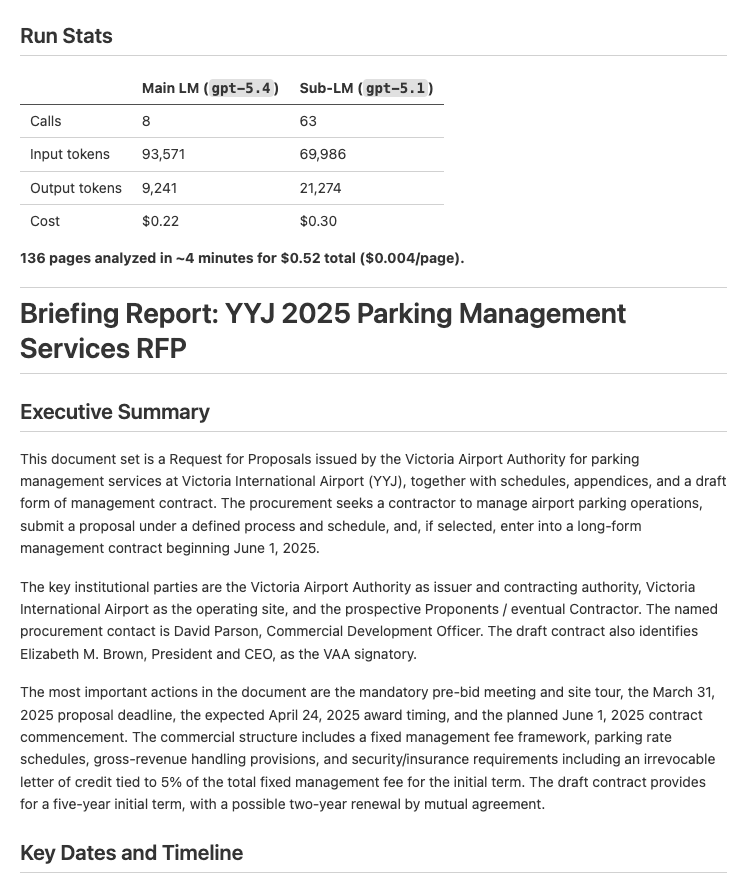
| Document Analysis — Analyze documents and extract key dates, entities, and financial information into a structured report | Input: PDFs Output: Structured briefing report (example output) |
 |
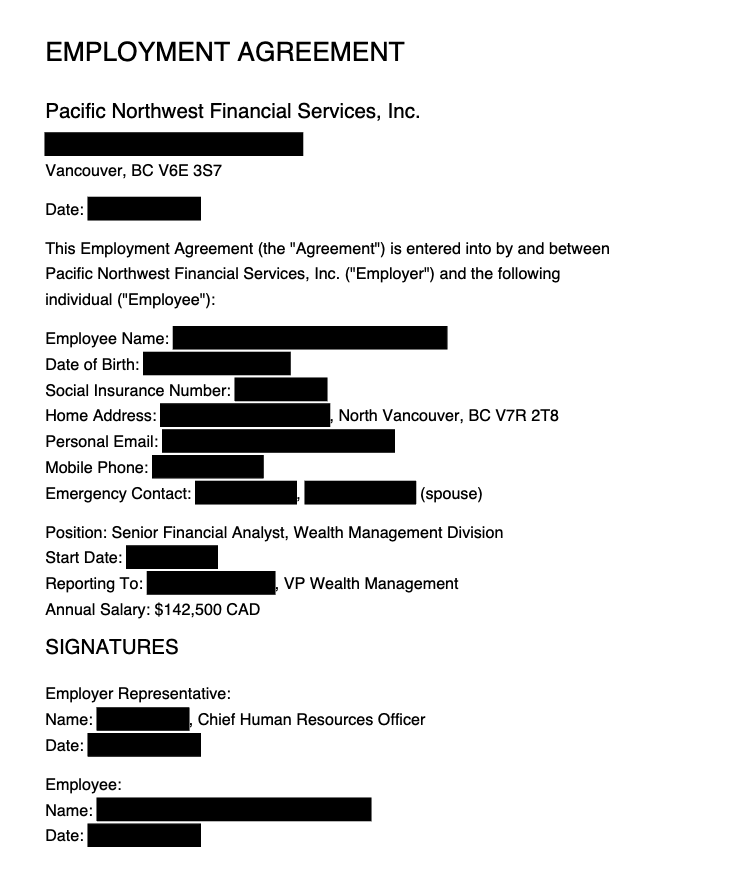
| Document Redaction — Redact PII from PDFs based on a policy, then verify the redactions visually | Input: PDFs Output: Redacted PDFs (example output) |
 |
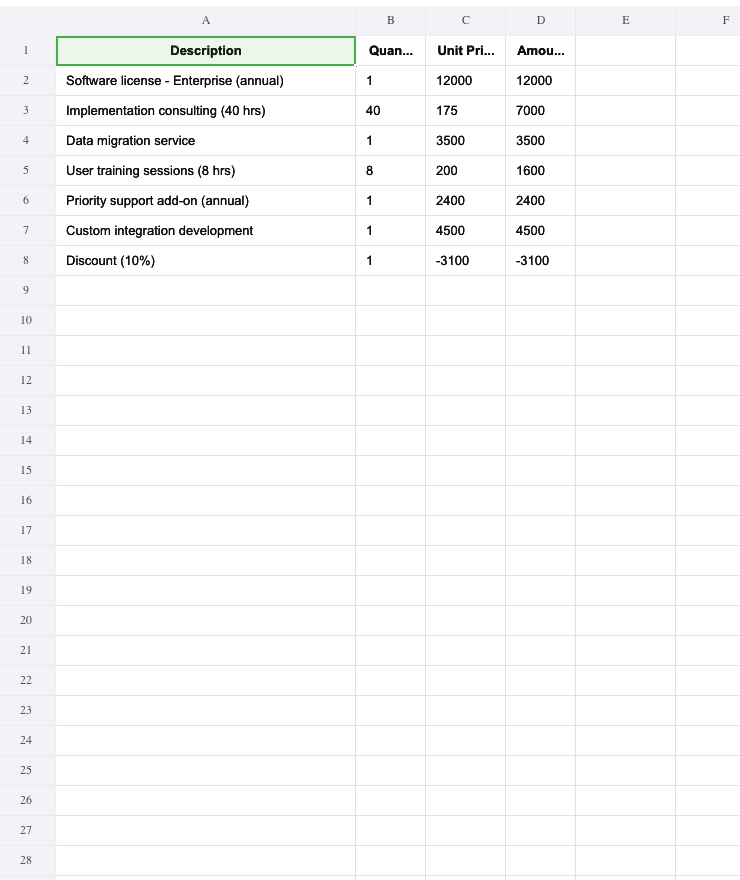
| Invoice Processing — Extract vendor info, line items, and totals from PDF invoices into a consolidated Excel spreadsheet | Input: PDF invoices Output: Excel spreadsheet (example output) |
 |
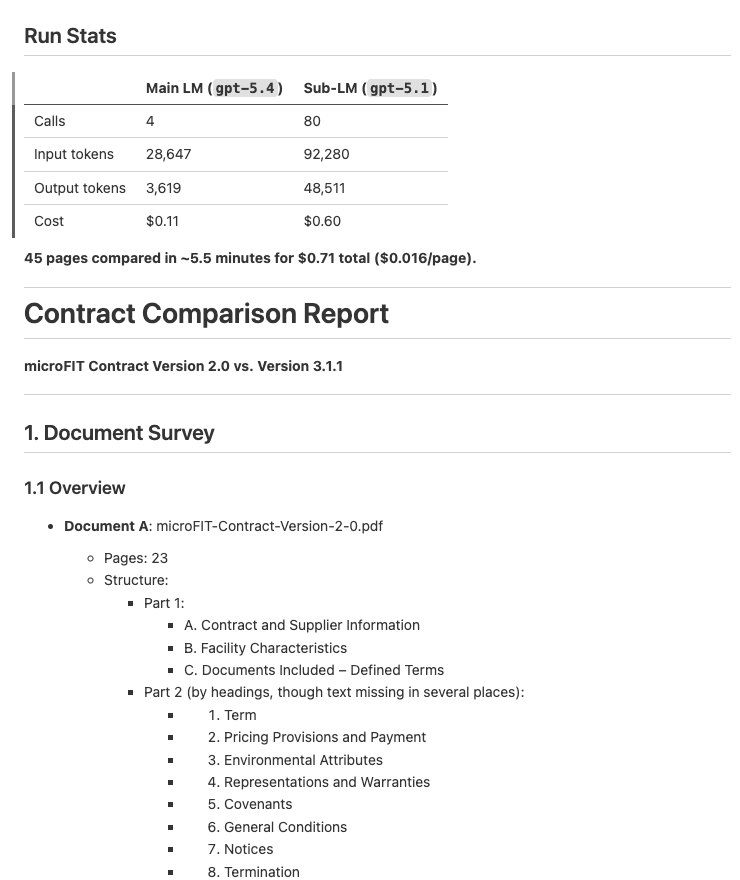
| Contract Comparison — Compare two contract versions and produce a structured diff report with per-section analysis | Input: 2 PDF contracts Output: Structured diff report (example output) |
 |
Install the predict-rlm skill in Claude Code, Codex, Cursor, or any compatible coding agent:
npx skills add Trampoline-AI/predict-rlmThen ask your agent to build an RLM:
❯ /rlm build an RLM that extracts line items from PDF invoices into a spreadsheet
import dspy
from predict_rlm import File, PredictRLM

class AnalyzeImages(dspy.Signature):
    """Analyze images and answer the query. Load each image as a base64 data
    URI and use predict() with dspy.Image to extract visual information."""
    images: list[File] = dspy.InputField()
    query: str = dspy.InputField()
    answer: str = dspy.OutputField()

rlm = PredictRLM(
    AnalyzeImages,
    lm="openai/gpt-5.4",
    sub_lm="openai/gpt-5.1",
)

result = rlm(
    images=[File(path="page.png")],
    query="Extract all visible text, then count each letter A-Z (case-insensitive).",
)

print(result.answer)JSPI/Deno/Pyodide remains the default sandbox. Use Docker Sandboxes (sbx) when
you want an explicit opt-in Linux Python runner:
brew install docker/tap/sbx
sbx login
from predict_rlm import PredictRLM, SbxConfig, SbxPool
rlm = PredictRLM(
"question -> answer",
sandbox_backend="sbx",
sbx_config=SbxConfig(name="my-predict-rlm-sbx"),
)By default, SbxConfig passes the explicit non-Docker shell template
docker.io/docker/sandbox-templates:shell to sbx create. Pass a custom
template="..." to override it, or template=None to omit --template and use
Docker's CLI default behavior.
For throughput-sensitive evals or optimization loops, create a pool of prewarmed runners and pass it explicitly:
with SbxPool(size=4, config=SbxConfig()) as pool:
    rlm = PredictRLM(
        "question -> answer",
        sandbox_backend="sbx",
        sbx_pool=pool,
    )
The backend mounts only a per-run staging directory under .predict_rlm_sbx/ by
default, preserving model-facing paths such as /sandbox/input/... and
/sandbox/output/... without exposing the rest of the repo workspace. Use
SbxConfig(extra_workspaces=[...]) only when the sandbox needs explicit
additional host mounts. Real sbx integration tests are skipped by default; run
them with PREDICT_RLM_RUN_SBX_TESTS=1 uv run pytest -m sbx after the CLI is
installed and logged in.
The optimized spreadsheet skill is built in. Import it and pass it through
skills=[spreadsheet] so the RLM gets the spreadsheet-specific instructions,
openpyxl, pandas, formulas, and the formula_eval verification module
inside its sandbox.
import dspy

from predict_rlm import File, PredictRLM
from predict_rlm.skills import spreadsheet


class UpdateWorkbook(dspy.Signature):
    """Update the workbook following the request.

    Use openpyxl for workbook edits, Excel formulas for derived values, and
    verify formulas before returning the final .xlsx file.
    """

    workbook: File = dspy.InputField(desc="Input .xlsx workbook")
    request: str = dspy.InputField(desc="Requested spreadsheet changes")
    updated_workbook: File = dspy.OutputField(desc="Updated .xlsx workbook")


rlm = PredictRLM(
    UpdateWorkbook,
    lm="openai/gpt-5.4",
    sub_lm="openai/gpt-5.1",
    skills=[spreadsheet],
)

result = rlm(
    workbook=File(path="model.xlsx"),
    request="Add a Summary sheet with revenue by quarter and formulas for totals.",
)

print(result.updated_workbook.path)
For workflows that combine source documents and spreadsheets, compose skills:
from predict_rlm.skills import pdf, spreadsheet

rlm = PredictRLM(ProcessInvoices, skills=[pdf, spreadsheet])Hook into the RLM iteration loop to broadcast progress to a UI, write
structured logs, or feed an observability pipeline. PredictRLM extends
DSPy's existing callback contract (dspy.utils.callback.BaseCallback)
with two RLM-specific handlers:
| Handler | Fires | Receives |
|---|---|---|
on_rlm_iteration_start |
Before the action LM is called for iteration N | call_id, instance, iteration, max_iterations |
on_rlm_iteration_end |
After iteration N finishes (code executed, IterationStep built — or an error was raised) |
call_id, instance, iteration, step: IterationStep | None, is_final: bool, exception: Exception | None |
call_id matches the parent module's on_module_start/end ID, so events
correlate cleanly with DSPy's own callback events when you invoke the RLM
through DSPy's public module call path (rlm(...) or await rlm.acall(...)).
Existing BaseCallback subclasses keep working unchanged — handlers we
call are opt-in via getattr.
Async-aware. If you use await rlm.acall(...) your handlers may be
coroutines and they will be awaited. Sync rlm(...) calls sync handlers;
if it encounters an async handler the coroutine is closed and a warning
is logged.
Failure-isolated. Handler exceptions are logged and swallowed — a broken callback can never break the run.
import json
from dspy.utils.callback import BaseCallback
from predict_rlm import IterationStep, PredictRLM

class ProgressBroadcaster(BaseCallback):
    def __init__(self, websocket):
        self.ws = websocket

    async def on_rlm_iteration_start(self, *, iteration, max_iterations, **_):
        await self.ws.send_json({
            "type": "iteration_start",
            "iteration": iteration,
            "max_iterations": max_iterations,
        })

    async def on_rlm_iteration_end(
        self, *, iteration, step: IterationStep | None, is_final, exception, **_
    ):
        await self.ws.send_json({
            "type": "iteration_end",
            "iteration": iteration,
            "is_final": is_final,
            "step": step.model_dump(mode="json") if step else None,
            "error": str(exception) if exception else None,
        })

rlm = PredictRLM("query -> answer")
rlm.callbacks = [ProgressBroadcaster(ws)]
result = await rlm.acall(query="...")
Register globally instead with dspy.configure(callbacks=[...]) and the
same handlers fire for every PredictRLM instance.
- How it works — understand the sandbox, REPL loop, signatures, and file I/O
- API reference — constructor params for
PredictRLM,File, andSkill - Skills — define, compose, and mount custom skills
- RLM-GEPA — optimize RLM skills from traces and
configure
AgentSpec - Examples — end-to-end demos with setup instructions