Alternative Controll App for Corsair K70RGB
Base on Ideas of:
- https://github.com/PawYT/K70-RGB-Mod
- http://www.reddit.com/user/chrisgzy
- http://www.reddit.com/user/fly-hard
The sources should compile on Microsoft Visual Studio Comunity Editon 2013 (which is free).
If you just want to use it - just download the ZIP file named "K70Tray_release_XXX.rar" - unpack and start.
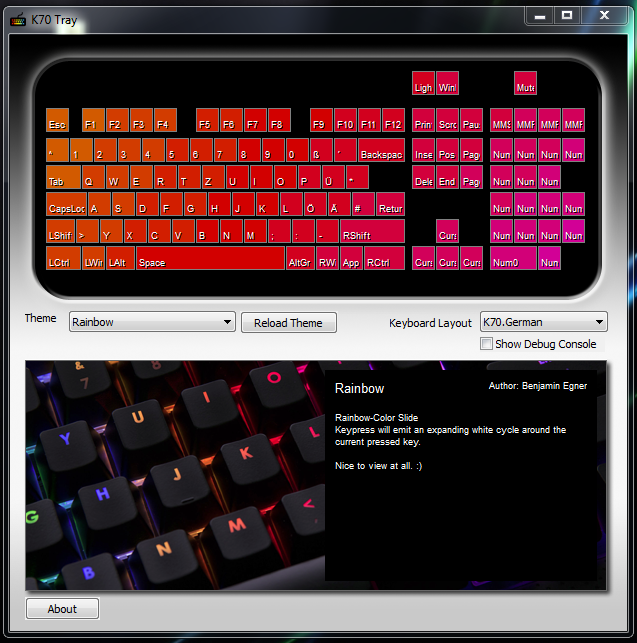
A Windows System Tray Application which allows you to define RGB Keyboard Layouts via XML. This software is as-it-is - and far from bugfree. It is not testet - but you've got a high chance to get it work. Please report errors to me.
That is my first C++ Project EVER and im not good in it. I noticed, that it's got some memory leaks (on switching Themes) :D Please help me if you like - and fork it.
The Keyboardlayouts in this world are different. So - the K70Tray reads XML Files which holds the definition. Basicly its a Map: which key has which scancode, where is it on the Keyboard how big is ist and which led adress belongs to it.
Take a look at the examples and play with that features.
I'll be glad if you send me other XML-Layouts, so i'll commit them.
<Layout>
    <Row>
        <Space keysize="0.25" />
        <Key name="Light" code="0x02" led="137" keysize="1" />
        <Key name="SomeKey" code="0x12" led="134" keysize="1.5" />
    </Row>
    <Row>
        ...
    </Row>
</Layout>
A Row is a new Row on the Keyboard. Take a look at the K70 RGB. It has 7 Rows: The first row has only 3 Buttons (on the right corner) The second row begins with ESC and the Fx Keys...
The Key needs to have 4 Elements:
- name: A unique name (human readable)
- code: Hexadecimal Code (scancode) of the key
- led: Number of the led
- keysize: Size of the Key.
Note: All rows needs to have the same size(!)
If there is space beween keys, you should define it with
- keysize: Size of the Space (in Key-Units).
Hu - this is gonna to be difficult to explain... :D
A Theme is a complete representation of a BoardLayout. A Theme consists of Maps. Each Map has its own KeyState. So you can create a default Map, a map which is displayed, as long you hold CTRL Key. A map which is displayed as long you hold the Shift Key. A map which is displayed as long you hold CTRL and Shift Key... You get it :D
Each Theme NEEDS to have one Map which is called "default".
So here's one default map, which lights all keys up in red.
<Map name="default">

    <!-- needs empty group to set on default! -->
    <activateOnKey>
        <group />
    </activateOnKey>

    <all>
        <colorGroup type="default">
            <color r="7" g="0" b="0">
        </colorGroup>
    </all>

</Map>
If you want to create a Key-Respond map do the following: This Map will lights everything blue, while shift is pressed.
<Map name="Shift">
    <activateOnKey>
        <group>
            <key keyname="LShift" />
        </group>
        <group>
            <key keyname="RShift" />
        </group>
    </activateOnKey>

    <all>
       <colorGroup type="default">
           <color r="0" g="0" b="7">
       </colorGroup>
    </all>
</Map>
There are 3 types of colorgroups:
- default: Which is the default state. (cycling)
- onPress: Which is the color of the key, while it is pressed (cycling)
- onRelease: A one-cycle animation, when key is released.
Example:
<all>
    <!-- Default state is red -->
    <colorGroup type="default">
        <color r="7" g="0" b="0" />
    </colorGroup>
    <!-- Default state is green -->
    <colorGroup type="onPress">
        <color r="0" g="7" b="0" />
    </colorGroup>
    <!-- Single Animation on release - colors will be ADDED to default animation -->
    <colorGroup type="onRelease">
        <color r="0" g="0" b="7" />
        <color r="0" g="0" b="6" />
        <color r="0" g="0" b="5" />
        <color r="0" g="0" b="4" />
        <color r="0" g="0" b="3" />
        <color r="0" g="0" b="2" />
        <color r="0" g="0" b="1" />
        <color r="0" g="0" b="0" />
    </colorGroup>
</all>
You could place as much as color tags inside a colorgroup as you want:
This example fades from blue to black.
<colorGroup>
    <color r="0" g="0" b="7" />
    <color r="0" g="0" b="6" />
    <color r="0" g="0" b="5" />
    <color r="0" g="0" b="4" duration="5" /> <-- This color lasts 5 ticks -->
    <color r="0" g="0" b="3" />
    <color r="0" g="0" b="2" />
    <color r="0" g="0" b="1" />
    <color r="0" g="0" b="0" />
</colorGroup>
You could define an animation for a single key as well. Use a Key tag instead of all:
<-- only for the H-Key -->
<key keyname="H">
    <colorGroup type="default">
        <color r="7" g="0" b="0">
    </colorGroup>
</all>
Or you can use a KeyGroup (look at Theme.Rainbow.xml)
- syncName & SyncGroups
- sharedAnimations and sharedKeyGroups
- onRelease join="add" / join="overwrite"
- Overlay Maps
- boardAnimations
Have Fun!