
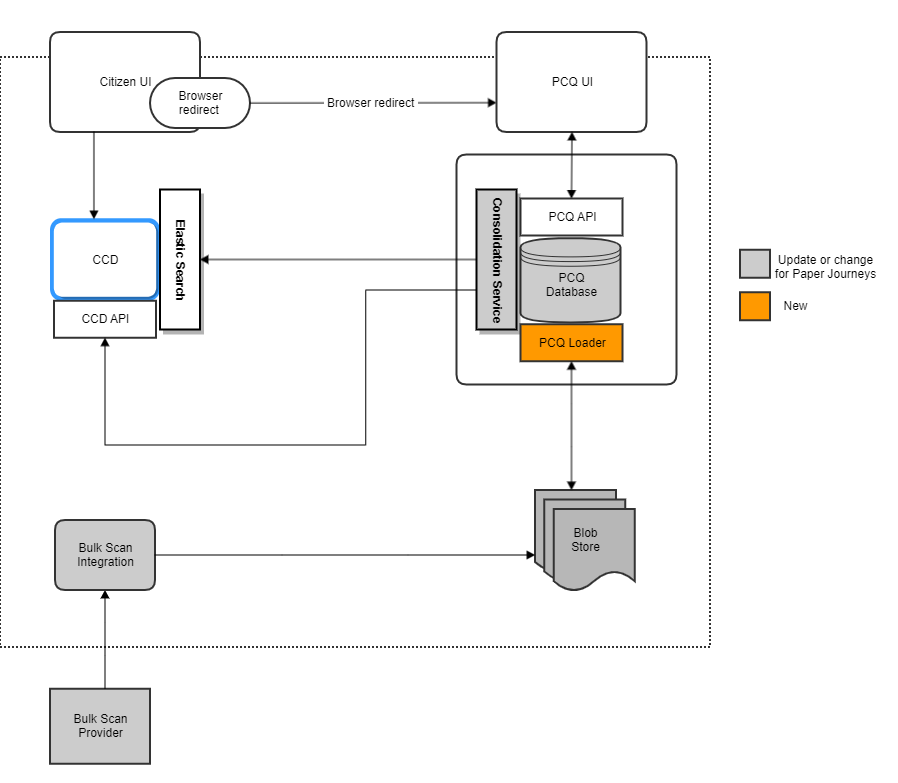
This is an API/worker service for the protected characteristics questionnaire platform. It pulls PCQ payloads from blob storage and forwards them to the PCQ backend for processing.
pcq-frontend • pcq-backend • pcq-consolidation-service • pcq-shared-infrastructure • pcq-loader
Since Spring Boot 2.1 bean overriding is disabled. If you want to enable it you will need to set spring.main.allow-bean-definition-overriding to true.
JUnit 5 is now enabled by default in the project. Please refrain from using JUnit4 and use the next generation
The project uses Gradle as a build tool. It already contains
./gradlew wrapper script, so there's no need to install gradle.
To build the project execute the following command:
./gradlew buildCreate the image of the application by executing the following command:
./gradlew assembleCreate docker image:
docker-compose buildRun the distribution (created in build/install/pcq-backend directory)
by executing the following command:
docker-compose upThis will start the API container exposing the application's port
(set to 4556 in this pcq-loader app).
In order to test if the application is up, you can call its health endpoint:
curl http://localhost:4556/healthYou should get a response similar to this:
{"status":"UP","diskSpace":{"status":"UP","total":249644974080,"free":137188298752,"threshold":10485760}}
The service reads configuration from environment variables (defaults are in src/main/resources/application.yaml) and optionally from a Kubernetes config tree mounted at /mnt/secrets/pcq/ (see spring.config.import).
Environment Variables:
PCQ_BACKEND_URL- URL for the PCQ backend API.JWT_SECRET- shared secret used to sign/verify JWTs.STORAGE_ACCOUNT_NAME- Azure storage account name.STORAGE_KEY- Azure storage account key (base64 encoded).STORAGE_URL- Azure blob endpoint URL for the account.STORAGE_DOWNLOAD_PATH- local path for temporary blob downloads.STORAGE_BLOB_PCQ_CONTAINER- source container name (defaultpcq).STORAGE_BLOB_PCQ_REJECTED_CONTAINER- rejected container name (defaultpcq-rejected).STORAGE_BLOB_LEASE_TIMEOUT- blob lease timeout in seconds.BLOB_COPY_TIMEOUT_IN_MILLIS- timeout for blob copy operations.BLOB_COPY_POLLING_DELAY_IN_MILLIS- polling delay for blob copy operations.LEASE_ACQUIRE_DELAY_IN_SECONDS- delay before acquiring blob lease.
Deployment patterns:
- Helm chart at
charts/pcq-loaderwires Key Vault secrets (JWT + storage credentials) to env vars for the CronJob. - Ensure the pod has write access to
STORAGE_DOWNLOAD_PATHor the default/var/tmp/pcq-loader/download/blobs.
To skip all the setting up and building, just execute the following command:
./bin/run-in-docker.shFor more information:
./bin/run-in-docker.sh -hScript includes bare minimum environment variables necessary to start api instance. Whenever any variable is changed or any other script regarding docker image/container build, the suggested way to ensure all is cleaned up properly is by this command:
docker-compose rmIt clears stopped containers correctly. Might consider removing clutter of images too, especially the ones fiddled with:
docker images

docker image rm <image-id>
There is no need to remove postgres and java or similar core images.
This project is licensed under the MIT License - see the LICENSE file for details.