Okapi is a modern, minimalist HTTP framework for Go built for simplicity, performance, and developer experience. It helps you create fast, scalable, and well-documented APIs with minimal boilerplate..
Designed around clarity and strong typing, Okapi provides automatic request validation and built-in OpenAPI documentation out of the box, making it easy to build production-ready APIs that are clean, maintainable, and easy to evolve..






Named after the okapi (/oʊˈkɑːpiː/), a rare and graceful mammal native to the rainforests of the Democratic Republic of the Congo, the framework reflects the same balance of elegance, adaptability, and strength. Like the animal itself, Okapi combines distinct qualities into a unique and powerful experience.
Go developers often combine multiple libraries for routing, validation, documentation, authentication, and testing.
Okapi brings all these capabilities together in one cohesive framework while remaining fully compatible with Go’s standard net/http.
Key goals:
- Developer experience similar to FastAPI
- Minimal boilerplate
- Strong typing
- Built-in OpenAPI documentation
- Production-ready features out of the box
- Intuitive API Design – Clean, declarative syntax for routes and middleware.
- Automatic Request Binding – Parse JSON, XML, forms, query params, headers, and path variables into structs
- Built-in Validation – Struct tag-based validation with comprehensive error messages.
- Auto-Generated OpenAPI Docs – Swagger UI, ReDoc, and Scalar automatically synced with your code.
- Runtime Documentation Control – Enable/disable OpenAPI docs at runtime without redeployment
- Authentication Ready – Native JWT, Basic Auth, and extensible middleware support.
- SPA Serving – Serve single-page apps (React, Vue, …) with index fallback, from disk or an embedded filesystem.
- Standard Library Compatible – Fully compatible with Go’s
net/http. - Dynamic Route Management – Enable/disable routes at runtime without code changes
- Production Ready – TLS support, CORS, graceful shutdown, middleware system, and more.
mkdir myapi && cd myapi
go mod init myapi
go get github.com/jkaninda/okapi@latestpackage main
import "github.com/jkaninda/okapi"
func main() {
o := okapi.Default()
o.Get("/", func(c *okapi.Context) error {
return c.OK(okapi.M{
"message": "Hello from Okapi!",
})
})
err := o.Start()
if err != nil {
panic(err)
}
}Run the application:
go run main.go
Visit:
- API → http://localhost:8080
- Swagger Docs → http://localhost:8080/docs
- ReDoc → http://localhost:8080/redoc
- Scalar → http://localhost:8080/redoc
Okapi supports multiple binding styles, from simple handlers to fully typed input/output patterns.
Define validation rules directly on your structs:
type Book struct {
    Name   string `json:"name" minLength:"4" maxLength:"50" required:"true" pattern:"^[A-Za-z]+$"`
    Price  int    `json:"price" required:"true" min:"5" max:"100"`
    Year   int    `json:"year" deprecated:"true"`
    Status string `json:"status" enum:"available,out_of_stock,discontinued" default:"available"`
}The simplest approach to bind and validate within your handler:
o.Post("/books", func(c *okapi.Context) error {
    var book Book
    if err := c.Bind(&book); err != nil {
        return c.ErrorBadRequest(err)
    }
    return c.Created(book)
})Automatic input binding with a typed handler signature:
o.Post("/books", okapi.Handle(func(c *okapi.Context, book *Book) error {
    book.ID = generateID()
    return c.Created(book)
}),
    okapi.DocRequestBody(&Book{}),
    okapi.DocResponse(&Book{}),
)A concise version for simple input validation:
type BookDetailInput struct {
    ID int `path:"id"`
}

o.Get("/books/{id:int}", okapi.H(func(c *okapi.Context, input *BookDetailInput) error {
    book := findBookByID(input.ID)
    if book == nil {
        return c.AbortNotFound("Book not found")
    }
    return c.OK(book)
}))Define both input and output structs separately for complex operations:
type BookEditInput struct {
    ID   int  `path:"id" required:"true"`
    Body Book `json:"body"`
}

type BookOutput struct {
    Status int
    Body   Book
}

o.Put("/books/{id:int}", okapi.HandleIO(func(c *okapi.Context, input *BookEditInput) (*BookOutput, error) {
    book := updateBook(input.ID, input.Body)
    if book == nil {
        return nil, c.AbortNotFound("Book not found")
    }
    return &BookOutput{Body: *book}, nil
})).WithIO(&BookEditInput{}, &BookOutput{})When you only need a structured output without specific input validation:
type BooksResponse struct {
    Body []Book `json:"books"`
}

o.Get("/books", okapi.HandleO(func(c *okapi.Context) (*BooksResponse, error) {
    return &BooksResponse{Body: getAllBooks()}, nil
})).WithOutput(&BooksResponse{})Separate payload from metadata using the Body field pattern:
type BookRequest struct {
    Body   Book   `json:"body"`              // Request payload
    ID     int    `param:"id" query:"id"`    // Path or query parameter
    APIKey string `header:"X-API-Key" required:"true"` // Header
}

type BookResponse struct {
    Status    int    // HTTP status code
    Body      Book   // Response payload
    RequestID string `header:"X-Request-ID"` // Response header
}


o.Post("/books", func(c *okapi.Context) error {
    var req BookRequest
    if err := c.Bind(&req); err != nil {
        return c.ErrorBadRequest(err)
    }

    res := &BookResponse{
        Status:    201,
        RequestID: uuid.New().String(),
        Body:      req.Body,
    }
    return c.Respond(res) // Automatically sets status, headers, and body
},
    okapi.Request(&BookRequest{}),
    okapi.Response(BookResponse{}),
)api := o.Group("/api")
// Versioned API groups
v1 := api.Group("/v1", authMiddleware).Deprecated()
v2 := api.Group("/v2")
v1.Get("/books", getBooks)
v2.Get("/books", v2GetBooks)
// Disable routes at runtime
v2.Get("/experimental", experimentalHandler).Disable()
// Apply middleware to individual routes
v2.Get("/books/{id}", getBookByID).Use(cacheMiddleware)
// Protected admin routes
admin := api.Group("/admin", adminMiddleware)
admin.Get("/dashboard", getDashboard)Ideal for controller or service-based architectures:
type BookHandler struct{}

func (s *BookHandler) Routes() []okapi.RouteDefinition {
    apiGroup := &okapi.Group{Prefix: "/api"}

    return []okapi.RouteDefinition{
        {
            Method:      http.MethodGet,
            Path:        "/books",
            Handler:     s.List,
            Group:       apiGroup,
            Summary:     "List all books",
            Response:    &BooksResponse{},
        },
        {
            Method:      http.MethodPost,
            Path:        "/books",
            Handler:     s.Create,
            Group:       apiGroup,
            Middlewares: []okapi.Middleware{authMiddleware},
            Security:    bearerAuthSecurity,
            Options: []okapi.RouteOption{
                okapi.DocSummary("Create a book"),
                okapi.DocRequestBody(&Book{}),
                okapi.DocResponse(&Book{}),
            },
        },
    }
}

// Register routes
app := okapi.Default()
bookHandler := &BookHandler{}
app.Register(bookHandler.Routes()...)jwtAuth := okapi.JWTAuth{
SigningSecret: []byte("your-secret-key"),
Issuer: "okapi",
Audience: "okapi.jkaninda.dev",
ClaimsExpression: "Equals(`email_verified`, `true`)",
TokenLookup: "header:Authorization",
ContextKey: "user",
}
protected := o.Group("/api", jwtAuth.Middleware).WithBearerAuth()
protected.Get("/profile", getProfile)basicAuth := okapi.BasicAuth{
Username: "admin",
Password: "secure-password",
}
admin := o.Group("/admin", basicAuth.Middleware)
admin.Get("/dashboard", getDashboard)func main() {
tmpl, _ := okapi.NewTemplateFromDirectory("views", ".html")
o := okapi.Default().WithRenderer(tmpl)
o.Get("/", func(c *okapi.Context) error {
return c.Render(http.StatusOK, "home", okapi.M{
"title": "Welcome",
"message": "Hello, World!",
})
})
o.Start()
}//go:embed views/*
var Views embed.FS
func main() {
app := okapi.New()
app.WithRendererFromFS(Views, "views/*.html")
app.StaticFS("/assets", http.FS(must(fs.Sub(Views, "views/assets"))))
app.Start()
}Serve a client-side routed app (React, Vue, Svelte, …) alongside your API.
Register the SPA after your API routes.
func main() {
    o := okapi.Default()

    o.Get("/api/v1/users", listUsers)

    // From disk
    o.SPA("/", "./web")

    o.Start()
}
For single-binary deployments, embed the built front-end and serve it with
SPAFS:
//go:embed all:web/dist
var dist embed.FS

func main() {
    o := okapi.Default()

    o.Get("/api/v1/users", listUsers)

    o.SPAFS("/", dist, okapi.SPAConfig{
        Root:   "web/dist", // sub-directory inside the embed.FS
        MaxAge: time.Hour,  // Cache-Control for assets; index stays no-cache
    })

    o.Start()
}
See the SPA guide and the
examples/spa example for the full configuration.
import "github.com/jkaninda/okapi/okapitest"

func TestGetBooks(t *testing.T) {
    server := okapi.NewTestServer(t)
    server.Get("/books", GetBooksHandler)

    okapitest.GET(t, server.BaseURL+"/books").
        ExpectStatusOK().
        ExpectBodyContains("Go Programming").
        ExpectHeader("Content-Type", "application/json")
}import "github.com/jkaninda/okapi/okapicli"
func main() {
o := okapi.Default()
cli := okapicli.New(o, "My API").
String("config", "c", "config.yaml", "Config file").
Int("port", "p", 8000, "Server port").
Bool("debug", "d", false, "Debug mode")
cli.Parse()
o.WithPort(cli.GetInt("port"))
// ... register routes ...
cli.Run()
}Okapi automatically generates interactive API documentation with multiple approaches to document your routes.
With okapi.Default() – Documentation is enabled by default.
With okapi.New() – Documentation is disabled by default. Enable it conditionally:
o := okapi.New()

if os.Getenv("ENABLE_DOCS") == "true" {
    o.WithOpenAPIDocs()
}
Once enabled, the following routes are served:
| Route | Content |
|---|---|
/docs |
The selected UI (Swagger UI by default) |
/swagger |
Swagger UI |
/redoc |
ReDoc |
/scalar |
Scalar API Reference |
/openapi.json |
OpenAPI spec (JSON) — 3.1 by default |
/openapi.yaml |
OpenAPI spec (YAML) — 3.1 by default |
/openapi-3.0.json |
OpenAPI 3.0 spec (JSON) |
/openapi-3.0.yaml |
OpenAPI 3.0 spec (YAML) |
Okapi serves the same API description as both OpenAPI 3.1 / JSON Schema 2020-12 and OpenAPI 3.0.
Webhooks – declare outbound callbacks with
o.Webhook(...); they appear under thewebhooksfield of the 3.1 document only.
// A webhook is documentation-only: it is not added to the router.
o.Webhook("newPet", http.MethodPost,
    okapi.DocSummary("Notifies subscribers about a newly added pet"),
    okapi.DocRequestBody(Pet{}),
    okapi.DocResponse(200, okapi.M{"received": true}),
)Okapi ships with three interactive UIs: Swagger UI (default), ReDoc, and Scalar.
The UI rendered at /docs is configurable, while each UI also stays reachable at its own
dedicated route regardless of the selection.
Select it via the UI field on OpenAPI:
o.WithOpenAPIDocs(okapi.OpenAPI{
    Title: "My API",
    UI:    okapi.ScalarUI, // okapi.SwaggerUI (default) | okapi.RedocUI | okapi.ScalarUI
})
…or with the chainable WithDocUI method:
o := okapi.New().WithOpenAPIDocs().WithDocUI(okapi.ScalarUI)Whether the non-selected UIs stay reachable depends on how you create the instance:
okapi.Default()— all UI routes (/swagger,/redoc,/scalar) stay reachable alongside/docs(StrictDocUIis disabled).okapi.New()— only the selected UI is served at/docs; the other routes return404(StrictDocUIis enabled).
Override the behavior explicitly via the StrictDocUI field. Set it to true to register
only the selected UI — the other UI routes then return 404:
o.WithOpenAPIDocs(okapi.OpenAPI{
    Title:       "My API",
    UI:          okapi.ScalarUI,
    StrictDocUI: true, // only /docs is served
})
or set it to false to keep every UI reachable regardless of the selection:
o.WithOpenAPIDocs(okapi.OpenAPI{
    Title:       "My API",
    UI:          okapi.ScalarUI,
    StrictDocUI: false, // /swagger, /redoc and /scalar all stay reachable
})Simple and readable for most routes:
o.Get("/books", getBooksHandler,
    okapi.DocSummary("List all available books"),
    okapi.DocTags("Books"),
    okapi.DocQueryParam("author", "string", "Filter by author name", false),
    okapi.DocQueryParam("limit", "int", "Maximum results to return", false),
    okapi.DocResponseHeader("X-Client-Id", "string", "Client ID"),
    okapi.DocResponse([]Book{}),
    okapi.DocResponse(400, ErrorResponse{}),
)For complex or dynamic documentation needs:
o.Post("/books", createBookHandler,
    okapi.Doc().
        Summary("Add a new book to the inventory").
        Tags("Books").
        BearerAuth().
        ResponseHeader("X-Client-Id", "string", "Client ID").
        RequestBody(BookRequest{}).
        Response(201, Book{}).
        Response(400, ErrorResponse{}).
        Build(),
)Define request/response metadata directly in structs:
type BookRequest struct {
    Body struct {
        Name  string `json:"name" minLength:"4" maxLength:"50" required:"true"`
        Price int    `json:"price" required:"true"`
    } `json:"body"`
    ID     int    `param:"id" query:"id"`
    APIKey string `header:"X-API-Key" required:"true"`
}

o.Post("/books", createBookHandler,
    okapi.Request(&BookRequest{}),
    okapi.Response(&BookResponse{}),
)Chain documentation directly on route definitions:
o.Post("/books", handler).WithIO(&BookRequest{}, &BookResponse{})  // Both request & response
o.Post("/books", handler).WithInput(&BookRequest{})                 // Request only
o.Get("/books", handler).WithOutput(&BooksResponse{})               // Response only
See the full guide at okapi.jkaninda.dev/features/openapi
With the declarative okapi.RouteDefinition, documentation lives right next to the
route. Common fields — Summary, Description, Tags, Request, Response, and
Security — are set directly on the struct:
routes := []okapi.RouteDefinition{
    {
        Method:      http.MethodPost,
        Path:        "/books",
        Handler:     createBookHandler,
        Summary:     "Add a new book",
        Description: "Create a new book in the inventory",
        Tags:        []string{"Books"},
        Request:     &BookRequest{},
        Response:    &Book{},             // 200 response schema
        Security: []map[string][]string{  // requires bearer auth
            {"bearerAuth": {}},
        },
    },
}

app := okapi.New()
okapi.RegisterRoutes(app, routes)
For anything the struct fields don't cover (extra status codes, headers, query
params, …), drop down to the Options field with the same Doc* helpers used
elsewhere. Struct fields and Options can be mixed freely:
routes := []okapi.RouteDefinition{
    {
        Method:  http.MethodGet,
        Path:    "/books/{id:int}",
        Handler: getBookHandler,
        Tags:    []string{"Books"},
        Options: []okapi.RouteOption{
            okapi.DocSummary("Get a book by ID"),
            okapi.DocPathParam("id", "int", "The ID of the book"),
            okapi.DocResponse(Book{}),                       // 200
            okapi.DocResponse(404, ErrorResponse{}),         // 404
            okapi.DocResponseHeader("X-Request-Id", "string", "Request ID"),
        },
    },
}
Attach routes to a group to share a prefix, tags, middleware, and security across several definitions:
books := &okapi.Group{Prefix: "/api/v1", Tags: []string{"Books"}}

routes := []okapi.RouteDefinition{
    {
        Method:   http.MethodGet,
        Path:     "/books",
        Handler:  listBooksHandler,
        Group:    books,
        Summary:  "List all books",
        Response: &BooksResponse{},
    },
    {
        Method:   http.MethodPost,
        Path:     "/books",
        Handler:  createBookHandler,
        Group:    books,
        Summary:  "Add a new book",
        Request:  &BookRequest{},
        Response: &Book{},
    },
}

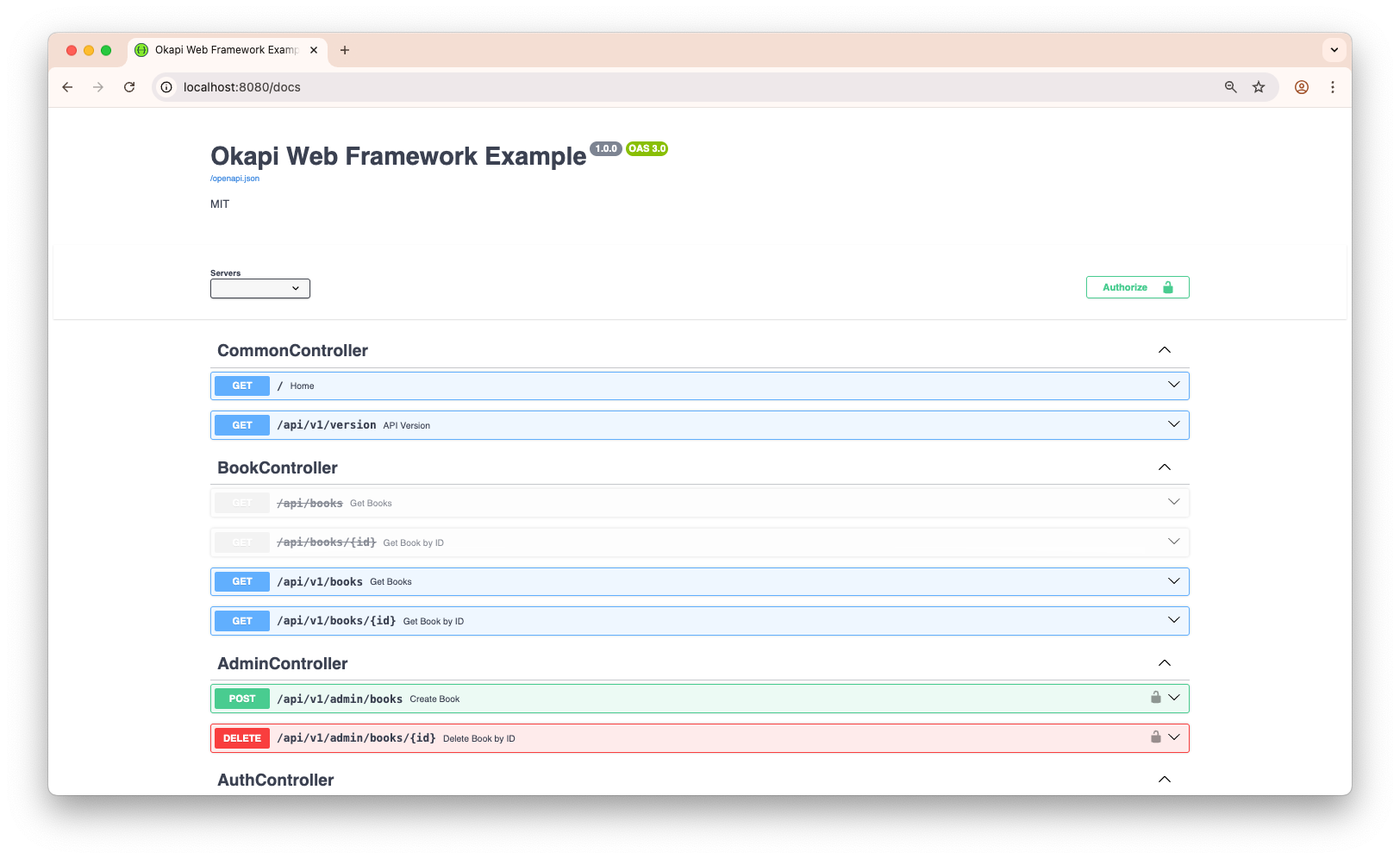
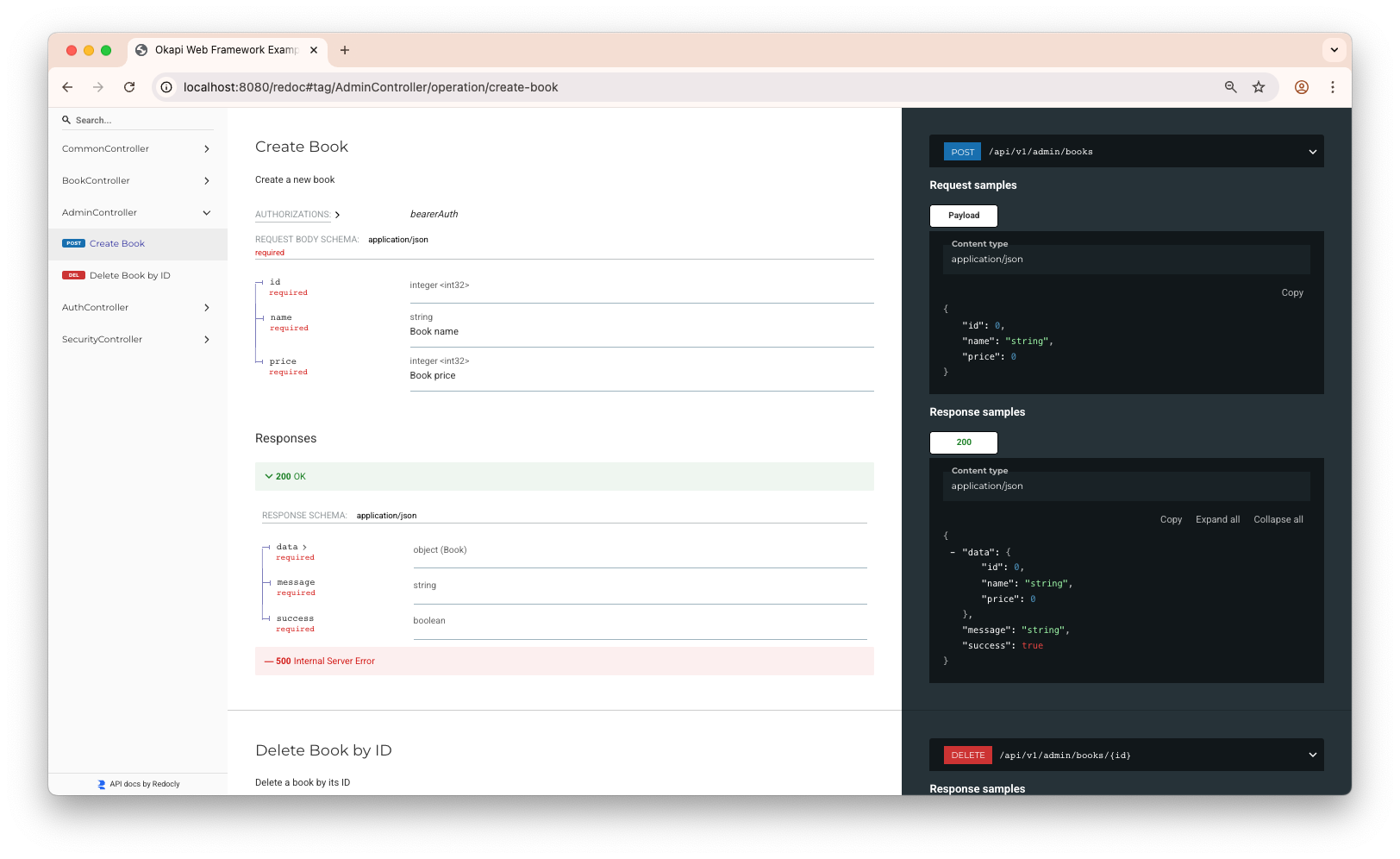
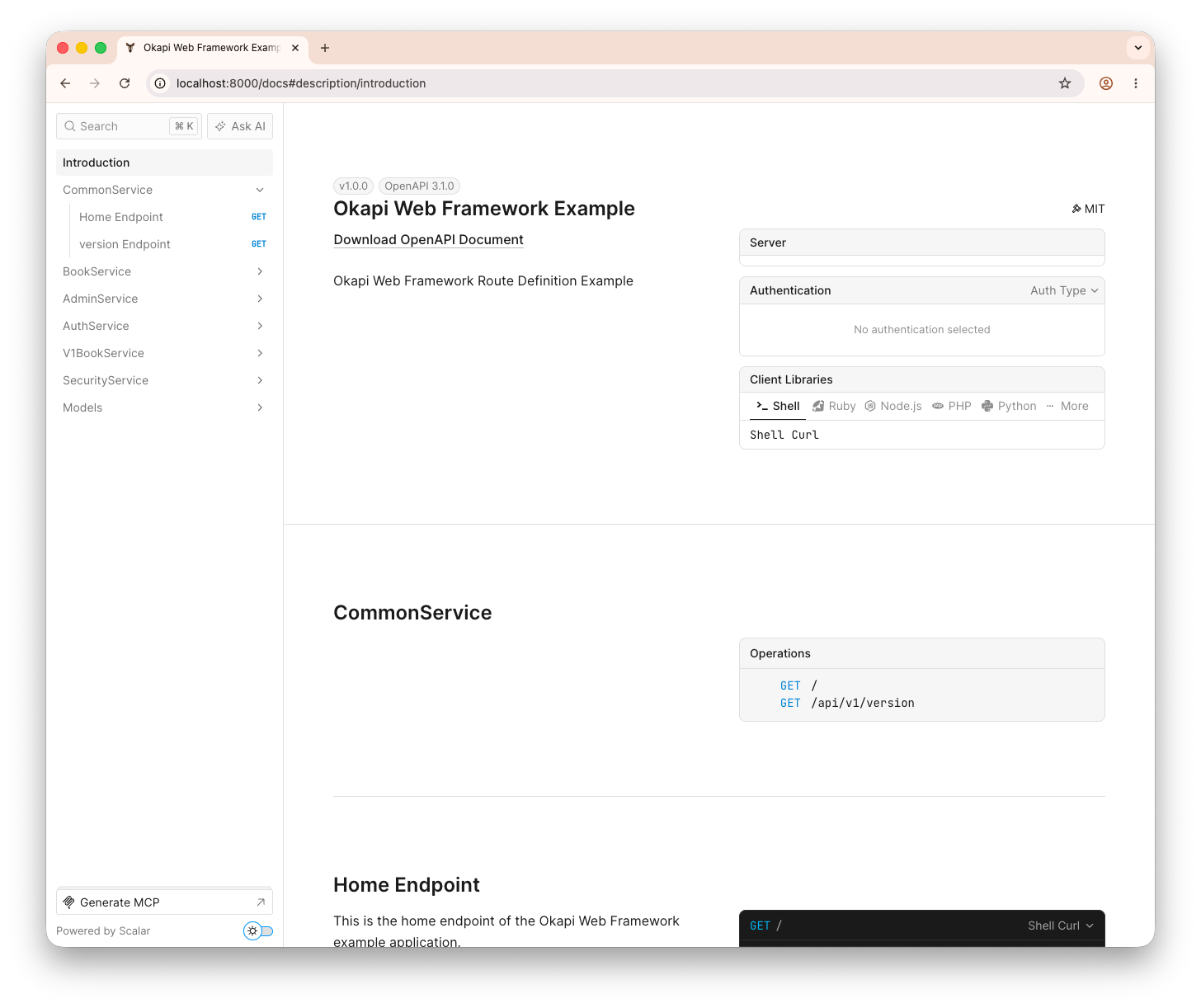
app.Register(routes...) // or okapi.RegisterRoutes(app, routes)With okapi.Default(), Okapi serves Swagger UI (/swagger), ReDoc (/redoc), and Scalar
(/scalar) out of the box, with /docs rendering your selected default (Swagger UI unless changed via
UI / WithDocUI). With okapi.New(), only /docs is served — see
Choosing the Documentation UI to change this.
Swagger UI (/swagger) |
ReDoc (/redoc) |
Scalar (/scalar) |
|---|---|---|
 |
 |
 |
Full documentation available at okapi.jkaninda.dev
Topics covered: Routing, Request Binding, Validation, Responses, Middleware, Authentication, OpenAPI, Testing, TLS, CORS, Graceful Shutdown, and more.
Building microservices? Check out Goma Gateway a high-performance API Gateway with authentication, rate limiting, load balancing, and support for REST, GraphQL, gRPC, TCP, and UDP.
- Posta — Self-hosted email delivery platform. Send emails via HTTP API with SMTP delivery, templates, storage, and analytics.
- Goma Admin — Control plane for Goma Gateway. Manage, configure, and monitor distributed API gateways from a unified dashboard.
Both Okapi and Huma aim to improve developer experience in Go APIs with strong typing and OpenAPI integration. The key difference is philosophy: Okapi is a batteries-included web framework, while Huma is an API layer designed to sit on top of existing routers.
| Feature / Aspect | Okapi | Huma |
|---|---|---|
| Positioning | Full web framework | API framework built on top of existing routers |
| Router | Built-in high-performance router | Uses external routers (Chi, httprouter, Fiber, etc.) |
| OpenAPI Generation | Native, framework-level (Swagger UI & Redoc included) | Native, schema-first API design |
| Request Binding | Unified binder for JSON, XML, forms, query, headers, path params | Struct tags + resolver pattern for headers, query, path params |
| Validation | Tag-based (min, max, enum, required, default, pattern, etc.) | Included |
| Response Modeling | Output structs with Body pattern; headers & status via struct fields |
Strongly typed response models with similar patterns |
| Middleware | Built-in + custom middleware, groups, per-route middleware | Router middleware + Huma-specific middleware and transformers |
| Authentication | Built-in JWT, Basic Auth, security schemes for OpenAPI | Security schemes via OpenAPI; middleware via router |
| Dynamic Route Management | Enable/disable routes & groups at runtime | Not a core feature |
| Templating / HTML | Built-in rendering (HTML templates, static files) | API-focused; not intended for HTML apps |
| CLI Integration | Built-in CLI support (flags, env config) | Included |
| Testing Utilities | Built-in test server and fluent HTTP assertions | Relies on standard Go testing tools |
| Learning Curve | Very approachable for Go web developers | Slightly steeper (requires OpenAPI-first mental model) |
| Use Case Fit | Full web apps, APIs, gateways, microservices | Pure API services, schema-first API design |
| Philosophy | "FastAPI-like DX for Go, batteries included" | "OpenAPI-first typed APIs on top of your router of choice" |
Okapi — define a route with built-in validation and OpenAPI metadata:
app:=okapi.Default()
app.Register(okapi.RouteDefinition{
     Method:      http.MethodPost,
     Path:        "/users",
     Handler:     createUser,
     OperationId: "create-user",
     Summary:     "Create a new user",
     Tags: []string{"users"},
     Request: &UserRequest{},
     Response:    &User{},
     Options: []okapi.RouteOption{
	    okapi.DocErrorResponse(401, &ErrorUnauthorized{}),
	    okapi.DocErrorResponse(404, &ErrorNotFound{}),
	},
})
Huma — similar concept, different style:
huma.Register(api, huma.Operation{
    OperationID: "create-user",
    Method:      http.MethodPost,
    Path:        "/users",
    Summary:     "Create a new user",
    Tags:        []string{"Users"},
}, createUser)
Both approaches generate OpenAPI documentation automatically.
- Fork the repository
- Create a feature branch (
git checkout -b feature/amazing-feature) - Commit your changes (
git commit -m 'Add amazing feature') - Push to the branch (
git push origin feature/amazing-feature) - Open a Pull Request
- Documentation: okapi.jkaninda.dev
- AI Agent Skills: jkaninda/okapi-skills
- Issues: GitHub Issues
- Discussions: GitHub Discussions
- LinkedIn: Jonas Kaninda
MIT License - see LICENSE for details.
Made with ❤️ for the Go community
⭐ Star us on GitHub — it motivates us to keep improving!
Copyright © 2025 Jonas Kaninda