




A slop linter for Markdown.
Slop is the set of habits that make text read as machine-written: the em-dash aside, the
filler verb, the marketing adjective, the not just X but Y padding. deslopper finds slop
in Markdown with plain patterns. It uses no model and no network, so a run is free, fast,
and gives the same smells for the same input. That makes it safe to use as a gate in CI
and pre-commit, where an LLM check would cost a call each run and could change its answer.
deslopper does one narrow job. It does not check spelling, grammar, house style, or readability. Tools such as Vale and proselint do that, and deslopper runs next to them.
For the judgement calls that a pattern cannot make, --jev asks the
Jev decision model whether to keep or rewrite each smell. Jev only adds
notes. It never changes the result of the lint.
- A deterministic lint for 38 tells, with an opt-in
aggressivepreset for 18 more. - Jev triage:
deslopper lint --jevgives each smell akeeporrewriteverdict and a probability. A file with smells costs one request, at a fraction of a cent, and a disk cache skips the smells that did not change. - An eval for your rewrite pass:
deslopper evalchecks that a model rewrite removes the tells and keeps your code, headings, tables, and links. - A skill for coding agents, so the agent writes within the tells and lints its own work.
- No dependencies beyond Python 3.10. It runs in GitHub Actions, pre-commit, and the terminal.
- Getting started
- The tells
- Install
- Use it in CI
- Use it in pre-commit
- Configure
- Fix slop with an LLM
- Agent skill
- Triage smells with Jev
- Commands
- Contributing
-
Install deslopper. On macOS and Linux, Homebrew is the quickest way:
brew install jv-k/tap/deslopper
For pipx, uv, and pip, see Install.
-
Lint the Markdown in a repo. Run this from the repo root:
deslopper lint
deslopper gives each file a section. Inside it, each tell appears once with its fix, then every place it fired, with a caret under the caught words:
   deslopper  lint                                  1 file, 1 with slop

  notes.md                                          1 error  2 warnings
  ─────────────────────────────────────────────────────────────────────
  ✖ em-dash
    em dash in prose, use a colon, comma, parentheses, or two sentences
      3:20  The fix was simple — restart the server.
                               ^

  ! filler-verb
    filler verb, use a plain verb or cut
       5:6  This leverages the cache; it is fast.
                 ^

  ! semicolon
    semicolon in prose, prefer a full stop
      5:25  This leverages the cache; it is fast.
                                    ^

  ─────────────────────────────────────────────────────────────────────
  ✖ 1 error   ! 2 warnings
This view needs gum, a tool from Charm that draws styled output in a terminal. Without gum, and whenever the output is piped, deslopper prints one
path:line:col [tier] tell: messageline per smell. See Output formats. -
Fix the smells and run the lint again. An error fails the run. A warning only reports, unless you add
--strict. To let an LLM do the fixing, see Fix slop with an LLM. -
To tune the tells and the files to lint, write a starter config with
deslopper init. See Configure. -
Add the lint to your pipeline. See Use it in CI and Use it in pre-commit.
The recommended preset ships these tells. Each row shows a sample of the prose it
catches. The em dash, section sign, middle dot, and curly quotes are also caught when they
are written as HTML entities.
scripts/readme_tells.py generates this table from the preset, and the tests check that
each sample fires its tell. To see the tells for your own config, run deslopper rules.
❌ error, fails the run. --strict.
| Tell | Tier | Example | Message |
|---|---|---|---|
em-dash |
❌ | A quick fix — just restart. |
em dash in prose, use a colon, comma, parentheses, or two sentences |
section-sign |
❌ | See § 4.2 for details. |
section sign, write 'section' |
middle-dot |
❌ | fast · simple · tested |
middle dot or bullet in prose, join the items with a comma or plain words, or separate with ◦ |
curly-quote |
❌ | It’s “done” now. |
curly quote, use a straight quote |
bold-bullet-lead |
- **Blazing speed** builds finish in seconds |
bolded bullet lead, reserve bold for a rare callout not a per-item label | |
id-label-lead |
- FR-1 The app shall sync. |
id label on a list item, number the list plainly | |
semicolon |
It compiles; it ships. |
semicolon in prose, prefer a full stop | |
not-just-x-but-y |
not just fast but correct |
"not just X but Y" padding, make the point once | |
filler-verb |
This leverages the cache. |
filler verb, use a plain verb or cut | |
marketing-adjective |
a seamless, robust workflow |
marketing adjective, say what is true | |
throat-clearing |
It's worth noting that tests pass. |
throat-clearing or transition opener, start with the point | |
vague-intensifier |
significantly faster |
vague intensifier with no number behind it | |
emoji |
Done ✅ |
emoji or decorative checkmark in body text | |
chatbot-phrase |
I hope this helps! |
chatbot phrase, delete it | |
sycophancy |
Great question! |
sycophantic tone, respond directly | |
fancy-is |
The CLI boasts three modes. |
fancy way to say 'is', say 'is' or 'has' | |
puffery |
A testament to good design. |
puffery, state what happened | |
vague-attribution |
Experts believe it scales. |
vague attribution, name the source or cut | |
inflated-word |
A crucial, intricate detail. |
inflated word, use a plain one | |
trailing-participle |
It retries, ensuring delivery. |
trailing participle clause, say it straight or cut | |
false-exclusivity |
Nobody talks about the cost. |
claim that others miss the point, make the point and cite who missed it | |
hidden-truth |
The uncomfortable truth: tests rot. |
promised hidden truth, state the fact plainly | |
real-problem-reframe |
The real problem isn't speed. |
reframe to a "real" problem, name the problem and show why | |
false-suspense |
Here's the thing: it caches. |
false suspense before a reveal, start with the point | |
rhetorical-self-answer |
The catch? It only runs on Linux. |
question answered at once, state the answer as a sentence | |
emphasis-crutch |
It never drops a job. Let that sink in. |
emphasis crutch, cut it and let the point stand | |
staged-candor |
Honestly? It depends. |
staged candor, drop the honesty marker and make the claim | |
mic-drop |
That's the whole point. |
mic-drop line that grades the point, cut it or add a fact | |
negation-pivot |
It's not a bug. It's a feature. |
"it's not X, it's Y" pivot, say what it is | |
importance-flag |
This matters because retries add up. |
says it matters instead of showing why, give the consequence | |
signposting |
In conclusion, the cache works. |
essay signpost, cut the announcement and keep the point | |
urgency-inflation |
Fast builds have never been more critical. |
inflated stakes, give the reason it is urgent | |
stacked-hedge |
The job could potentially fail. |
stacked hedge, keep one hedge or none | |
tradeoff-dodge |
Fast without sacrificing safety. |
claims the gain costs nothing, state the tradeoff or show there is none | |
pithy-fragment |
Dense, not cramped. |
verbless slogan fragment, write a full sentence that says what it does | |
narrative-pivot |
Then something shifted. |
staged story turn, name what changed and why | |
negative-listing |
No config, no flags, just one binary. |
countdown of negations before the point, say what it is | |
business-jargon |
This will move the needle. |
business jargon, say the plain thing it stands for |
An error fails the run. A warn prints the smell but passes the run. Add --strict to
make warnings fail too.
| Exit code | Meaning |
|---|---|
| 0 | No failing smell |
| 1 | A failing smell, or a file deslopper could not read |
| 2 | A usage or configuration error |
The aggressive preset adds tells that catch more but also flag more false positives. Use
it when you would rather triage noise than miss a tell. Extend both presets, in this order:
{
  "extends": ["deslopper:recommended", "deslopper:aggressive"]
}
No tell in aggressive shares a name with a tell in recommended, so the preset only adds
tells and replaces none. Some words are also real technical terms, such as vector,
primitive, surface, harness, and scaffolding. The preset leaves those words out, because a
regex cannot tell the metaphor from the term.
| Tell | Tier | Example | Message |
|---|---|---|---|
abstract-metaphor |
Our north star is the flywheel. |
abstract metaphor, pick the concrete word | |
cutoff-disclaimer |
Specific details are limited. |
cutoff disclaimer, find the fact or cut | |
formulaic-challenge |
Despite challenges, it continues to thrive. |
formulaic challenge framing, give the specific fact | |
generic-conclusion |
The future looks bright. |
generic conclusion, state a plan or fact | |
boldface-overuse |
**Fast**, **safe**, **simple**. |
three or more bold spans on one line, bold at most one thing | |
strong-intensifier |
It is genuinely fast. |
strong intensifier, cut it or give the evidence | |
unicode-arrow |
Build → test → ship. |
arrow in prose, write the step or the cause in words | |
missing-piece |
This is the missing piece. |
claim of a gap others missed, show the gap and what fills it | |
contrarian-hook |
Most teams get this backwards. |
contrarian hook against an unnamed crowd, state your claim and its evidence | |
overreach |
There's no denying it scales. |
absolute claim with no support, back it with evidence or soften it | |
invented-concept-label |
Call it the context tax. |
coined label used as an established term, describe the effect instead | |
tutorial-signposting |
Let's dive in. |
tutorial signpost, start with the first step | |
contrast-adverb |
It is not simply a cache. |
contrast with a softening adverb, say what it is | |
negation-pivot-joined |
It's not a bug; it's a feature. |
"it's not X; it's Y" pivot joined by a colon or semicolon, say what it is | |
strawman-tail |
It keeps one copy, not one per caller. |
negated tail nobody claimed, cut it and keep the claim | |
restatement-marker |
In other words, it caches. |
restatement marker, say it once and plainly | |
numbered-lead-in |
Three key reasons: |
count announced before a list, start the list | |
claude-figurative |
This check is load-bearing. |
figurative word, use the literal one |
deslopper needs Python 3.10 or later and has no other dependencies. It is not on PyPI yet. Install it from the Homebrew tap, or from the GitHub repo with a Python tool.
| Tool | Command |
|---|---|
| Homebrew | brew install jv-k/tap/deslopper |
| pipx | pipx install git+https://github.com/jv-k/deslopper |
| uv | uv tool install git+https://github.com/jv-k/deslopper |
| pip | pip install git+https://github.com/jv-k/deslopper |
With pip, install into a virtual environment, so that deslopper does not change your system Python.
For colours and spinners on a terminal, also install
gum (brew install gum). gum is optional. Without
it, deslopper prints plain output and one line that names the install.
Homebrew also installs the shell completions for bash, zsh, and fish. For the other
install methods, print the script with deslopper completions and save it where your
shell reads it. Run deslopper completions --help to see the path for each shell.
To run deslopper once without installing it, use uvx or pipx run. Each one runs it in
a temporary environment:
uvx --from git+https://github.com/jv-k/deslopper deslopper lint
pipx run --spec git+https://github.com/jv-k/deslopper deslopper lint
To update, run deslopper update. It runs the upgrade of the tool that installed
deslopper. Read the changelog first, because a new release can add a tell
or change a tier. See Update deslopper for the other setups.
This GitHub Actions job fails a pull request that adds an error-tier tell. The job installs deslopper from a release tag of the GitHub repo, because it is not on PyPI yet. Pin the latest release, so that a new tell does not fail your build without warning.
# .github/workflows/prose.yml
name: Prose
on: pull_request
permissions:
  contents: read
jobs:
  deslop:
    runs-on: ubuntu-latest
    steps:
      - uses: actions/checkout@v4
      - uses: astral-sh/setup-uv@v8.2.0
      - run: uvx --from git+https://github.com/jv-k/deslopper@v2.2.2 deslopper lint --format github
The github format writes each smell as an annotation on the pull request.
If the repo has prose from before you added deslopper, lint only the files that the pull request changes. Then the old smells do not block every change:
- uses: actions/checkout@v4
  with:
    fetch-depth: 0
- uses: astral-sh/setup-uv@v8.2.0
- run: |
    files=$(git diff --name-only "origin/${{ github.base_ref }}...HEAD" -- '*.md' '*.markdown' '*.mdx')
    [ -z "$files" ] && exit 0
uvx --from git+https://github.com/jv-k/deslopper@v2.2.2 deslopper lint --format github $filesTo run the same lint before each commit, add a local hook to pre-commit:
# .pre-commit-config.yaml
repos:
  - repo: local
    hooks:
      - id: deslopper
        name: deslopper
        entry: deslopper lint
        language: system
        types: [markdown]
        pass_filenames: false
The hook runs the deslopper on your PATH, so install it first.
pass_filenames: false makes the hook lint the configured globs, not the staged files.
This keeps the local result the same as the CI result. deslopper lints explicit file
paths as given and ignores the config excludes for them. So a hook that passes the staged
files would flag files that your config excludes.
deslopper init writes a deslopper.config.json. In it, you can choose the presets, the
files to lint, and turn tells off, change them, or add your own:
{
  "extends": ["deslopper:recommended"],
  "files": { "exclude": ["CHANGELOG.md"] },
  "tells": {
    "disable": ["semicolon"],
    "override": { "filler-verb": { "tier": "error" } }
  }
}
To keep an intentional example, exempt it with an HTML comment. Put
<!-- deslop-lint-disable-line --> on the line, or wrap a block in
<!-- deslop-lint-disable --> and <!-- deslop-lint-enable -->. No tell fires inside
fenced code, inline code, or front matter.
See Configure deslopper for every key and the fields of a tell.
deslopper finds slop, and an LLM can fix it. deslopper never calls an LLM itself, so you bring your own. The loop is always the same:
- deslopper lints the files and lists the smells.
- The LLM rewrites the text at each smell, and changes nothing else.
- deslopper lints again. The loop ends when no error-tier smell is left.
The lint is the judge in this loop, not the LLM. So the loop ends on a fact, and the LLM cannot declare the job done too early.
Install the agent skill, then ask your agent in plain words:
De-slop README.md and docs/.
Any LLM that can read and edit files works. This example runs Claude Code without a session, and allows it to run the lint and edit files only:
claude -p "Run 'deslopper lint --format json docs/'. Fix each smell in place. \
Keep code, headings, tables, and links exactly as they are. \
Run the lint again, and repeat until it exits 0." \
  --allowedTools "Bash(deslopper lint:*)" Read Edit
Each smell carries a short fix hint in its message, such as "use a plain verb or cut".
The LLM can follow the hint without a long prompt. On a large backlog,
ask Jev first, so that the LLM
rewrites only the smells that need it.
An LLM rewrite can remove the tells and still damage the document. deslopper eval tests
your rewrite command on sample files before you run it on real ones. It checks that the
tells are gone, and that code, front matter, headings, tables, and links did not change.
Put the rewrite in a script that takes a folder path, then run:
deslopper eval './scripts/deslop.sh {dir}'See Eval a rewrite pass for the judges and the exit codes.
The repo ships a skill in skills/deslopper/. The skill is for coding agents that follow the skills convention, such as Claude Code.
Install it with the skills CLI:
npx skills add jv-k/deslopperYou can also copy skills/deslopper/ by hand. Put it in ~/.claude/skills/ to use it in
every project. Put it in a repo's .claude/skills/ to use it in that repo only.
The skill activates when the agent writes or edits Markdown or MDX. It also activates when you ask the agent to de-slop existing text. The agent then does these steps:
- It runs
deslopper rulesto load the active tells. The list follows your config and presets. - It writes within those tells.
- Before it finishes, it lints the files it touched.
- It fixes every error-tier smell and lints again, until no error-tier smell is left.
- It fixes a warn-tier smell only when the rewrite is clearly better. It reports the other warn-tier smells to you.
A regex cannot tell a decorative em dash from one inside a quoted title. So on a repo with real prose, the warn tier fills up with smells that a careful editor would keep.
deslopper lint --jev sends each smell, with the lines around it, to
Jev (typesafe-ai/jev) through the
Vercel AI Gateway. Jev is a decision model, not a
text generator. It answers one question for each smell: rewrite it, or keep it? Each
smell comes back with a verdict and a probability:
export AI_GATEWAY_API_KEY=...
deslopper lint --jev
✖ em-dash
em dash in prose, use a colon, comma, parentheses, or two sentences
❚❚❚❚❚ 0.76 keep 3:20 The fix was simple — restart the server.
^
Triage never changes the exit code, so a keep verdict cannot make a lint pass. A disk
cache keeps each verdict, so a later run asks Jev only about new or changed smells.
--jev is a command-line flag only, so no repo can turn on network calls for everyone who
lints it.
See Triage smells with Jev for the output, the cache, and the limits.
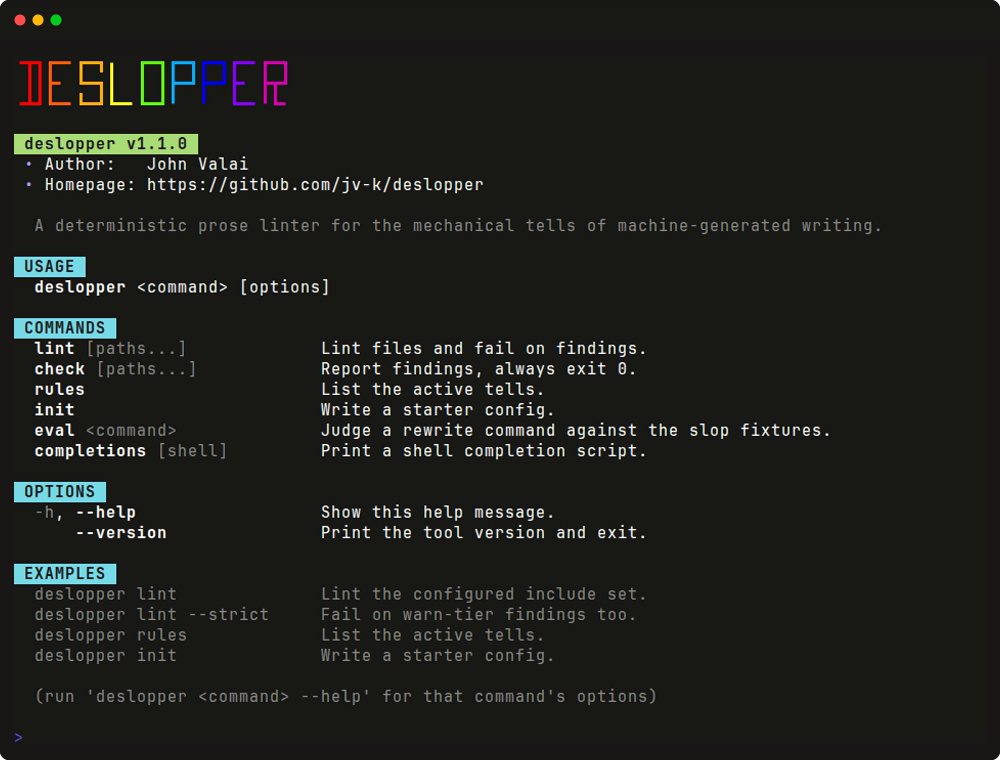
deslopper lint  [PATHS...] [--strict] [--config P] [--format text|github|json] [--jev] [--no-cache]
deslopper check [PATHS...] [--config P]   # report only, exits 0 on smells
deslopper rules [--config P]              # list the active tells
deslopper init                            # write a starter config
deslopper eval 'COMMAND' [--keep] [--plainness]   # judge a rewrite command
deslopper completions [bash|zsh|fish]     # print a completion script for your shell
deslopper update [--dry-run]              # update with the tool that installed it
With no paths, deslopper lints the Markdown and MDX files that match the configured globs. A file path lints that file as given, even when the config excludes it. For the formats, see Output formats.
You can add a tell, add a preset, or change the code. See
CONTRIBUTING.md. The tells live in
src/deslopper/presets/recommended.json. A preset is a <name>.json file in
src/deslopper/presets/, and a config opts into it as deslopper:<name>.
MIT.