


A React photo gallery that arranges photos by colour, so a page of pictures reads like one piece of work rather than a pile of thumbnails.
Live demo · Quick start · Next.js · Props
Most galleries show photos in the order you uploaded them. That order means nothing to a visitor, and a wall of unrelated thumbnails looks busy no matter how good the pictures are.
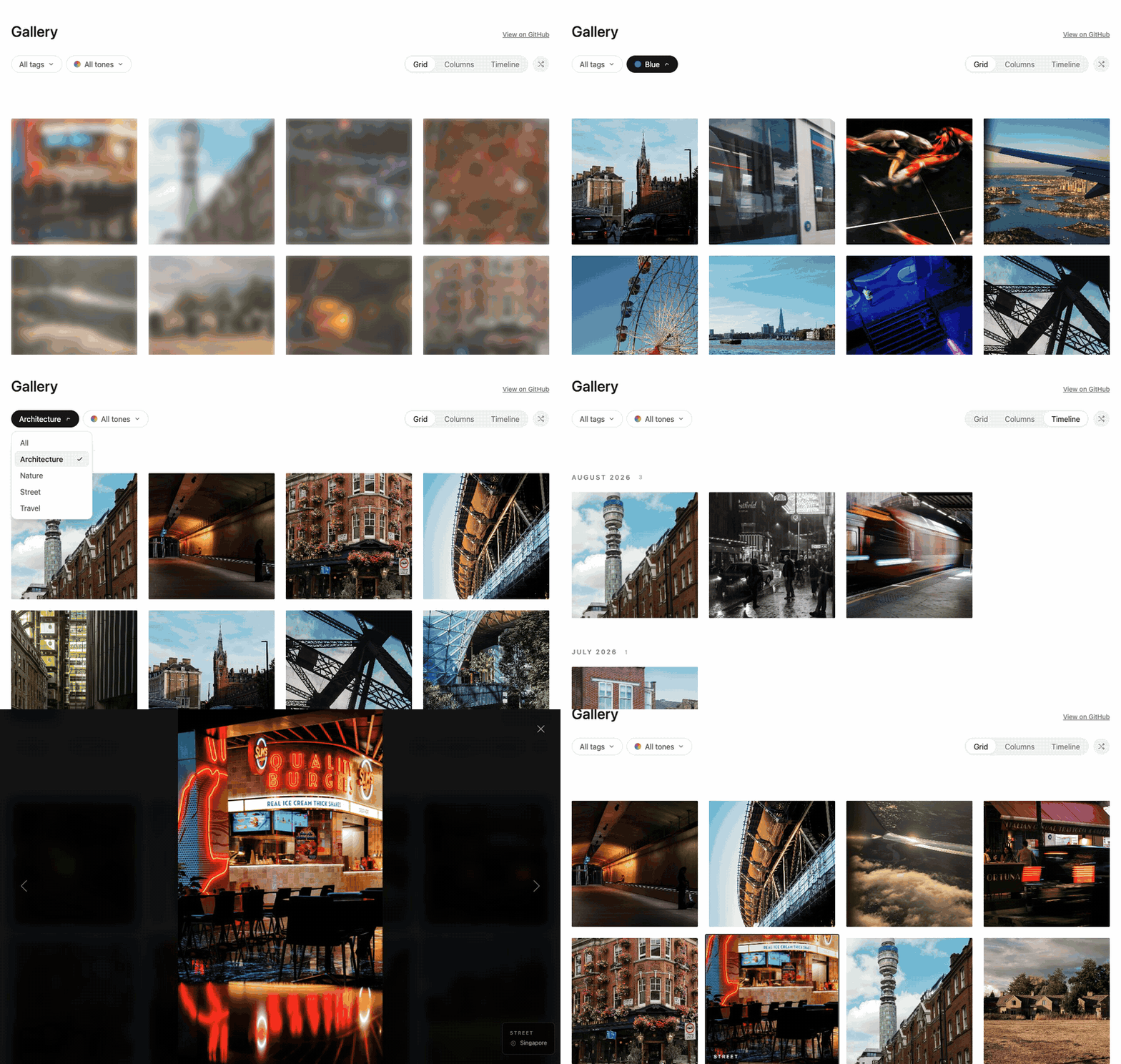
chromatic-gallery sorts photos round the colour wheel by their dominant colour. Neighbouring tiles share a palette, the page flows from warm to cool, and the whole set looks curated with no manual arranging. Visitors can pull the tone wheel to see only the blues or the reds, which is a far more natural way to browse a few hundred photos than paging through them.
It is a complete gallery, not a layout primitive. Filters, three views, a swipeable lightbox, blur placeholders, deep links, dark mode and translations are all built in, and the build-time helpers that extract the colours ship in the same package. Add it to a page in an afternoon and it keeps working as the collection grows.
For visitors
- Colour-sorted layout. Photos flow round the colour wheel, greys at the end. Shuffle keeps the colour journey while varying the order on each visit.
- Responsive by default. Two columns on phones, four on wide screens. Filters collapse into a single sheet on small screens, the grid is the default view on phones, and the lightbox respects notches and home indicators.
- Fast loading. Images lazy-load with correct
sizeshints so phones never download desktop-sized files. Each tile paints a gradient from the photo's own colours while the image loads, so the page never flashes white, and the lightbox preloads its neighbours so stepping through is instant. - Tone wheel. A draggable colour wheel filters to red, orange, yellow, green, blue, purple or neutral, with keyboard support.
- Tag filter. One dropdown built from your categories, title-cased for you.
- Three views. Grid, columns (masonry) and a timeline grouped by month, newest first.
- Lightbox. Full screen, swipeable, keyboard-driven, with the category and location shown alongside.
For developers
- Works in any React 18+ app on Node 20+: Next.js, Vite, Remix, Astro. No Tailwind, no CSS framework, one stylesheet import.
- Server-renderable with no hydration mismatches. Shuffling waits until after mount.
- One call to prepare each photo.
analysePhotoreturns dimensions, dominant colours, a blur placeholder and a perceptual hash. Run it once per photo and store the result. - Duplicate detection built in. Perceptual hashes stay close when a photo is resized, recompressed or lightly edited, so
findSimilarPairsandgroupDuplicatescatch the copies a byte-for-byte comparison misses, and suggest which one to keep. Clean up a messy export before it reaches the page. - Deep links. The open photo lives in the URL hash, so links share a specific photo and the back button closes the lightbox.
- Scales to large collections. Only the first screenful mounts on first paint, and the rest arrive in batches as you scroll, so a gallery of hundreds stays quick to load and does not exhaust memory on phones.
- Bring your own image component.
next/imageis supported directly; any component with the same props works too. - Themed with CSS custom properties. Follows the system colour scheme, your site's
.darkclass or a fixed scheme. Every colour and spacing value is overridable. - Fully translatable. Every label can be replaced.
- Typed, tested and tree-shakeable. Written in TypeScript, ESM and CommonJS builds, and the colour helpers in
chromatic-gallery/corehave no dependencies at all.
pnpm add chromatic-gallery
# For the build-time helpers in chromatic-gallery/node:
pnpm add -D sharpimport { ChromaticGallery, type GalleryPhoto } from "chromatic-gallery";
import "chromatic-gallery/styles.css";
const photos: GalleryPhoto[] = [
{
id: "harbour-at-dusk",
title: "Harbour at dusk",
src: "/photos/harbour.jpg",
width: 2400,
height: 1600,
colors: ["#2f6f8f", "#e3eef3", "#1b2b33"],
category: "travel",
location: "Lisbon",
date: "2026-05-14",
},
// ...
];
export function Gallery() {
return <ChromaticGallery photos={photos} />;
}colors drives the ordering and the tone filter, so photos without it sort last and only match "All tones". Generate it once per photo with analysePhoto (below) and store it with the rest of the photo's data.
chromatic-gallery/node reads an image with Sharp and returns everything the gallery needs. Run it when a photo is added or at build time, not on each request.
import { analysePhoto } from "chromatic-gallery/node";

const { width, height, colors, phash, blurDataURL } = await analysePhoto("photos/harbour.jpg");
// width, height: displayed size, after EXIF rotation
// colors:        ["#2f6f8f", "#e3eef3", "#1b2b33"], most dominant first
// phash:         "5728406318422352892", a 64-bit perceptual hash
// blurDataURL:   a tiny gradient placeholder built from colors
It accepts a file path, a Buffer or a Sharp instance. Colour extraction is deterministic, so re-running it never rewrites stored values. The lower-level pieces are exported too: extractColorsFromImage, extractDominantColors and computePhash.
Perceptual hashes stay close when an image is resized, recompressed or lightly edited. chromatic-gallery/core groups photos whose hashes are near each other and suggests which copy to keep.
import { findSimilarPairs, groupDuplicates } from "chromatic-gallery/core";

const pairs = findSimilarPairs(photos); // O(n²), so compute once
const groups = groupDuplicates(photos, pairs, 3); // regroup at any threshold for free

for (const group of groups) {
  console.log(`Keep ${group.keep.id}, review`, group.members.slice(1).map((m) => m.id));
}
A distance of 0 to 3 is almost certainly the same photo. Past about 12 the matches are similar scenes rather than copies. By default the biggest copy with the richest metadata is kept; pass a scoring function as the fourth argument to change that.
NextChromaticGallery renders photos with next/image, so they go through Next's image optimiser, and preloads the lightbox's neighbouring photos at the exact size it will request. Render it straight from a server component:
// app/gallery/page.tsx
import { NextChromaticGallery } from "chromatic-gallery/next";
import { colorBlur } from "chromatic-gallery/core";
import "chromatic-gallery/styles.css";

export default async function GalleryPage() {
  const photos = await getPhotos();
  return (
    <NextChromaticGallery
      photos={photos.map((p) => ({ ...p, blurDataURL: colorBlur(p.colors) }))}
      colorScheme="class"
    />
  );
}
Remote image hosts must be listed in images.remotePatterns. Inside your own client component, pass the adapter instead: <ChromaticGallery image={nextImage} />.
The package entry points (chromatic-gallery and chromatic-gallery/next) are client modules. Import helpers you call on the server from chromatic-gallery/core.
Pass any component that accepts GalleryImageProps (the same shape as next/image's props):
import type { ImageAdapter } from "chromatic-gallery";

const cdnImage: ImageAdapter = {
  Image: ({ src, alt, width, height, fill, className, onLoad, priority, loading }) => (
    <img
      src={`${src}?w=1200`}
      alt={alt}
      width={fill ? undefined : width}
      height={fill ? undefined : height}
      className={className}
      onLoad={onLoad}
      loading={priority ? "eager" : (loading ?? "lazy")}
      style={fill ? { position: "absolute", inset: 0, width: "100%", height: "100%" } : undefined}
    />
  ),
  preload: (src) => {
    new Image().src = `${src}?w=2400`;
  },
};
Call onLoad once the image has loaded: tiles stay blurred until it fires. Pass loading through: the gallery sets it to eager once a tile is within two screens of the viewport, so images are ready before they scroll into view.
| Prop | Type | Default | |
|---|---|---|---|
photos |
GalleryPhoto[] |
Required. | |
image |
ImageAdapter |
plain <img> |
nextImage from chromatic-gallery/next, or your own. |
categories |
{ label, value }[] |
derived | Tag filter options. Defaults to each distinct category, title-cased. [] hides the filter. |
tones |
boolean |
true |
Show the tone filter. |
views |
ViewMode[] |
all three | Which of grid, masonry (shown as "Columns") and timeline to offer. |
defaultView |
ViewMode |
responsive | Grid on phones, columns elsewhere, until the viewer picks one. |
order |
"chromatic" | "given" |
"chromatic" |
Sort by colour, or keep your order. |
shuffle |
boolean |
true |
Shuffle within colour bands after mount, and show the shuffle button. |
hashNavigation |
boolean |
true |
Keep the open photo in the URL hash. Turn off if the hash means something else on your page. |
onSelect |
(photo | null) => void |
Called when the lightbox opens or closes. | |
labels |
Partial<GalleryLabels> |
English | Replace any text. Nested views and tones can be partial too. |
locale |
string |
"en-GB" |
Locale for timeline month headings. |
initialCount |
number |
36 |
Photos mounted on first paint. |
batchSize |
number |
24 |
Photos mounted per scroll step. |
colorScheme |
"auto" | "class" | "light" | "dark" |
"auto" |
See Theming. |
className, style |
Applied to the root element. |
| Field | Type | |
|---|---|---|
id |
string |
Required. Stable and URL-safe: it becomes the #hash and the React key. |
title |
string |
Required. The tile's accessible name, and the alt text when there is no caption. |
src |
string | null |
Image URL. null shows a lettered placeholder. |
width, height |
number |
Intrinsic size. Needed for the columns view to reserve space. |
colors |
string[] |
#rrggbb, most dominant first. |
blurDataURL |
string |
Placeholder while loading. colorBlur(colors) makes one. |
category |
string |
Shown on hover and in the lightbox, and used by the tag filter. |
caption |
string |
Used as alt text. |
location |
string |
Shown in the lightbox. |
date |
string |
Anything Date parses. Groups the timeline view. |
Every colour and spacing value is a custom property on .cg-root. Override any of them:
.cg-root {
  --cg-accent: #0f766e;
  --cg-accent-fg: #ffffff;
  --cg-gap: 1rem;
  --cg-tile-radius: 6px;
}
The full list is at the top of styles.css. Colours use light-dark(), so set a pair to theme both schemes: --cg-accent: light-dark(#0f766e, #5eead4).
colorScheme picks the scheme:
autofollows the visitor's system setting. A.dark,.lightordata-themeattribute on an ancestor overrides it.classis light unless an ancestor has.darkordata-theme="dark". Use it with Tailwind's class strategy,next-themesand similar.lightanddarkforce one.
The lightbox is always dark. It renders into <body> above everything else; change its stacking with --cg-z-lightbox.
chromatic-gallery/core has no dependencies and runs anywhere:
| Export | |
|---|---|
sortChromatically(photos) |
Order round the colour wheel, greys and then uncoloured photos last. |
shuffleWithinChromaticOrder(photos, random?) |
Shuffle inside each colour band and rotate the starting band, keeping the colour journey. |
hueFamily(hex) |
"red", "orange", "yellow", "green", "blue", "purple" or "neutral". |
groupByMonth(photos, { locale, undatedLabel }) |
Timeline groups, newest first. |
colorBlur(colors) |
Base64 SVG gradient for use as a blur placeholder. |
phashDistance(a, b) |
Hamming distance between two hashes. |
isValidPhash(value) |
Whether a stored value looks like a real hash. |
findSimilarPairs, groupDuplicates, suggestKeeper |
Duplicate detection, above. |
examples/vite is the live demo. It analyses the photos in public/photos with analysePhoto and renders the gallery:
pnpm install
pnpm build
pnpm --filter chromatic-gallery-example dev
Swap in your own images in examples/vite/public/photos and run pnpm --filter chromatic-gallery-example photos to see them instead. Every push to main redeploys the demo to GitHub Pages.
pnpm install
pnpm check   # typecheck, test, build and publint
CI runs the same checks on Node 22 and 24 for every push and pull request, and builds the example.
pnpm version patch   # or minor / major: bumps package.json and tags
git push --follow-tags
The tag triggers the release workflow, which checks the tag matches package.json, publishes to npm with provenance through trusted publishing and creates a GitHub release with generated notes. Add the changes to CHANGELOG.md before tagging.
Current Chrome, Edge, Firefox and Safari (2024 onwards). The styles use light-dark() and container query units.