

Drive the coding agents on your machine from any browser (phone, tablet, or a second computer) through a web relay you host yourself.
curl -fsSL oar.sh/install | shOn Windows, run irm oar.sh/install.ps1 | iex in PowerShell. Other ways to install are under Install. Landing page: oar.sh; the complete guide: oar.sh/docs.
Coding agents such as GitHub Copilot, Claude Code, Cursor, Grok and DeepSeek usually live in a terminal. OAR puts them into a chat you can open anywhere: start a task at your desk, follow it from the sofa, answer the agent's question from your phone. The agents keep running on your own computer, with your files and your logins; OAR passes the conversation back and forth.
flowchart LR
  subgraph devices["Your devices"]
    phone["📱 Phone"]
    browser["💻 Browser"]
  end
  subgraph host["Your computer"]
    relay["OAR relay<br/>chats, queue, history, files"]
    agents["Copilot · OpenAI · Claude · Claude API<br/>Cursor · Grok · DeepSeek"]
  end
  cloud["☁️ Claude Cloud<br/>sandbox at Anthropic"]
  phone <--> relay
  browser <--> relay
  relay <--> agents
  relay <--> cloud
- Eight runtimes, one chat: you pick the agent per conversation, and all of them share the same chat, queue, history, file browser, and question cards (Runtimes).
- Yours: the relay runs on your hardware, answers only on this machine until you change that, and collects no telemetry (Security notes).
- Under active development: expect occasional rough edges, and some provider SDK features that are missing or incomplete.
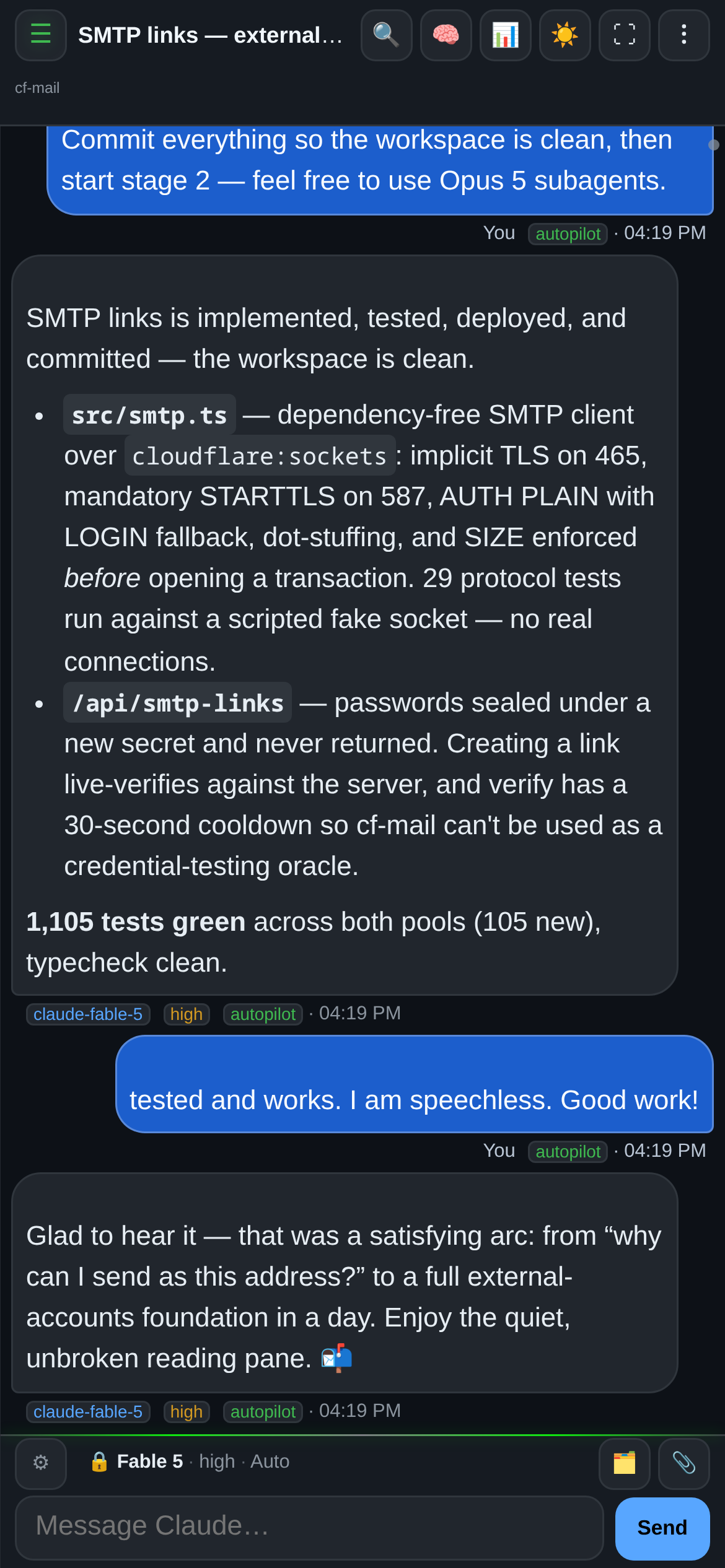 On a phone: the same conversations, installable as an app. |
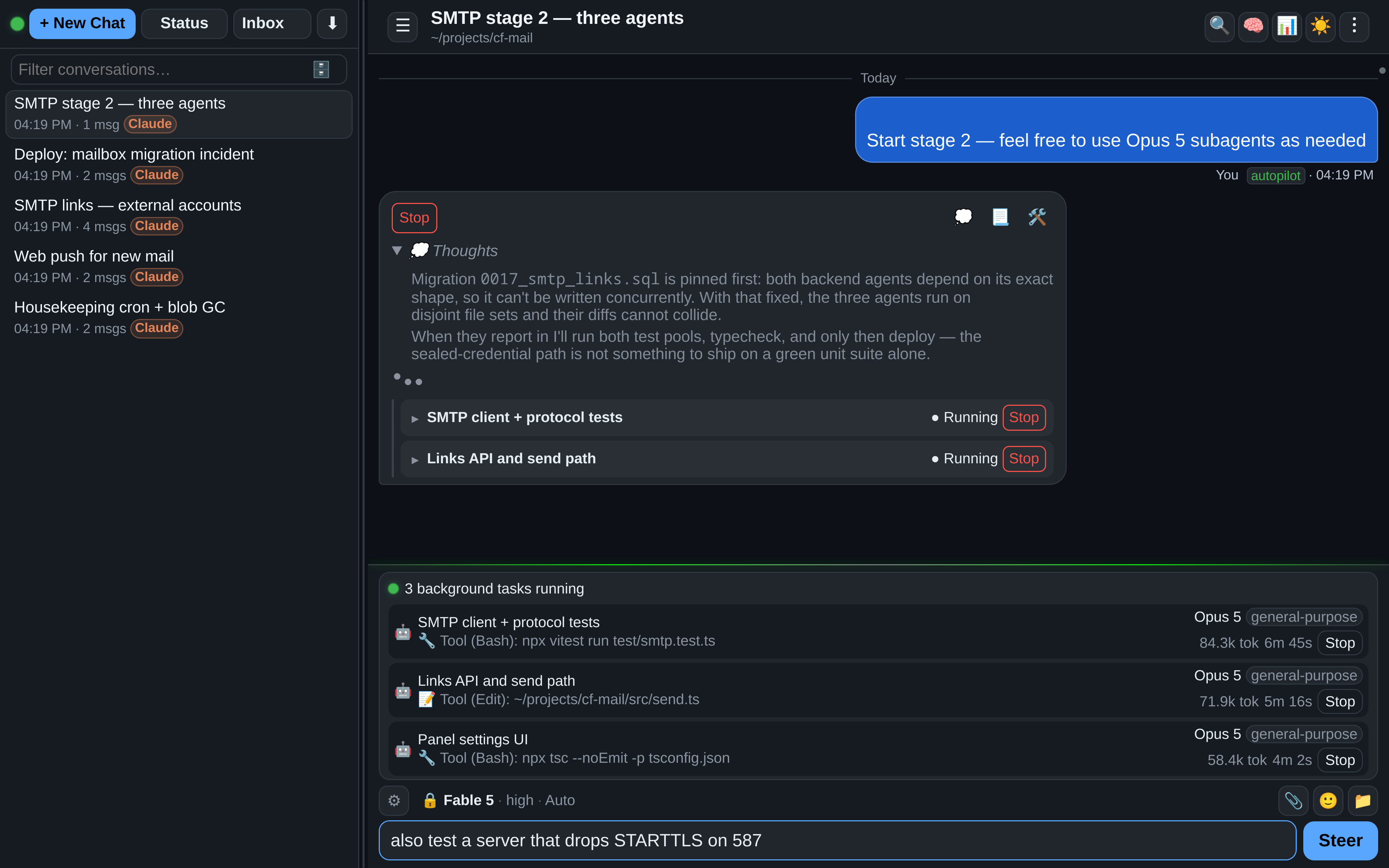 Agents working in parallel, each with live token counts and its own Stop. |
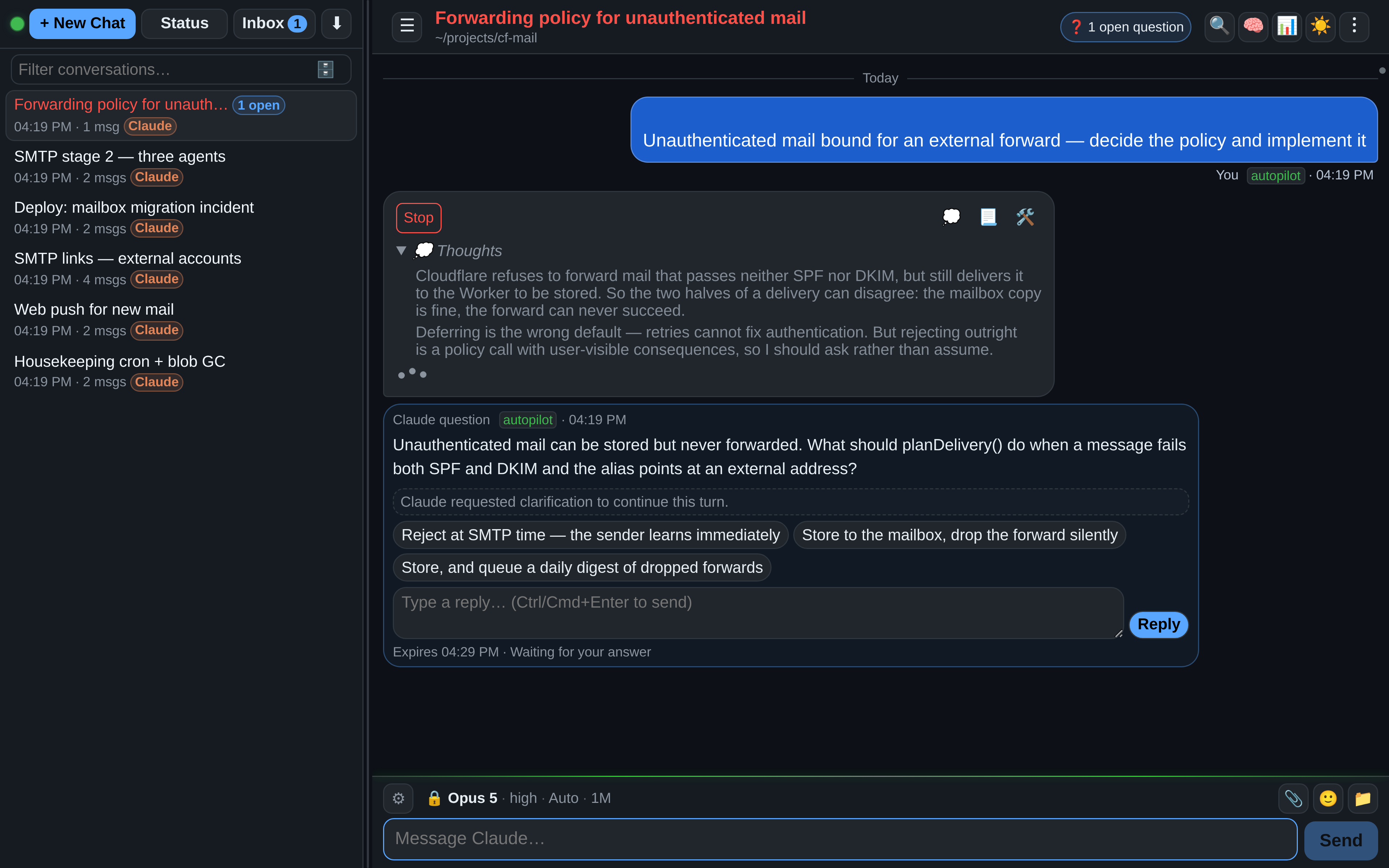 When the agent needs a decision, it asks, and waits for your answer. |
|
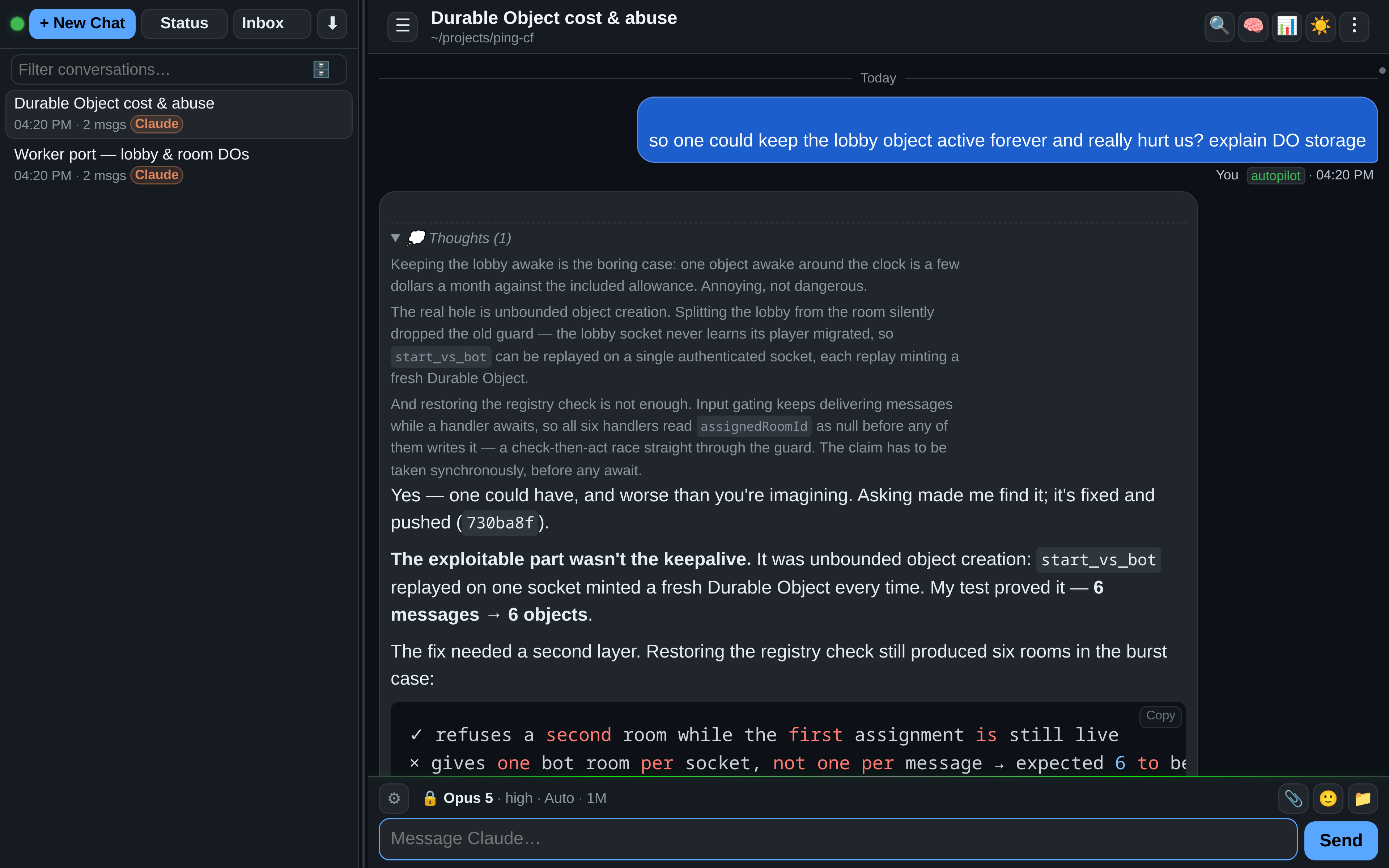 Read the reasoning, not just the answer. |
|
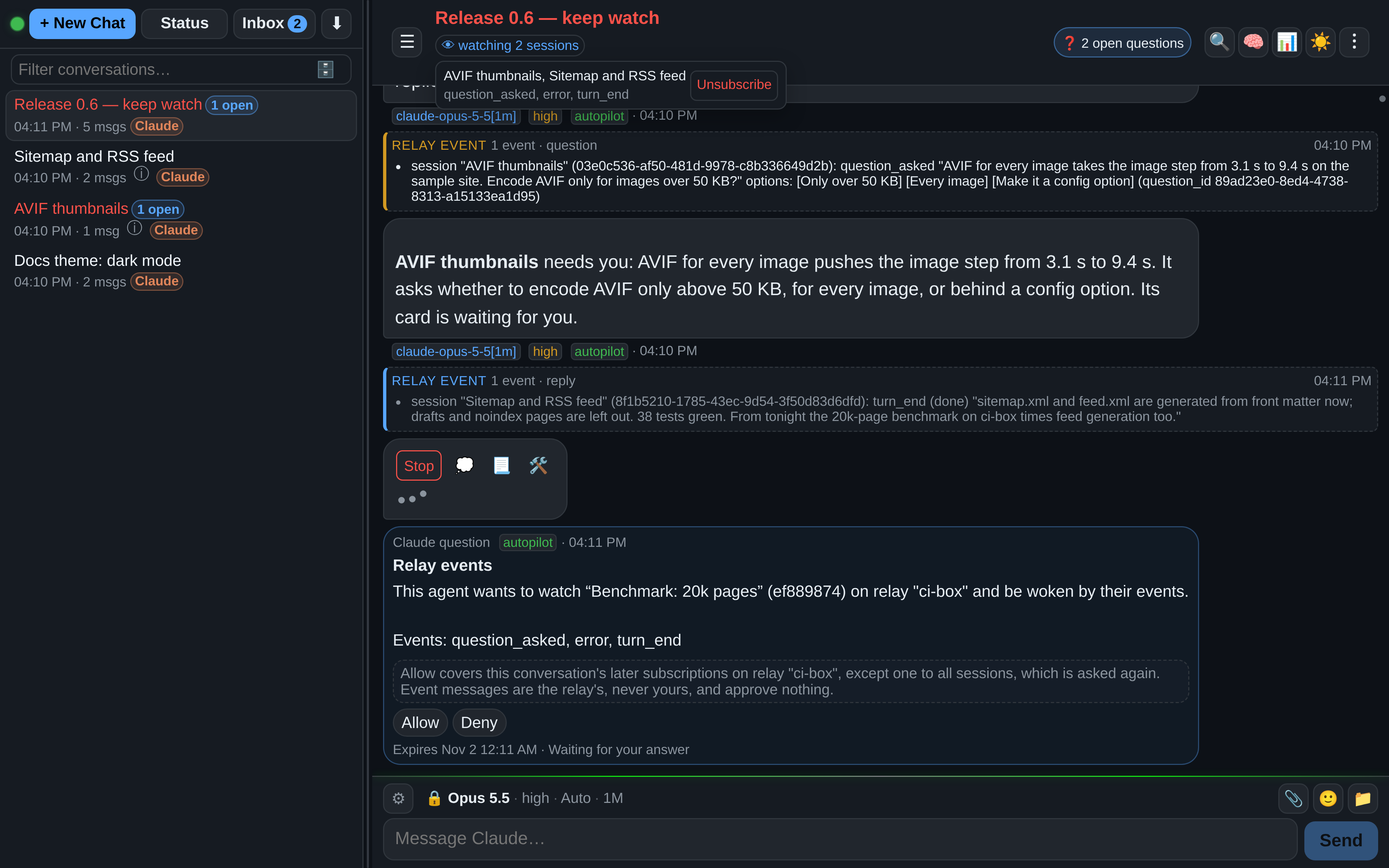 Agents that watch agents: woken by events, approving nothing. |
- Install. Run
curl -fsSL oar.sh/install | sh(macOS, Linux) orirm oar.sh/install.ps1 | iex(Windows PowerShell). On macOS and Linux the installer says what it is about to do and asks once, then installs OAR into your home directory, writes a config with a fresh access token, starts the relay, and prints its address with a QR code. On Windows, runoar startafterwards. - Open the address it printed;
oar urlprints it again. On the relay's own machine that ishttp://localhost:3333/. For your phone, switch on LAN access withoar setup --lan, or use a tunnel. - Turn on an agent under ⚙️ Settings → Providers, then start a conversation with + New Chat.
You need Node.js 22.13 or newer (the macOS and Linux installer brings its own when yours is missing or older) and an account with the agent you want to use; see Prerequisites. There are also installs with npm and from a git checkout.
oar alone opens a menu. oar start, stop, restart and status control the relay, oar service install starts it at boot or sign-in and keeps it running (a systemd user service on Linux, also for a git checkout; the sign-in autostart on Windows), oar doctor shows what it uses, and oar update installs a new release (as does ⚙️ Settings → General → Check for updates). All the details are in Installing and running OAR: the oar command, where OAR keeps its files, and updating.
The runtime (the provider in the UI) is chosen in New Chat and stays fixed for that conversation.
| Runtime | What it is | What you need |
|---|---|---|
| GitHub Copilot (default) | GitHub's coding agent, with every model your Copilot plan offers | The Copilot CLI, signed in on the relay host |
| OpenAI (BYOK) | Copilot's agent against OpenAI or a compatible endpoint | Your own API key |
| OpenAI Image | A chat whose replies are images | The same key |
| Claude | Claude Code on your machine | A Claude login, made from ⚙️ Settings |
| Claude API | Claude Code on your machine, billed to a Claude Console API key; a Claude chat can switch between the two | A Claude Console API key |
| Claude Cloud (experimental) | Claude Code in a sandbox at Anthropic, on a GitHub repository | A claude.ai account with GitHub connected |
| Cursor | Cursor's agent | A Cursor API key |
| Grok | xAI's Grok CLI | A Grok sign-in, made from ⚙️ Settings |
| DeepSeek | Claude Code on your machine, thinking with DeepSeek's models | A DeepSeek API key |
API keys are entered in ⚙️ Settings and stay on the relay host. The Claude and Grok CLIs can be installed and signed in to from the browser, so no shell on the host is needed. Each runtime discovers its own models. The full picture of each runtime is in Providers.
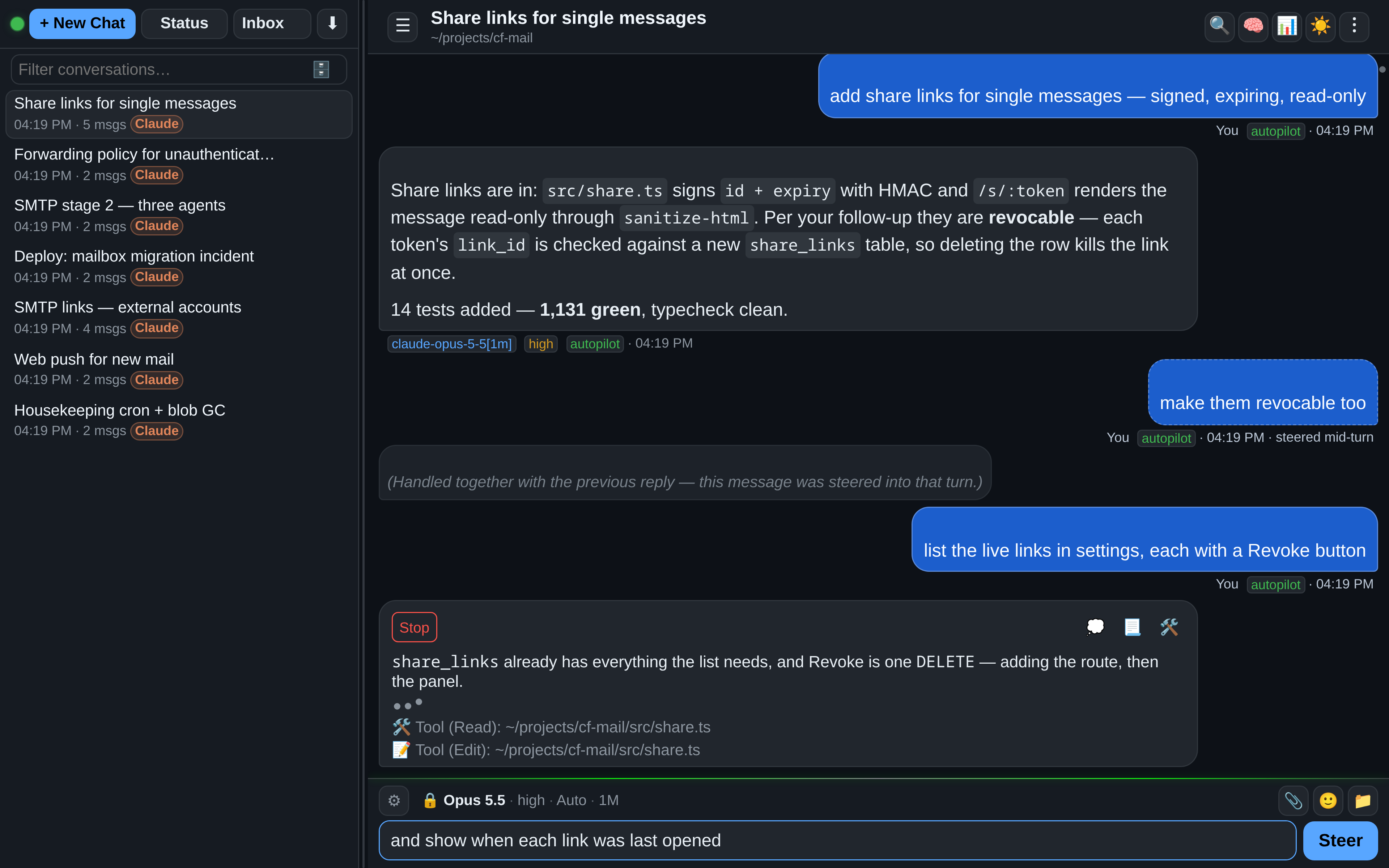 Send a message while the agent works, and it steers the running turn. |
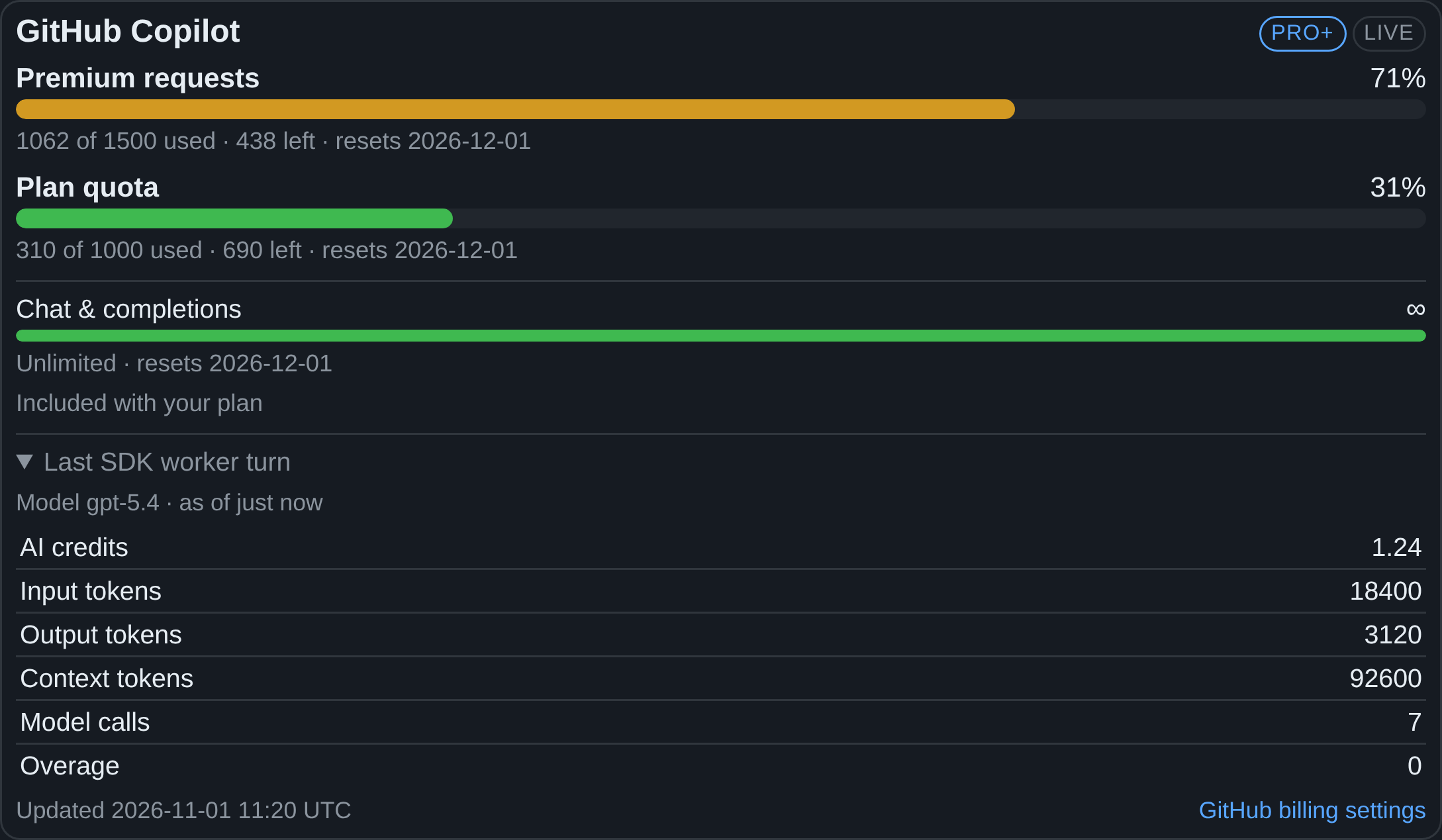 What each plan has left, in one place. |
- Watch a turn live: the reply, the agent's thoughts and every tool call appear as they happen, and each sub-agent gets a bubble of its own. Stop is always one tap away (While a turn runs).
- Steer or queue: a message sent during a turn goes into it (Claude, Copilot) or waits behind it (While a turn runs).
- Answer questions: the agent asks on a card with one-click choices, checkmarks or free text, and waits for you (Question cards).
- Background work: a task panel lists the commands and sub-agents that outlive a reply, each with its own Stop and its full record; a command's console shows its output live, says when it has gone quiet and counts a test run's passes and failures; the panel and its consoles come back after a relay restart, and a queued restart shows what it waits for and asks after a maximum wait (Background tasks, After a relay restart).
- Choose how the agent works:
ask,plan,agentorautopilot, plus model and reasoning effort, per message, from the composer's ⚙ (The composer, Relay modes). - Files and git: browse the workspace, preview files, review git changes in a diff viewer, and publish a dev server as a preview link (Files, git, and previews, preview servers).
- Usage and context: plan limits and credits of every provider, the estimated spend of DeepSeek and Claude API keys, and what fills the model's context window (Usage and context).
- Your conversations everywhere: the history lives on the relay, drafts follow you from device to device, and conversations can be searched, archived, grouped and pinned (The conversation list, drafts, session groups, pins).
- Share a conversation as a read-only link, hide single messages and the host's paths from it, and see when it was opened (Sharing).
- On your phone: install OAR as an app and get push notifications; back walks through the conversations you opened, a pinch zooms the whole app, and held sideways it keeps a phone's layout (Notifications and the app, back and forward, zoom, a phone held sideways).
The full tour is in Using the web UI; every setting and config key is in Settings and configuration. What changed in each release is in the changelog, with 0.9.21 as the latest.
Out of the box the relay answers only on its own machine. There are three ways to reach it from elsewhere:
- Same network:
oar setup --lanopens the relay to your LAN and prints a QR code for your phone. - Cloudflare Tunnel: no server of your own and no open port. You need a Cloudflare account and
cloudflaredon the relay host (how). - SSH tunnel: through a server you already run, behind your own HTTPS proxy (how).
flowchart LR
  phone["📱 Phone"]
  subgraph host["Your computer"]
    relay["OAR relay"]
    cfd["cloudflared"]
  end
  cf["Cloudflare"]
  vps["Your server<br/>HTTPS proxy"]
  phone -- "same network<br/>oar setup --lan" --> relay
  phone -- HTTPS --> cf --> cfd --> relay
  phone -- HTTPS --> vps -- "SSH tunnel" --> relay
The relay keeps both tunnels running and reconnects them by itself. Beyond your own network, always go through HTTPS. Behind a reverse proxy of your own on another host, tell the relay to trust it (how). The details are in Remote access.
- Paired relays: connect the OAR on your workstation with the OAR on a server. An agent on one can then read, prompt and start sessions on the other, once you mention that relay with
@. - Agent sessions: an agent hands parts of its task to new sessions on its own relay, waits for them and reads their results. It is off until you switch it on, the first session asks for your approval, and at most 4 run at once.
- Watching sessions: an agent subscribes to other sessions and is woken when a question waits, an error happens, or a reply arrives, instead of polling; if it asks, also when the relay runs again after a restart.
flowchart LR
  you(("You")) --> A
  subgraph r1["Relay on your workstation"]
    A["Your agent's session"] -- "starts, waits for" --> B["A session it started"]
  end
  subgraph r2["Paired relay on a server"]
    C["A session there"]
  end
  A -- "reads, prompts, waits" --> C
  C -. "question, reply, error" .-> A
You stay in charge: per paired relay you decide whether agents may only read, also prompt, or do everything, and in the ask and plan modes every write asks you first. A subscription only notifies; it approves nothing.
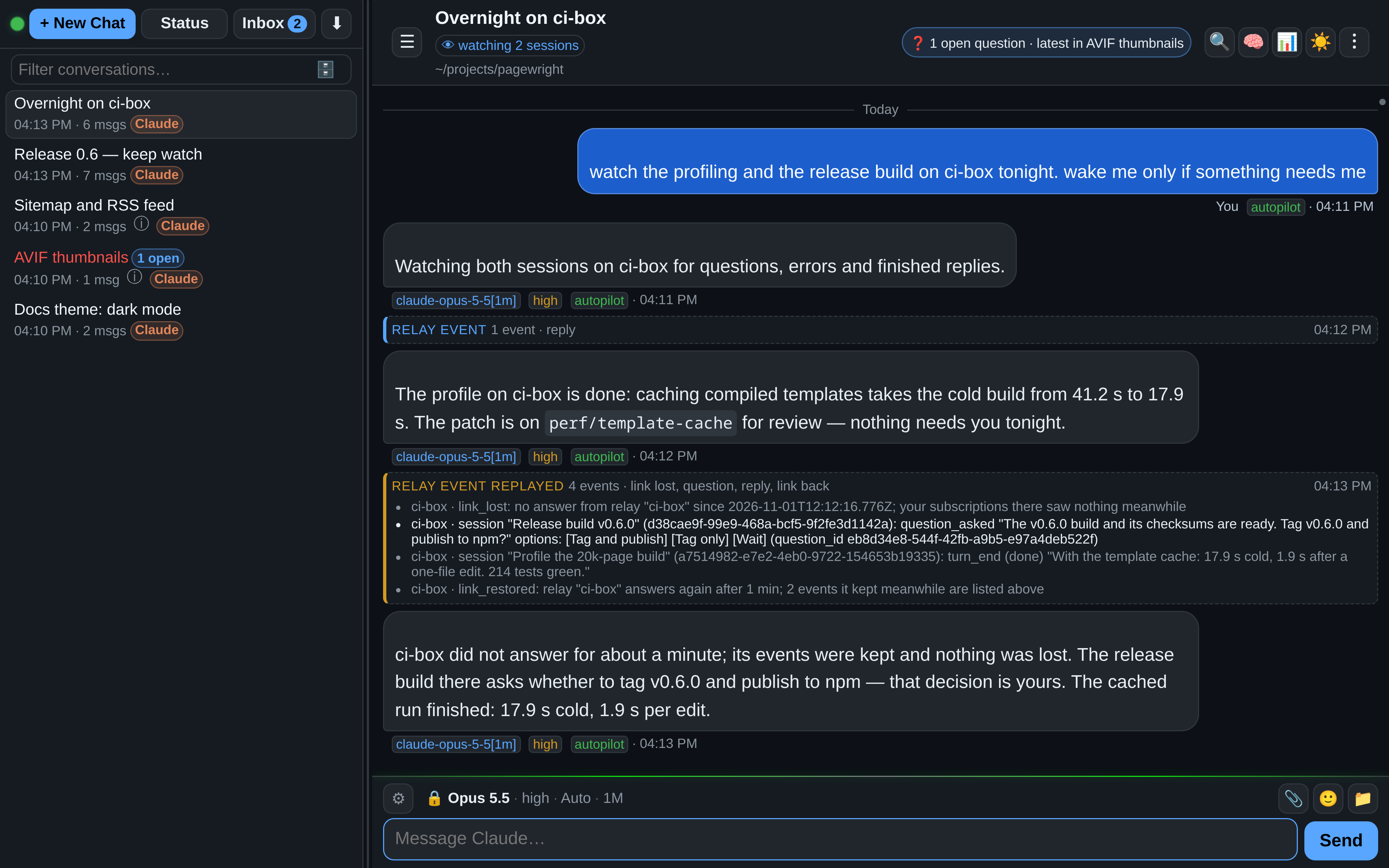
How pairing, permissions and limits work is in Agents working together.
- The access token is the key to everything. Whoever holds it, or a URL carrying
?token=, can have your agents run commands on the host. Treat it like a password;oar setup --new-tokenreplaces it and signs every device out. - OAR adds reach, not a sandbox. Agents act with the permissions of the user the relay runs as.
- Local by default. The relay answers only on its own machine until you change that. Beyond your network, use one of the tunnels.
- Public links are public. Anyone with a shared-conversation or preview link can open it without signing in.
- No telemetry. The only request to oar.sh is the update check, and it is off until you turn it on.
How keys, cookies, served files, paired relays and Claude Cloud's use of the Claude login are handled: Security notes.
| Symptom | What to do |
|---|---|
| A runtime is missing from New Chat | Turn it on in ⚙️ Settings → Providers; all of them except Copilot are off until you do |
| A reply says a CLI is missing or signed out | Press the button on the failed reply (Install Grok CLI, Sign in to Grok, Claude settings) |
| Banner says CLI is offline | Normal on an idle relay: send a message, and the banner clears once the conversation's worker connects |
| A conversation seems wedged | ☠️ Kill session in the ︙ menu, then retry or send a new message |
npm install -g @oar-sh/oar fails with EACCES |
Do not use sudo; run the installer, which installs into your home directory |
oar doctor prints the version, paths, port and provider CLIs in use. More symptoms are in Troubleshooting.
| Guide | What is in it |
|---|---|
| Installing and running OAR | Prerequisites, every install method, starting the relay, the oar command, files, updating |
| Providers | Each runtime in detail, installing provider CLIs from the relay, models |
| Using the web UI | Conversations, the composer, running turns, question cards, background tasks, files, usage, sharing, zoom and navigation, the menu |
| Settings and configuration | Settings, config.json, environment variables, stuck-turn detection |
| Remote access | SSH and Cloudflare tunnels, a reverse proxy on another host, the session-worker path guard |
| Agents working together | Paired relays, agent sessions, watching sessions |
| Security notes · Troubleshooting | The full lists |
| Preview servers · Copilot CLI with your own key | Publishing dev servers; BYOK notes |
| DEVELOPING.md · server/README.md · CHANGELOG.md | Development, tests, relay internals and the repository layout; the HTTP API; release notes |
The most complete guide, in six languages, is oar.sh/docs.