

- Overview
- Features
- Quick Start – Installation
- Quick Start – Usage
- Recipes
- Command-Line Reference
- Implementation Notes
- Limitations
- API
- Development
- Acknowledgements
- Other Work
- Keeping in Touch
- License
p5-server is a development server for p5.js. It provides a web server with live reload, and command-line tools to generate HTML and JavaScript templates. The server can serve JavaScript-only sketches (that do not require an HTML file); it figures out which libraries a sketch needs in order to run. Coding agents can inspect sketches, render them in a bounded headless browser session, and connect their existing browser tools to a p5-aware page API.

p5-server can be used to develop sketches or browse a collection of sketches in a directory.
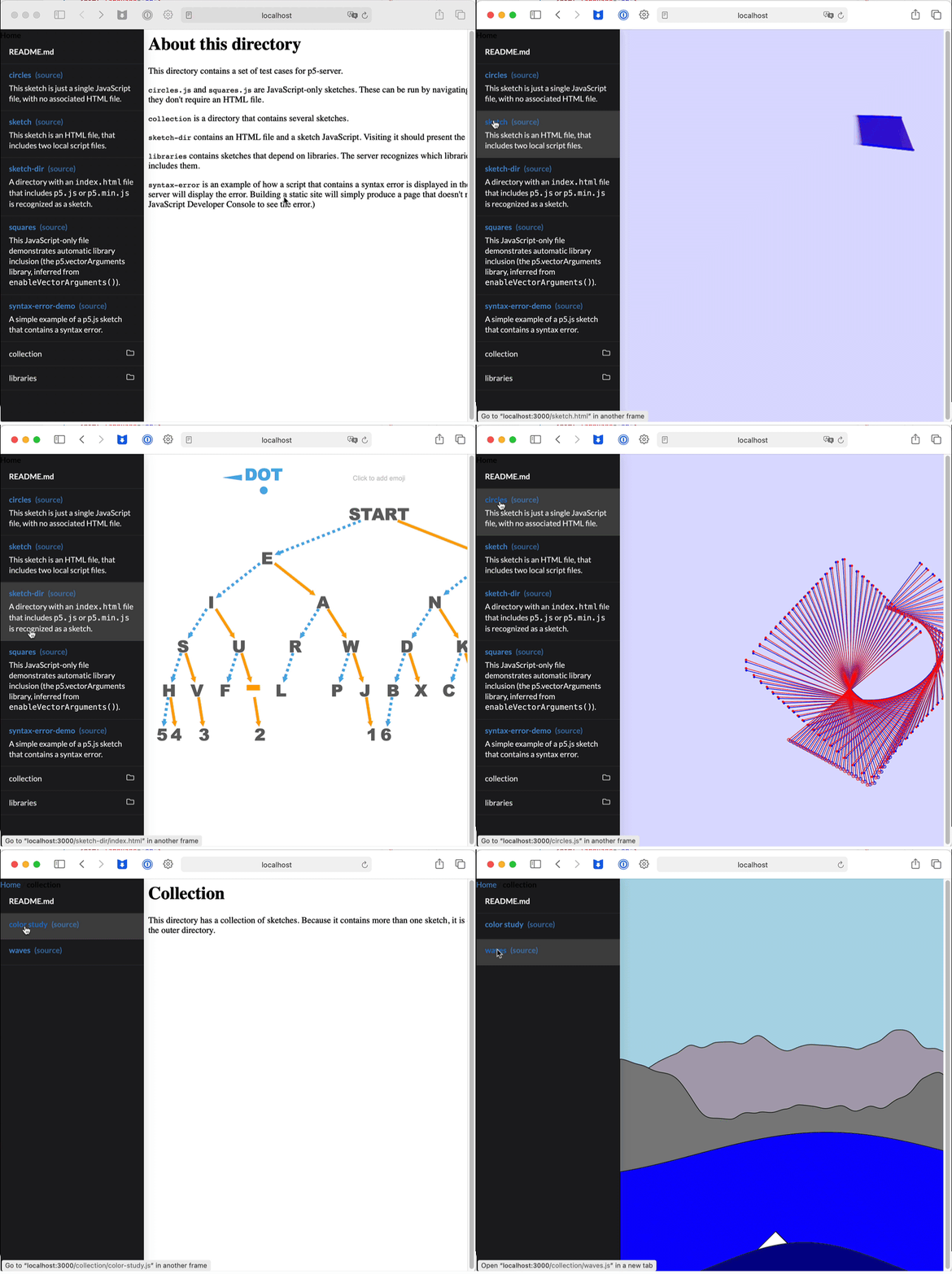
p5-server can also be used to create a set of HTML pages that present a collection of sketches. The examples page of the p5.vectorArguments documentation demonstrates this.
The web server, automatic library inclusion, and sketch generation features are also available as a Visual Studio Code extension, and via a programmatic API.
-
Agent support.
p5 analyze sketchdescribes a sketch and its problems in readable text.p5 renderruns it headlessly and reports static, browser, console, and request failures.p5 serve --agentadds p5-specific controls for browser integrations. -
Live reload. The browser reloads the page when the source is modified.
-
JavaScript-only sketches. A sketch can be a single JavaScript file. You don't need to create an HTML file just to run the sketch.
-
p5.js 2.x. Generated HTML and JavaScript-only sketches run on p5.js 2.3. HTML sketches that include p5.js themselves keep using the version they specify.
-
Automatic includes. If a JavaScript-only sketch uses a function from one of these libraries, the library will be included. (This page describes how this works.)
-
In-browser syntax errors. A JavaScript file that has a syntax error will display the error in the browser. Edit and save the file to reload the page.


-
Sketch-aware directory listings. Viewing a directory in the browser lists the sketches, folders, and other files in that directory.
-
Sketch file generation.
p5 createcreates a sketch file that you can use to get started. -
Offline CDN cache. The server proxies requests to the common content delivery networks (CDNs) that are used to deliver the sources to p5.js and common p5.js libraries. The proxy-cache guide describes its offline behavior and commands.


These commands install the p5 command on your computer. You only need to do
them once.
Text shown in monospace should be entered into a terminal.
-
node --versionThis tests whether Node.js is installed on your system. It should print
v20.0.0or newer.If Node.js is not installed, download the current LTS release from the Node.js website.
-
npm install -g p5-serverThis installs the
p5command on your computer.Once this is done, you can enter commands such as
p5 createandp5 serve, or justp5to see a list of all the commands.
-
p5 create my-sketch.jsThis creates a sketch named
my-sketch.jsin the current directory.If you already have some sketches on your file system, you can skip this step. Instead, use the
cdcommand to change the terminal's current directory to a directory that contains some sketches. -
p5 serve --openThis starts the server, and opens your sketch directory in the browser.
Click on a sketch in the browser page to run it.
-
Use a code editor (such as Visual Studio Code, Zed, vim, or emacs) to edit the
my-sketch.jsfile that you created in step 1. Each time you save the file, the browser will reload the page and re-run your sketch.
p5 serve
Starts a web server that knows about p5.js sketches, and that reloads sketches when files are changed. The server is set to serve files from the current directory.
p5 serve PATH
Starts a server that serves files from the directory at PATH.
p5 serve --open
Starts the server, and opens the directory in the default browser.
p5 serve --theme grid
Displays directory listings in grid view.
You can combine options. For example, p5 serve examples --theme grid --open
opens the examples directory in grid view.
Place p5-server.config.json in the served directory to select the p5.js
version and the indexed libraries that are eligible for automatic inclusion:
{
  "p5Version": "2.3.2",
  "libraries": {
    "compatibility": "verified",
    "includeLegacy": false,
    "collections": ["core", "community", "recommended", "peer"],
    "allow": ["p5.woff2"],
    "deny": ["dat.gui"]
  }
}
compatibility can be verified, allow-unknown (the default), or any.
allow makes a library eligible when the source contains one of its inference
signals; it does not load the library unconditionally. deny also applies to
explicit library: directives. An explicit directive bypasses the other soft
filters.
Use p5 serve --config FILE to select another config file, or
--p5-version VERSION to override the configured p5.js version. The effective
catalog and the reasons for excluded entries are available as JSON at
/__p5_server/api/libraries while the server is running.
-
p5 createcreates a JavaScript sketch file namedsketch.jsin the current directory.This is a JavaScript-only sketch. The server can run this sketch, or you can paste it into online editors such as the p5.js Web editor and OpenProcessing.org.
-
p5 create my-sketch.jscreates a JavaScript sketch file namedmy-sketch.js. -
p5 create my-sketch.htmlcreates an HTML file namedmy-sketch.htmland a JavaScript file namedmy-sketch.js. -
p5 create my-sketchcreates a folder namedmy-sketchcontainingindex.htmlandsketch.js.
The default generated script contains setup() and draw() functions. The
setup() function creates a canvas, and the draw() function draws circles
that follow the mouse. Use --options to customize the script. The
command-line reference lists the available options.
p5 build SOURCE builds a static site into ./build.
The build rejects symbolic links in the source tree and refuses an output path that is itself a symbolic link. It stages generated files before replacing the previous visible output, so a generation error preserves the last successful build.
Run p5 build --help for a list of options.
Two themes are supported, --theme grid and --theme split.
p5 screenshot my-sketch.js creates a screenshot named my-sketch.png in the
current directory. It operates by running the sketch in a browser, saving the
canvas, and then closing the browser page.
You can also use p5 screenshot my-sketch.html for an HTML sketch or p5 screenshot dir for a directory that contains one sketch.
Run p5 screenshot --help for a list of options. You can set the output
filename, skip initial frames, save multiple frames, set the pixel density and
canvas dimensions, choose Safari, Chrome, Firefox, or Edge, and set the maximum
wait with --timeout.
Notes:
- Only the canvas is saved, not the HTML. Elements created with
createButton(),createDiv(), and similar functions are not captured in the screenshot. - The screenshot feature has not been tested with instance-mode sketches.
p5-server gives coding agents a p5-aware test loop. Its reports use labeled,
readable sections so an agent can read the whole result directly. A written
image does not by itself mean that a render succeeded. The final Errors
section and the process exit status determine success.
Give a coding agent this prompt:
Install
p5-serverfrom https://github.com/osteele/p5-server and create a coding skill for using its agent-support features.
For an unreleased build, replace the repository URL with its download URL.
p5 analyze sketch path/to/sketch.jsThe report identifies the entry files, associated assets, additional p5.js libraries, missing files, and JavaScript syntax errors. Absolute paths make the reported files easy to open from another tool.
p5 render path/to/sketch.js --frame 60 --seed 42 --canvas-size 800x800p5 render starts a temporary server and a headless browser, waits for the
requested p5 frame, saves the first canvas, closes both processes, and prints a
report. The report includes the browser and canvas state, output path, files,
libraries, console messages, warnings, runtime errors, and failed requests.
The command exits with a nonzero status when the sketch has a syntax error,
missing asset, browser error, failed request, console.error() message, missing
canvas, or timeout.
The default browser is an installed Google Chrome. Use --browser msedge for
Microsoft Edge, or --browser-path PATH for another Chromium executable. Use
--full-page to capture p5.js DOM elements and the rest of the page instead of
the first canvas.
Set the frame, seed, viewport, canvas size, and pixel density when they affect the result. These settings make comparisons between edits more meaningful.
p5 serve path/to/sketch.js --agent --seed 42 --canvas-size 800x800Open the printed URL with Puppeteer, Playwright, a browser plugin, or a computer
use tool. The sketch page exposes window.__p5Agent:
await window.__p5Agent.waitForReady();
await window.__p5Agent.waitForFrame(60);
window.__p5Agent.getStatus();
window.__p5Agent.setSeed(42);
window.__p5Agent.captureCanvas();
getStatus() reports document readiness, canvas dimensions, the observed p5
frame, and loop state. captureCanvas() returns a PNG data URL by default. The
wait methods accept an optional timeout in milliseconds. The browser
integration remains responsible for navigation, screenshots, DOM inspection,
and input events such as clicks and key presses.
p5 convert sketch.html --to script converts an HTML sketch to a
JavaScript-only sketch by deleting the HTML file. Before deleting it, the
command verifies that the sketch has one local script file and that the script
contains the information needed to run the sketch.
p5 convert sketch.js --to html creates an HTML file that can be used to run the
sketch.
Run p5 --help to see a list of commands.
Run p5 <command> --help to see command-line options for a particular command.
Describe a sketch and report problems found without running it.
The report includes the sketch type, description, entry files, associated files, inferred libraries, missing files, and syntax diagnostics.
p5 buildcreates an HTML index for a collection of sketches.p5 build -o outplaces the index in the./outdirectory. (The default is./build.)
Converts between HTML and JavaScript-only sketches.
p5 convert FILENAME --to htmlcreates an HTML file that uses the<script>tag to include the JavaScript sketch.p5 convert FILENAME --to scriptremoves an HTML file, leaving only the JavaScript file.
Converting a JavaScript-only sketch creates an HTML file with the same base name. The file includes the sketch, p5.js from a CDN, and any inferred libraries. The command fails if that HTML file already exists.
Converting an HTML sketch to a JavaScript-only sketch deletes the HTML file and can lose information. The command performs these checks first:
- The HTML file includes only a single script file.
- The libraries that the HTML file includes (via
<script>tags) are the same as the libraries that will be inferred from the script file, based on the classes and functions that the script file uses and does not define. - Every external script is either p5.js or a recognized library. Use
--discard-htmlto explicitly discard other external dependencies.
Create a JavaScript-only sketch; or an HTML file and a JavaScript file.
p5 create– createssketch.jsp5 create my-sketch.js– creates just the JavaScript filep5 create my-sketch.html– createsmy-sketch.htmlandmy-sketch.jsp5 create my-sketch– creates a folder namedmy-sketchthat containsindex.htmlandsketch.js.
p5 create --options comments,asyncSetup specifies a comma-separated set of
template options. The options are:
comments– include comments such as// put setup code hereinside the functionsasyncSetup– makesetup()asynchronous so it can use p5.js 2.x asset loading such asimage = await loadImage('image.png')windowResized– include awindowResized()function that resizes the canvas when the window is resizedno-draw– omit thedraw()function to create a static sketchno-examples– omit the example call inside ofdraw()
Run a sketch in a bounded headless browser session and save an image.
The default command captures the first canvas at frame 1:
p5 render sketch.jsUse --frame, --seed, --viewport, --canvas-size, and --pixel-density
to control the render. --timeout sets the limit for the complete operation in
seconds. --full-page captures the whole document. Run p5 render --help for
the full option list.
Runs a web server that knows about p5.js sketches.
p5 serve PATH serves a sketch or directory. Multiple paths create separate
mount points in one server.
- If
PATHis an HTML file such asindex.html, the command serves that page. - If
PATHis a JavaScript file that contains a p5.js sketch, such assketch.js, the server serves a page that runs the sketch. - If
PATHis a directory, the browser displays its sketches and files. - If
PATHis omitted, the browser displays sketches and files in the current directory. (This is the same asp5 serve ..)
By default, the server runs on port 3000. You can open it in a browser by
visiting http://localhost:3000. p5 serve --open does this automatically.
The server listens only on the local machine by default. To make it available
to other devices on the network, pass --host 0.0.0.0. Only do this on a
trusted network; p5-server is a development server, not a production server.
If another server is already running on port 3000, the server will choose another port.
p5 serve PATH --agent injects window.__p5Agent into sketch pages. The
--seed, --canvas-size, and --pixel-density options set p5 behavior before
the sketch starts. These options require --agent.
Open the sketch in a browser, and save the canvas as an image.
Display the contents of DIRECTORY, organized by sketch.
$ p5 tree examples
📁examples
├── 🎨circles (circles.js)
├── 🎨single-sketch-directory
│   ├── index.html
│   ├── morse.js
│   ├── arrows.js
│   └── trimLine.js
├── 🎨sketch
│   ├── sketch.html
│   ├── main.js
│   └── helper.js
├── 🎨squares (squares.js)
├── 🎨syntax-error-demo
│   ├── index.html
│   └── sketch.js
├── 📁collection
│   ├── 🎨color study (color-study.js)
│   ├── 🎨waves (waves.js)
│   └── README.md
├── 📁libraries
│   ├── 🎨dat.gui (dat.gui.js)
│   ├── 🎨layers demo (layers-demo.js)
│   ├── 🎨play sound
│   │   ├── play-sound.js
│   │   └── doorbell.mp3
│   ├── 🎨play sound pulse (play-sound-pulse.js)
│   ├── 🎨posenet (posenet.js)
│   ├── 🎨vector arguments (vector-arguments.js)
│   └── README.md
└── README.md
This is similar to what the Sketch Explorer view in the Visual Studio Code extension displays.
Additional command-line tools are listed in the p5-analysis command-line reference.
The p5-analysis implementation notes describe sketch detection, automatic library inclusion, and other details of the implementation.
- Routine CI runs the full workspace checks on Linux and Windows, and tests the packed packages on Node.js 20, 22, and 24. macOS checks are available as a manual workflow.
- Files created by
p5 buildandp5 createload p5.js and other libraries directly from content delivery networks, so they require internet access or a populated browser cache. Pages served byp5 serveuse the on-disk proxy cache. Runp5 proxy-cache pathto display its location. - Support for
instance-mode
sketches is limited to recognizing the common
new p5(callback)form. - The analyzer accepts ECMAScript modules, but generated wrapper pages load
JavaScript-only sketches as classic scripts. To serve a module-based sketch,
provide an HTML file with a
<script type="module">element. - This is a development server, not a production server. It was not designed for security or performance.
- See the p5-analysis implementation notes for limitations on the recognition of associated files.
The server can be invoked programmatically. See the p5-server API reference for installation instructions and reference documentation. The sketch-analysis API has its own reference.
This repository is a Bun workspace containing p5-analysis and p5-server.
Install Bun, then run:
bun install --frozen-lockfile
bun run check
The root scripts build, lint, type-check, and test both workspaces. bun run test:packages also packs the publishable packages and verifies them in a clean
consumer project.
See RELEASING.md for the package release workflow. Planned improvements are tracked in ROADMAP.md.
This project builds on these libraries and frameworks:
- Commander, Chalk, and update-notifier for the command-line interface
- Babel for JavaScript parsing and scope analysis
- node-html-parser for parsing HTML
- Express for the web server
- LiveReload for live reload
- Marked for converting Markdown to HTML
- Nunjucks and Pug for template generation
- Playwright for headless browser control
- Semantic UI for directory-page styles
- p5.js
https://code.osteele.com lists my other p5.js projects. These include tools, libraries, examples, and educational materials.
Report bugs, feature requests, and suggestions in the issue tracker.
MIT © by Oliver Steele