Repository navigation
Intermittent Network Latency/Outages on Windows Devices that Route (Forward) Traffic #1428
Description

EDIT: 8/28/2021 - Updated section 1.2 to reference comment below for instructions on replicating the issue with Win 10.
1. Overview
I believe there's an issue in the Windows ZeroTier NDIS 6.1 Miniport driver that can cause intermittent latency and dropped packets. This unwanted behavior is particularly noticeable when attempting to use ZeroTier on a Windows device that's configured as a router. I'll cover how my environment is setup, what is triggering the unwanted behavior, why I think it's happening, some crude work-arounds, and recommendations to fix what I suspect is the root issue.
1.1 Environment
This is a example environment that reflects the pertinent details of my network. If you want to look at my particular network, feel free to reference support ticket ZT-3762, which should contain links to my account and subscription.
ZeroTier Central:
- IPv4 subnet range: 10.10.0.0/24
- Managed Route: 192.168.0.0/23 -> 10.10.0.150 (/23 is on purpose, and helps prevent network conflicts on clients)
Physical Office Network:
- IPv4 subnet range: 192.168.0.0/24
- ISP Router (Default Gateway): 192.168.0.1
- ISP Router - Static Route: 10.10.0.0/24 -> 192.168.0.8
Remote Client:
- Windows 10 20H2
- ZeroTier One v1.6.5
- ZeroTier IP: 10.10.0.31
Windows Router:
- Windows Server 2019 Standard 1809
- ZeroTier One v1.6.5
- ZeroTier IP: 10.10.0.150
- Physical/Office IP: 192.168.0.8
1.2 Steps to Reproduce the error
- Configure an environment relatively similar to the one stated above. The Windows Router must be a windows device. The client can be any OS.
- Install the Routing and Remote Access Server (RRAS) role on the Windows Server.
- See my comment below for instructions on how to replicate this issue with a Windows 10 Pro or Enterprise workstation.
- Identify an unused IP on the Physical network connected to the Windows Router. For example 192.168.0.214
- Attempt to ping the unused IP from the Windows Router.
- From the Windows Router command line, run arp -a and verify the unused IP is not listed in the ARP cache.
- From the Windows Router, setup a recurring ping to the Remote Client. For example: ping -t 10.10.0.31
- From the Remote Client, attempt to ping the unused IP: For example: ping -t 192.168.0.214
- Note that every time the Remote Client pings, the recurring ping on the Windows Router will incur a ~2000 ms delay.

1.3 Desired Behavior
When a ZeroTier device initiates a connection to an internal IP that ARP can not resolve, the RRAS server's ZeroTier NIC continues to pass traffic.
1.4 Observed Behavior
When a ZeroTier device initiates a connection to an internal office IP that ARP can not resolve, the RRAS server's ZeroTier NIC becomes unresponsive for ~2 seconds. If this scenario occurs repeatedly, the latency builds up to the point that the RRAS server's ZeroTier NIC becomes unable to pass any traffic. Since the RRAS server's ZeroTier NIC IP is also the next hop for ZeroTier devices to access my physical/office network, the office network becomes unreachable.
This unwanted behavior isn't just caused by ICMP (ping) traffic. It can be generated by any type of IPv4 traffic (IPv6 doesn't use ARP for neighbor discovery) destined to an IP that doesn't exist. In an office/enterprise network, there are many reasons why a workstation would try to contact an IP that doesn't exist. If a share drive get's moved, and people don't re-map it. If a printer goes offline (temporarily or permanently). Third-party software with old/noisy configurations. When enough of this traffic occurs in succession, the ZeroTier NIC will become completely unavailable and all traffic will stop passing.
1.4.1 Why is ARP such a Problem?
I suspect that ARP isn't the only protocol that can suffer from this issue, but it is the one I can most easily demonstrate the problem with. In some situations, Windows is particularly noisy when it comes to ARP neighbor discovery. Windows will wait 1 second to hear back an ARP response, before sending another ARP request. It will send up to 3 ARP requests. This means every packet destined to an unreachable IP will yield 3 ARP requests, 1 second apart.

For some reason (which I'll theorize on next) the ZeroTier NIC doesn't seem to pass any traffic for those 2 seconds while Windows is performing the ARP requests. Obviously, Windows needs to know the destination MAC address before it can forward the packet. So it's as if the ZeroTier NIC is unable to process more traffic, until after Windows forwards (or drops) the current packet.
2. Root Cause (Theoretical)
I did some reading up on Windows NDIS miniport drivers and took a look through the ZeroTier Windows TapDriver6 source code. I'm familiar with C/C++/C#, but have zero experience writing NDIS drivers, so the following is just a theory based on the information I could find.
2.1 Initial Impressions Point to the TAP Driver
A user on the OpenVPN forum is having the same issues as me with their RRAS server. The ZeroTier Windows TAP driver is based on the OpenVPN driver. This makes me think the problem is not in the ZeroTier One client code, but rather in the TAP driver.
This problem may have surfaced in 2015 when ZeroTier transitioned from an NDIS 5 TAP driver to an NDIS 6 TAP driver. NDIS 6 was a big change, and brought about new requirements. Of note, NDIS 5 miniport drivers could be serialized or deserialized. Serialized drivers rely on NDIS to managed their send (and receive?) queues. Deserialized drivers have to manage everything themselves. With the transition to NDIS 6, Microsoft dropped support for serialized drivers, so now everyone had to start managing their send (and receive?) queues. If OpenVPN's NDIS 5 driver was serialized, the move to NDIS 6 may have introduced this issue. Source: Miniport drivers
2.2 Intro to NDIS Receive Buffers
If this is a driver issue, the problem would lay somewhere in how the miniport driver delivers packet data to the Windows router. NDIS miniport drivers call the function NdisMIndicateReceiveNetBufferLists to present a structure of packet data called a NET_BUFFER_LIST (or just NBL for short) to higher level NDIS drivers. In our scenario the higher level NDIS driver would be a Windows RRAS driver, used to re-write packet headers and forward them. Miniport drivers usually have a limited number of NBLs available, as they reside in privileged memory, which is expensive real estate. The Intel NIC drivers on my server and laptop are both limited to 256 NBLs:

When NdisMIndicateReceiveNetBufferLists sends an NBL, ZeroTier relinquishes ownership of the NBL to the higher level driver. The NdisMIndicateReceiveNetBufferLists function takes a ReceiveFlags parameter, which can be configured with the NDIS_RECEIVE_FLAGS_RESOURCES flag. If the NDIS_RECEIVE_FLAGS_RESOURCES flag is present, the higher level driver will copy the NBL data to it's own buffers, and immediately return ownership of the NBL to the miniport driver. If the flag is not present, the higher level driver will wait to return the NBL until after it's done with it, by calling MiniportReturnNetBufferLists. Source: Indicating Received Data from a Miniport Driver
Microsoft goes into further detail in another article by stating "Setting the NDIS_RECEIVE_FLAG_RESOURCES flag in the ReceiveFlags parameter forces the protocol drivers to copy the network data and release the NET_BUFFER_LIST structures to the miniport driver. Driver writers should design their miniport drivers with enough preallocated NET_BUFFER_LIST structures to avoid unnecessary copying." This last sentence is particularly interesting. It implies that the NDIS_RECEIVE_FLAGS_RESOURCES flag will reduce performance, and should only be used when absolutely necessary. The most obvious scenario would be to only use it when you have 1 spare NBL left. Things may run a little slower, but at least the miniport driver will be able to continue indicating NBLs to higher level drivers. Source: NdisMIndicateReceiveNetBufferLists function (ndis.h)
2.3 ZeroTier NDIS Driver Analysis
Looking at constants.h we see 3 variables that could represent the number of NBLs allocated by the ZeroTier TAP driver. The first is set to 64, and the other two are set to 16. However, I couldn't find these variables used in any meaningful way inside the other .c code files. They mostly appeared in comments. So I'm unsure whether these are implemented or not.
- device.c: Line 654 to 692
- mem.c: Line 102 to 104
The NdisMIndicateReceiveNetBufferLists function is called three times in rxpath.c (Line 149 and Line 496 and Line 606). The first time it's called, there's a possibility the NDIS_RECEIVE_FLAGS_DISPATCH_LEVEL flag could be applied, but I couldn't find a code path that ever leads to NDIS_RECEIVE_FLAGS_RESOURCES being set. The last two times it's called, the ReceiveFlags parameter is set directly to 0.
Therefore, it looks like the ZeroTier TAP driver will always rely on the higher level NDIS driver to return NBLs in a timely fashion, with no fall-back mode of operation for cases where it runs out of NBLs. Also, I was unable to confirm (mainly due to my ineptitude with NDIS drivers) that the TAP driver is actually honoring the number of concurrent NBLs listed in constants.h.
2.4 Theory of Malfunction
The following diagram depicts why I think unreachable ARPs are causing issues. Please read it from top to bottom. Based on the ZeroTier driver source code, and what I've read from Microsoft, I'm somewhat confident the first 2 "NDIS" columns are correct. I'm very confident the last column (Windows Kernel/ARP Logic) is correct. Windows is closed source, so the "RRAS Driver" column is an educated guess, based on my observations and networking knowledge.

If this is correct, then any delay in any higher level NDIS drivers could cause ZeroTier NIC latency/outages. In that case, this issue would not just be limited to ARPs on an RRAS server. It could surface anywhere a higher level NDIS driver is taking it's sweet time with something.
3. Fix Recommendations
I'm proposing two courses of action, with the goal of improving ZeroTier network resiliency in situations when NBLs are not handled immediately.
- Recommend validating the logic that allows the ZeroTier NDIS driver to send concurrent NBLs to higher-level NDIS drivers. Some comments in the source code tend to refer to this as "in-flight NBLs." As seen in the Intel NIC driver pictured above, exposing this setting as a configurable option in the device's Advanced tab could be a good way to keep the number low for average users, while allowing the number to be cranked up for high performance computer situations.
- Recommend adding in logic to detect when there is only 1 spare NBL left. When the last spare NBL is indicated, add NDIS_RECEIVE_FLAGS_RESOURCES to the ReceiveFlags parameter. This will force windows to copy the NBL's contents, and return it immediately, so the ZeroTier driver can continue to pass traffic.
4. Work-Arounds
Until a true fix can be implemented, there's a few ways we can try to circumvent the underlying issue:
4.1 Add another hop between RRAS and the Internal/Physical network
The ZeroTier NIC driver is unable to handle the long-running ARP requests performed by Windows. But Windows only needs to perform ARPs for IPs residing on networks that it's directly connected to. So if you insert a /30 or /31 routing network between Windows and your Internal/Office network, then Windows will have no need to perform an ARP, because none of the destination IPs are local. This solution will be more effective than the work-around listed in 4.2, but it has the draw-back of requiring you to change the RRAS server's internal/office IP. You'll also need to make some physical cabling changes to your network, and re-work some of your static routes.
Current Network:
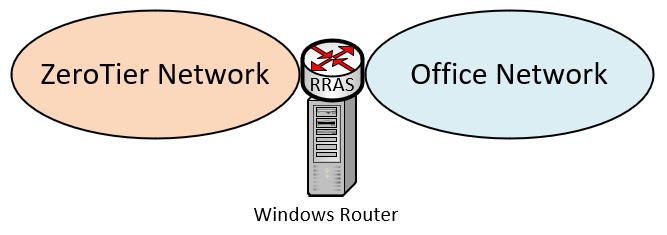
Work-Around Network:
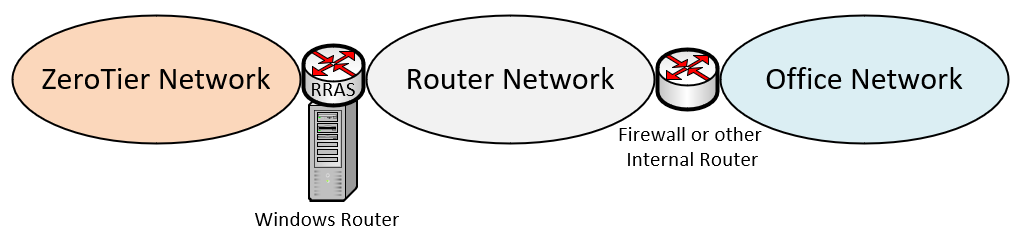
4.2 Get Windows to reduce the number of ARPs it does
While the solution about in Section 4.1 is going to be more stable, it's not always an option for some people. For me, I'm unable to change the server's internal IP address, and making physical cabling changes isn't easy. This leaves us trying to get Windows to not be so noisy when performing ARPs on our internal network. I tried all sort of NIC and reg settings (ARP Offload, ArpRetryCount, EnableDeadGWDetect, etc...), restarting along the way, but nothing had any effect. However, I noticed that when pinging from internal to an unreachable ZeroTier IP, Windows would only issue 1 ARP request every 61 seconds. After much trial and error, I determined that setting a static route on the ZeroTier NIC (apparently the default gateway/route isn't good enough) will get Windows to chill out on it's spastic ARP requests. Now a normal person would think that to change ARP behavior on the Internal NIC, you would need to set the static route on the Internal NIC... But no, it only works when you set it on the ZeroTier NIC. All I can say is "That's Windows for ya!"
After further testing, I came up with a list rules for the static route, in order to trigger the desired behavior:
- The static route must not be on the internal/office NIC. (Not sure if it must be the ZT NIC)
- The Next Hop IP must be reachable, but does not actually need to route traffic
- The Next Hop IP must not be located on the Windows Router device
- The destination network must be larger than your existing internal network, and encompass it.
I didn't want to setup another device on ZeroTier for the Next Hop IP, because if it fails for some reason, then my network will go down within a matter of seconds. Instead, since the ZeroTier default gateway is already in the Windows ARP cache, we can use that as the next hop IP. So here's the workaround I'm currently using:
4.2.1 Add this static route to the Windows Router device
I do this through RRAS, but you could also do it on the command line with a persistent route. The nice thing about doing it with RRAS, is the route only exists if the RRAS service is running.
- Interface: ZeroTier One NIC
- Destination Network: 192.168.0.0/23 (Notice this is 1 bit bigger than the actual Internal network 192.168.0.0/24)
- Next Hop: 25.255.255.254
- Metric: 512
Applying this workaround is super simple, but it comes at the cost of not being as effective. Windows is still going to perform ARPs, and my testing has shown that ARPs for UDP traffic don't follow the 61 second cool-down rule that ARPs for ICMP and TCP traffic do. Here's a table showing what kind of improvements you can expect from this workaround:

In my case, I still have a lot of SNMP traffic to deal with from long forgotten printers. At times, all that unreachable UDP traffic can still overwhelm the ZeroTier network driver, to the point where the network will drop for a few minutes. Until I can get around to removing those stale printer entries, I've had to block SNMP traffic using the Flow Rules in ZeroTier Central:

5. Scope of Impact
Thought it might be worth mentioning that several other people are having similar issues (...and as a cheap plug to try and garner support for this issue, haha!).
5.1 ZeroTier network issues with Windows RRAS:
- Zerotier connection stops after user logs in
- Traffic routing issues with Windows based servers (ZeroTier driver is based on OpenVPN's driver)
5.2 Intermittent ZeroTier network issues with SSDP/UPnP:
I can't 100% confirm these situations are related, but I also saw SSDP (port 1900) and WS-Discovery traffic on my network that correlated with some ZeroTier network degradation. After implementing the workaround I listed in Section 4.2 above, I removed the UDP 1900 block from my flow control rules, and haven't had any problems since. Could be coincidence, but I suspect it's because the UPnP Device Host service is getting hung up with the non-standard routing scenarios, and is taking too long to respond.
Activity
joseph-henry commentedon Aug 9, 2021
@JonathonFS this is the most beautiful ticket we've ever seen. Thank you for putting this together. Please give us some time digest and test this.
JonathonFS commentedon Aug 28, 2021
@joseph-henry you're most welcome! Really love this product, and what you guys are doing with it.
Replicating the Issue on Windows 10 instead of Server
My initial post showed how to replicate the issue on a Windows Server OS, but I realize this may be hard to come by for some people. The following guide shows how to setup routing on Windows 10 Pro or Enterprise, and replicate the same issue.
1 Prerequisites
Identify a device to be used as the Windows ZT Router:
Identify a device to be used as the Remote ZT Client:
2 ZeroTier Network Setup
2.1 Verify ZeroTier Connectivity
3 Enable Routing
The section will show how to route (forward) traffic between the physical (192.168.200.0/24) and ZeroTier (10.147.17.0/24) networks.
3.1 Windows Router Config
3.2 ZeroTier Central Routing Config
3.3 (Optional) Physical Network Routing Config
This step is optional, and is not required to replicate the issue below. If you want other devices on the Windows ZT Router's physical network (192.168.200.0/24) to be able to communicate with devices on the ZeroTier network (10.147.17.0/24), then a static route must be configured on the physical network's default gateway. This results in a more "real-world" demo environment.
3.4 Verify ZeroTier Routing
4 Replicating the Issue
The first thing we need to do is find an unused IP on the physical network connected to the Windows ZT Router. This demo will use 192.168.200.214.
4.1 Reproducing NIC Latency
4.2 Reproducing NIC Packet Loss
NullP0interEx commentedon Oct 28, 2026
I ran into this on a Windows 10 box that routes between a ZeroTier network and a warehouse LAN: handheld scanners on the LAN reach an ERP server over ZeroTier through it. The symptom matched this issue exactly. Every few pings took 1.6 to 2.6 s, and at worst replies were held for 7 s and then released together. I tracked it down and opened a fix: #2635.
How it happens
The analysis in the original post was close. The missing piece is that the service only ever has one write to the tap driver in flight:
WindowsEthernetTaphands it to the tap driver with an overlappedWriteFile.IRP_MJ_WRITE(rxpath.c) the driver wraps the IRP's buffer in an NBL, marks the IRP pending and callsNdisMIndicateReceiveNetBufferListswithReceiveFlags = 0. The IRP completes only once NDIS returns the NBL.WindowsEthernetTap::threadMainhas a singletapOvlWriteand a singlewriteInProgressflag. As long as that one write is pending, it skips writing anything else.So one frame to a dead LAN IP blocks every inbound ZeroTier frame of that host for up to 3 s. That includes traffic addressed to the host itself, which never touches ARP. Repeated requests to dead IPs keep the queue permanently behind, which is the "ZeroTier stops passing traffic entirely" stage.
In a
pktmoncapture on the router, the encrypted reply reached the physical NIC 1 ms after the request, but the decrypted frame was indicated on the ZeroTier adapter only 2.9 s later. Internet path, LAN and peers were all clean at the same time.Typical triggers in a real network are a printer whose IP changed but is still polled by some monitoring software, a moved share, or a decommissioned device. In my case it was a label printer monitor polling
192.168.3.20:9100every 20 s after the printer had been moved to USB.How it's fixed
#2635 keeps up to 16 writes in flight, each with its own
OVERLAPPEDand buffer. A frame that Windows holds now occupies only its own slot, and the rest keeps flowing. Ordering is unchanged because the driver indicates each frame synchronously insideIRP_MJ_WRITE, and only the completion is delayed. It is a service-only change (osdep/WindowsEthernetTap.cpp), with no driver rebuild or re-signing needed.Measured on the affected router, 120 pings each, alternating official 1.16.2 and patched build:
Remaining limit: more than 16 such frames within about 3 s would fill all slots again. The complete fix in the driver would be
NDIS_RECEIVE_FLAGS_RESOURCES(recommendation 2 above) or completing the IRP after a copy. That needs a re-signed driver, so I kept this PR to the service.Until it's released, the workarounds in the original post (an extra hop or route so Windows doesn't ARP for the destinations) still apply. Building
zerotier-one_x64.exefrom 1.16.2 + #2635 and replacing only that file also works with the installed driver.